Reference for the keyboard shortcuts available in the WireMock Cloud web UI
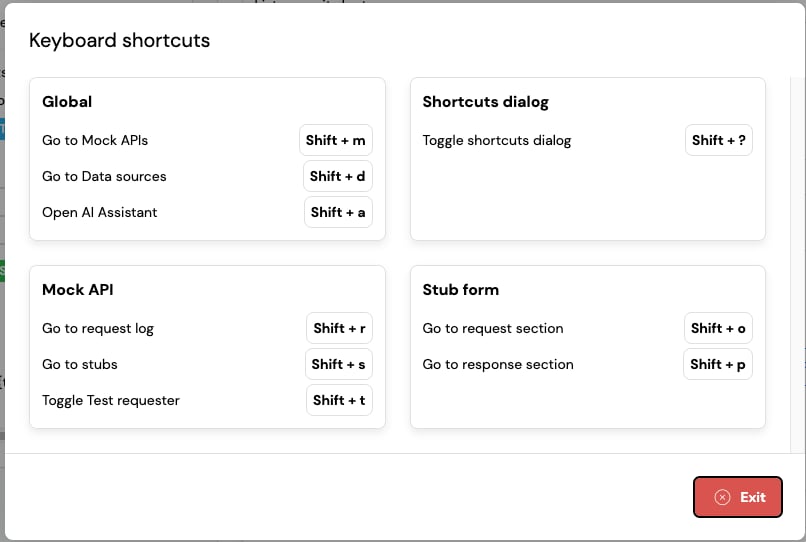
The WireMock Cloud web UI provides keyboard shortcuts for common navigation tasks and actions.
Press Shift + ? at any time to open the keyboard shortcuts dialog, which lists the shortcuts
available on the current screen.Shortcuts are not triggered while you are typing in a text field.
These shortcuts are only available when you are viewing or editing a stub:
Shortcut
Action
Shift + o
Go to the request section
Shift + p
Go to the response section
{"docsConfig":{"theme":"mint","$schema":"https://mintlify.com/docs.json","name":"WireMock Cloud","colors":{"primary":"#234E69","light":"#51AFE9","dark":"#234E69"},"logo":{"light":"https://mintcdn.com/wiremockinc/naAVdBHezo3uA-vt/logo/light.svg?fit=max\u0026auto=format\u0026n=naAVdBHezo3uA-vt\u0026q=85\u0026s=d793ceace787ddb9b53e3a8e828b9635","dark":"https://mintcdn.com/wiremockinc/naAVdBHezo3uA-vt/logo/dark.svg?fit=max\u0026auto=format\u0026n=naAVdBHezo3uA-vt\u0026q=85\u0026s=810f6c4093990be5f0ed074a7b863d80","href":"https://www.wiremock.io"},"favicon":"https://mintcdn.com/wiremockinc/m4BUFp24THf4QtFv/favicon.svg?fit=max\u0026auto=format\u0026n=m4BUFp24THf4QtFv\u0026q=85\u0026s=251fb2a34172427153d66e0068127eb9","api":{"openapi":"api-reference/openapi.yaml"},"navbar":{"links":[{"href":"mailto:support@wiremock.io","label":"Get Support"}],"primary":{"type":"button","label":"Login","href":"https://app.wiremock.cloud"}},"footer":{"socials":{"slack":"https://slack.wiremock.org/","x":"https://x.com/wiremockorg","github":"https://github.com/wiremock","linkedin":"https://www.linkedin.com/company/wiremock"}},"seo":{"organization":{"sameAs":["https://wiremock.org","https://www.wiremock.io","https://slack.wiremock.org/","https://x.com/wiremockorg","https://github.com/wiremock","https://www.linkedin.com/company/wiremock/"]}},"integrations":{"ga4":{"measurementId":"G-QGY5DELWWQ"},"gtm":{"tagId":"GTM-PVHGF5P4"},"intercom":{"appId":"xjme6u4w"}},"contextual":{"options":["download-spec"],"display":"header"},"styling":{"latex":false},"navigation":{"global":{"anchors":[{"anchor":"Slack community","icon":"slack","href":"https://slack.wiremock.org"},{"anchor":"Blog","icon":"newspaper","href":"https://wiremock.io/blog"},{"anchor":"Install With Cursor","icon":"robot","href":"cursor://anysphere.cursor-deeplink/mcp/install?name=WireMock\u0026config=eyJjb21tYW5kIjoid2lyZW1vY2sgbWNwIn0="},{"anchor":"Self-paced Training","icon":"pen","href":"https://wiremockcloud.learnworlds.com/"},{"anchor":"Change Log","icon":"newspaper","href":"https://changes.wiremock.io/"},{"anchor":"System Status","icon":"bell","href":"https://status.wiremock.io/"}]},"pages":[]}},"deployment":{"deploymentMetadataValue":{"subdomain":"wiremockinc","hasAudioNarration":false,"actualSubdomain":"wiremockinc","customDomains":["docs.wiremock.io"],"gitSource":{"type":"github","owner":"wiremock-inc","repo":"public-api-docs","deployBranch":"main","contentDirectory":"","isPrivate":false,"mountPath":"","label":""},"chroma":{"liveDeploymentHistoryId":"6acf8a67e83f422a254c2745","collectionId":"018666ab-9c46-4250-adf2-a4a3ae911f17","schemaVersion":"v3","latestBuiltDeploymentHistoryId":"6acf8a67e83f422a254c2745"},"entitlements":{"AI_CHAT":{"status":"ENABLED"},"WEB_MCP":{"status":"ENABLED"},"NARRATION":{"status":"ENABLED"}},"buildId":"6acf8c418cb1216fb5d1cf06","clientVersion":"0.0.3971","searchFilterCounts":[{"language":"default","tag":"Documentation","count":119},{"language":"default","tag":"API Reference","count":104},{"language":"default","tag":"How-to Guides","count":77},{"language":"default","tag":"Reference","count":25},{"language":"default","tag":"Settings","count":16},{"language":"default","tag":"Concepts","count":14},{"language":"default","tag":"Templating","count":14},{"language":"default","tag":"Stub Mappings","count":11},{"language":"default","tag":"CLI","count":10},{"language":"default","tag":"Requests","count":10}]},"assistantConfig":{},"basePath":"","hasChatPermissions":true,"hasWebMcpPermissions":true,"toggles":[{"name":"kill-isr","enabled":true,"variant":{"name":"disabled","enabled":false,"feature_enabled":true},"impressionData":false},{"name":"agent-mintlify-slack","enabled":true,"variant":{"name":"disabled","enabled":false,"feature_enabled":true},"impressionData":false},{"name":"editor-v7-file-tree","enabled":true,"variant":{"name":"disabled","enabled":false,"feature_enabled":true},"impressionData":false},{"name":"agent-integrations-settings","enabled":true,"variant":{"name":"disabled","enabled":false,"feature_enabled":true},"impressionData":false},{"name":"automations-pr-grouping","enabled":true,"variant":{"name":"disabled","enabled":false,"feature_enabled":true},"impressionData":false},{"name":"custom-prefix","enabled":true,"variant":{"name":"disabled","enabled":false,"feature_enabled":true},"impressionData":false},{"name":"analytics-v7","enabled":true,"variant":{"name":"disabled","enabled":false,"feature_enabled":true},"impressionData":false},{"name":"user-flows-analytics","enabled":true,"variant":{"name":"disabled","enabled":false,"feature_enabled":true},"impressionData":false},{"name":"no-publish-flow","enabled":true,"variant":{"name":"disabled","enabled":false,"feature_enabled":true},"impressionData":false},{"name":"workos-onboarding","enabled":true,"variant":{"name":"disabled","enabled":false,"feature_enabled":true},"impressionData":false},{"name":"llms-txt-v2","enabled":true,"variant":{"name":"disabled","enabled":false,"feature_enabled":true},"impressionData":false},{"name":"pause-universal-search-reconcile","enabled":true,"variant":{"name":"disabled","enabled":false,"feature_enabled":true},"impressionData":false},{"name":"snapshot-serving-live","enabled":true,"variant":{"name":"disabled","enabled":false,"feature_enabled":true},"impressionData":false},{"name":"stripTemperatureMiddleware","enabled":true,"variant":{"name":"disabled","enabled":false,"feature_enabled":true},"impressionData":false},{"name":"per-site-search-delta","enabled":true,"variant":{"name":"disabled","enabled":false,"feature_enabled":true},"impressionData":false},{"name":"support-platform-pylon-zendesk","enabled":true,"variant":{"name":"disabled","enabled":false,"feature_enabled":true},"impressionData":false},{"name":"snapshot-serving","enabled":true,"variant":{"name":"disabled","enabled":false,"feature_enabled":true},"impressionData":false},{"name":"instant-rollback","enabled":true,"variant":{"name":"disabled","enabled":false,"feature_enabled":true},"impressionData":false},{"name":"granular-notifications-server","enabled":true,"variant":{"name":"disabled","enabled":false,"feature_enabled":true},"impressionData":false},{"name":"granular-notifications","enabled":true,"variant":{"name":"disabled","enabled":false,"feature_enabled":true},"impressionData":false},{"name":"editor-private-page-search","enabled":true,"variant":{"name":"disabled","enabled":false,"feature_enabled":true},"impressionData":false},{"name":"automations-fable","enabled":true,"variant":{"name":"disabled","enabled":false,"feature_enabled":true},"impressionData":false},{"name":"fixed-ai-action-pricing","enabled":true,"variant":{"name":"disabled","enabled":false,"feature_enabled":true},"impressionData":false},{"name":"automation-resolve-merge-conflict","enabled":true,"variant":{"name":"disabled","enabled":false,"feature_enabled":true},"impressionData":false},{"name":"scoped-publishing","enabled":true,"variant":{"name":"disabled","enabled":false,"feature_enabled":true},"impressionData":false},{"name":"mintql","enabled":true,"variant":{"name":"disabled","enabled":false,"feature_enabled":true},"impressionData":false},{"name":"page-level-analytics","enabled":true,"variant":{"name":"disabled","enabled":false,"feature_enabled":true},"impressionData":false},{"name":"editor-version-history-v2","enabled":true,"variant":{"name":"disabled","enabled":false,"feature_enabled":true},"impressionData":false},{"name":"editor-nav-generations","enabled":true,"variant":{"name":"disabled","enabled":false,"feature_enabled":true},"impressionData":false},{"name":"billing-page-v2","enabled":true,"variant":{"name":"disabled","enabled":false,"feature_enabled":true},"impressionData":false},{"name":"workspace-projects","enabled":true,"variant":{"name":"disabled","enabled":false,"feature_enabled":true},"impressionData":false},{"name":"assistant-v5","enabled":true,"variant":{"name":"disabled","enabled":false,"feature_enabled":true},"impressionData":false},{"name":"byok-sep-25","enabled":true,"variant":{"name":"disabled","enabled":false,"feature_enabled":true},"impressionData":false},{"name":"fork-pr-previews","enabled":true,"variant":{"name":"disabled","enabled":false,"feature_enabled":true},"impressionData":false},{"name":"revalidation-jwt","enabled":true,"variant":{"name":"disabled","enabled":false,"feature_enabled":true},"impressionData":false},{"name":"vite-origin","enabled":true,"variant":{"name":"disabled","enabled":false,"feature_enabled":true},"impressionData":false},{"name":"editor-agent-model-picker","enabled":true,"variant":{"name":"disabled","enabled":false,"feature_enabled":true},"impressionData":false},{"name":"billing-updated-9-15","enabled":true,"variant":{"name":"disabled","enabled":false,"feature_enabled":true},"impressionData":false},{"name":"workos-sso-scim","enabled":true,"variant":{"name":"disabled","enabled":false,"feature_enabled":true},"impressionData":false},{"name":"hobby-abuse-scan","enabled":true,"variant":{"name":"disabled","enabled":false,"feature_enabled":true},"impressionData":false},{"name":"dashboard-inbox","enabled":true,"variant":{"name":"disabled","enabled":false,"feature_enabled":true},"impressionData":false},{"name":"workos-signup","enabled":true,"variant":{"name":"disabled","enabled":false,"feature_enabled":true},"impressionData":false},{"name":"workos-enabled","enabled":true,"variant":{"name":"disabled","enabled":false,"feature_enabled":true},"impressionData":false}],"isAtlas":false,"googleFontsInlined":false},"customCss":[{"filePath":"style.css","content":"code.language-handlebars .block{display:inline-block}"}],"page":{"pagePath":"keyboard-shortcuts","slug":"/keyboard-shortcuts","pageMetadata":{"title":"Keyboard shortcuts","description":"Reference for the keyboard shortcuts available in the WireMock Cloud web UI","href":"/keyboard-shortcuts"},"description":{"compiledSource":"\"use strict\";\nconst {jsx: _jsx} = arguments[0];\nconst {useMDXComponents: _provideComponents} = arguments[0];\nfunction _createMdxContent(props) {\n const _components = {\n p: \"p\",\n ..._provideComponents(),\n ...props.components\n };\n return _jsx(_components.p, {\n children: \"Reference for the keyboard shortcuts available in the WireMock Cloud web UI\"\n });\n}\nfunction MDXContent(props = {}) {\n const {wrapper: MDXLayout} = {\n ..._provideComponents(),\n ...props.components\n };\n return MDXLayout ? _jsx(MDXLayout, {\n ...props,\n children: _jsx(_createMdxContent, {\n ...props\n })\n }) : _createMdxContent(props);\n}\nreturn {\n default: MDXContent\n};\n","frontmatter":{},"scope":{}},"pageType":"default","mdx":{"mdxSource":{"compiledSource":"\"use strict\";const{Fragment:_Fragment,jsx:_jsx,jsxs:_jsxs}=arguments[0];const{useMDXComponents:_provideComponents}=arguments[0];function _createMdxContent(props){const _components={code:`code`,p:`p`,strong:`strong`,tbody:`tbody`,td:`td`,th:`th`,thead:`thead`,tr:`tr`,..._provideComponents(),...props.components},{Heading,OptimizedImage,Table,Tip}=_components;if(!Heading)_missingMdxReference(`Heading`,true);if(!OptimizedImage)_missingMdxReference(`OptimizedImage`,true);if(!Table)_missingMdxReference(`Table`,true);if(!Tip)_missingMdxReference(`Tip`,true);return _jsxs(_Fragment,{children:[_jsxs(_components.p,{children:[`The WireMock Cloud web UI provides keyboard shortcuts for common navigation tasks and actions.\nPress `,_jsx(_components.code,{children:`Shift + ?`}),` at any time to open the keyboard shortcuts dialog, which lists the shortcuts\navailable on the current screen.`]}),`\n`,_jsx(OptimizedImage,{src:`https://mintcdn.com/wiremockinc/MReX7FBhzy5jP10I/images/screenshots/keyboard-shortcuts-dialog.png?fit=max\u0026auto=format\u0026n=MReX7FBhzy5jP10I\u0026q=85\u0026s=042e613c8fdffa4220a46fab94243639`,alt:`The keyboard shortcuts dialog`,\"data-og-width\":`806`,width:`806`,\"data-og-height\":`542`,height:`542`,\"data-path\":`images/screenshots/keyboard-shortcuts-dialog.png`,\"data-optimize\":`true`,\"data-opv\":`3`,srcset:`https://mintcdn.com/wiremockinc/MReX7FBhzy5jP10I/images/screenshots/keyboard-shortcuts-dialog.png?w=280\u0026fit=max\u0026auto=format\u0026n=MReX7FBhzy5jP10I\u0026q=85\u0026s=adcb424ed706734555c3e58fe9df0d36 280w, https://mintcdn.com/wiremockinc/MReX7FBhzy5jP10I/images/screenshots/keyboard-shortcuts-dialog.png?w=560\u0026fit=max\u0026auto=format\u0026n=MReX7FBhzy5jP10I\u0026q=85\u0026s=5b4ef06aebc94d62105dfe51550e5b32 560w, https://mintcdn.com/wiremockinc/MReX7FBhzy5jP10I/images/screenshots/keyboard-shortcuts-dialog.png?w=840\u0026fit=max\u0026auto=format\u0026n=MReX7FBhzy5jP10I\u0026q=85\u0026s=a54a3713cd242abcd3e1f0bf5830a7df 840w, https://mintcdn.com/wiremockinc/MReX7FBhzy5jP10I/images/screenshots/keyboard-shortcuts-dialog.png?w=1100\u0026fit=max\u0026auto=format\u0026n=MReX7FBhzy5jP10I\u0026q=85\u0026s=6eb1b363370be97324d74d08ffbdcd93 1100w, https://mintcdn.com/wiremockinc/MReX7FBhzy5jP10I/images/screenshots/keyboard-shortcuts-dialog.png?w=1650\u0026fit=max\u0026auto=format\u0026n=MReX7FBhzy5jP10I\u0026q=85\u0026s=613b9d905e89b76f691090db2049bf30 1650w, https://mintcdn.com/wiremockinc/MReX7FBhzy5jP10I/images/screenshots/keyboard-shortcuts-dialog.png?w=2500\u0026fit=max\u0026auto=format\u0026n=MReX7FBhzy5jP10I\u0026q=85\u0026s=2eab1f6d3ff020e6f84064ade9bab1c9 2500w`}),`\n`,_jsx(_components.p,{children:`Shortcuts are not triggered while you are typing in a text field.`}),`\n`,_jsx(Heading,{level:`2`,id:`global`,children:`Global`}),`\n`,_jsx(_components.p,{children:`These shortcuts are available everywhere in the app:`}),`\n`,_jsxs(Table,{children:[_jsx(_components.thead,{children:_jsxs(_components.tr,{children:[_jsx(_components.th,{children:`Shortcut`}),_jsx(_components.th,{children:`Action`})]})}),_jsxs(_components.tbody,{children:[_jsxs(_components.tr,{children:[_jsx(_components.td,{children:_jsx(_components.code,{children:`Shift + m`})}),_jsx(_components.td,{children:`Go to Mock APIs`})]}),_jsxs(_components.tr,{children:[_jsx(_components.td,{children:_jsx(_components.code,{children:`Shift + d`})}),_jsx(_components.td,{children:`Go to Data sources`})]}),_jsxs(_components.tr,{children:[_jsx(_components.td,{children:_jsx(_components.code,{children:`Shift + a`})}),_jsx(_components.td,{children:`Open the AI Assistant`})]}),_jsxs(_components.tr,{children:[_jsx(_components.td,{children:_jsx(_components.code,{children:`Shift + ?`})}),_jsx(_components.td,{children:`Toggle the keyboard shortcuts dialog`})]})]})]}),`\n`,_jsx(Tip,{children:_jsxs(_components.p,{children:[`The AI Assistant is currently in `,_jsx(_components.strong,{children:`private beta`}),`. If you would like access to this feature contact us\nvia the `,_jsx(_components.code,{children:`Get Support`}),` link in the menu bar`]})}),`\n`,_jsx(Heading,{level:`2`,id:`mock-api`,children:`Mock API`}),`\n`,_jsx(_components.p,{children:`These shortcuts are only available when you are inside a mock API:`}),`\n`,_jsxs(Table,{children:[_jsx(_components.thead,{children:_jsxs(_components.tr,{children:[_jsx(_components.th,{children:`Shortcut`}),_jsx(_components.th,{children:`Action`})]})}),_jsxs(_components.tbody,{children:[_jsxs(_components.tr,{children:[_jsx(_components.td,{children:_jsx(_components.code,{children:`Shift + r`})}),_jsx(_components.td,{children:`Go to the request log`})]}),_jsxs(_components.tr,{children:[_jsx(_components.td,{children:_jsx(_components.code,{children:`Shift + s`})}),_jsx(_components.td,{children:`Go to stubs`})]}),_jsxs(_components.tr,{children:[_jsx(_components.td,{children:_jsx(_components.code,{children:`Shift + t`})}),_jsx(_components.td,{children:`Toggle the Test requester`})]})]})]}),`\n`,_jsx(Heading,{level:`2`,id:`stub-form`,children:`Stub form`}),`\n`,_jsx(_components.p,{children:`These shortcuts are only available when you are viewing or editing a stub:`}),`\n`,_jsxs(Table,{children:[_jsx(_components.thead,{children:_jsxs(_components.tr,{children:[_jsx(_components.th,{children:`Shortcut`}),_jsx(_components.th,{children:`Action`})]})}),_jsxs(_components.tbody,{children:[_jsxs(_components.tr,{children:[_jsx(_components.td,{children:_jsx(_components.code,{children:`Shift + o`})}),_jsx(_components.td,{children:`Go to the request section`})]}),_jsxs(_components.tr,{children:[_jsx(_components.td,{children:_jsx(_components.code,{children:`Shift + p`})}),_jsx(_components.td,{children:`Go to the response section`})]})]})]})]})}function MDXContent(props={}){const{wrapper:MDXLayout}={..._provideComponents(),...props.components};return MDXLayout?_jsx(MDXLayout,{...props,children:_jsx(_createMdxContent,{...props})}):_createMdxContent(props)}return{default:MDXContent};function _missingMdxReference(id,component){throw new Error(`Expected `+(component?`component`:`object`)+\" `\"+id+\"` to be defined: you likely forgot to import, pass, or provide it.\")}","frontmatter":{},"scope":{"config":{},"pageMetadata":{"title":"Keyboard shortcuts","description":"Reference for the keyboard shortcuts available in the WireMock Cloud web UI","href":"/keyboard-shortcuts"}}},"mdxSourceWithNoJs":null},"mdxExtracts":{"tableOfContents":[{"title":"Global","slug":"global","depth":2,"children":[]},{"title":"Mock API","slug":"mock-api","depth":2,"children":[]},{"title":"Stub form","slug":"stub-form","depth":2,"children":[]}],"codeExamples":{}},"jsLinks":["/_mintlify/custom/wiremockinc/029d9f60e6edd2c0/scripts/generate-llms-txt.js"],"subdomain":"wiremockinc","siteName":"WireMock Cloud","title":"Keyboard shortcuts - WireMock Cloud","navMaps":{"firstHrefInVersion":{},"firstHrefInLanguage":{}},"lastModified":"2026-08-07T15:00:27.552Z","originalFileLocation":"keyboard-shortcuts.mdx"},"headHtml":"\u003cscript data-mint-head>(function(){var d=document.documentElement,p=null;if(!p){try{p=localStorage.getItem(\"isDarkMode\")}catch(e){}if(p==='true')p='dark';else if(p==='false')p='light';if(p!=='light'\u0026\u0026p!=='dark'\u0026\u0026p!=='system')p=\"system\"}var r=p==='system'?(matchMedia(\"(prefers-color-scheme: dark)\").matches?'dark':'light'):p;d.classList.remove(r==='dark'?'light':'dark');d.classList.add(r);d.setAttribute(\"data-theme-preference\",p)})();\u003c/script>\u003cmeta data-mint-head name=\"description\" content=\"Reference for the keyboard shortcuts available in the WireMock Cloud web UI\">\u003cmeta data-mint-head name=\"application-name\" content=\"WireMock Cloud\">\u003cmeta data-mint-head name=\"generator\" content=\"Mintlify\">\u003clink data-mint-head rel=\"icon\" type=\"image/png\" sizes=\"192x192\" href=\"/mintlify-assets/_mintlify/favicons/wiremockinc/CECzM-LCKYF2F3LU/_generated/favicon/android-chrome-192x192.png\" media=\"(prefers-color-scheme: light)\">\u003clink data-mint-head rel=\"apple-touch-icon\" type=\"image/png\" sizes=\"180x180\" href=\"/mintlify-assets/_mintlify/favicons/wiremockinc/CECzM-LCKYF2F3LU/_generated/favicon/apple-touch-icon.png\">\u003clink data-mint-head rel=\"icon\" type=\"image/png\" sizes=\"16x16\" href=\"/mintlify-assets/_mintlify/favicons/wiremockinc/CECzM-LCKYF2F3LU/_generated/favicon/favicon-16x16.png\" media=\"(prefers-color-scheme: light)\">\u003clink data-mint-head rel=\"icon\" type=\"image/png\" sizes=\"32x32\" href=\"/mintlify-assets/_mintlify/favicons/wiremockinc/CECzM-LCKYF2F3LU/_generated/favicon/favicon-32x32.png\" media=\"(prefers-color-scheme: light)\">\u003clink data-mint-head rel=\"shortcut icon\" type=\"image/x-icon\" href=\"/mintlify-assets/_mintlify/favicons/wiremockinc/CECzM-LCKYF2F3LU/_generated/favicon/favicon.ico\" media=\"(prefers-color-scheme: light)\">\u003clink data-mint-head rel=\"icon\" type=\"image/png\" sizes=\"192x192\" href=\"/mintlify-assets/_mintlify/favicons/wiremockinc/CECzM-LCKYF2F3LU/_generated/favicon-dark/android-chrome-192x192.png\" media=\"(prefers-color-scheme: dark)\">\u003clink data-mint-head rel=\"icon\" type=\"image/png\" sizes=\"16x16\" href=\"/mintlify-assets/_mintlify/favicons/wiremockinc/CECzM-LCKYF2F3LU/_generated/favicon-dark/favicon-16x16.png\" media=\"(prefers-color-scheme: dark)\">\u003clink data-mint-head rel=\"icon\" type=\"image/png\" sizes=\"32x32\" href=\"/mintlify-assets/_mintlify/favicons/wiremockinc/CECzM-LCKYF2F3LU/_generated/favicon-dark/favicon-32x32.png\" media=\"(prefers-color-scheme: dark)\">\u003clink data-mint-head rel=\"shortcut icon\" type=\"image/x-icon\" href=\"/mintlify-assets/_mintlify/favicons/wiremockinc/CECzM-LCKYF2F3LU/_generated/favicon-dark/favicon.ico\" media=\"(prefers-color-scheme: dark)\">\u003cmeta data-mint-head property=\"og:title\" content=\"Keyboard shortcuts - WireMock Cloud\">\u003cmeta data-mint-head property=\"og:description\" content=\"Reference for the keyboard shortcuts available in the WireMock Cloud web UI\">\u003cmeta data-mint-head property=\"og:site_name\" content=\"WireMock Cloud\">\u003cmeta data-mint-head property=\"og:url\" content=\"https://docs.wiremock.io/keyboard-shortcuts\">\u003cmeta data-mint-head property=\"og:type\" content=\"website\">\u003cmeta data-mint-head property=\"og:image\" content=\"https://wiremockinc.mintlify.app/_mintlify/api/og/v2?division=Reference\u0026amp;title=Keyboard+shortcuts\u0026amp;description=Reference+for+the+keyboard+shortcuts+available+in+the+WireMock+Cloud+web+UI\u0026amp;theme=bd6b655a49d3bdf06e9a283b\u0026amp;signature=98180da6a1cca0690affb48012bd235051ccf4c142f648817a8d1fb54818ef81\">\u003cmeta data-mint-head property=\"og:image:width\" content=\"1200\">\u003cmeta data-mint-head property=\"og:image:height\" content=\"630\">\u003cmeta data-mint-head name=\"twitter:card\" content=\"summary_large_image\">\u003cmeta data-mint-head name=\"twitter:title\" content=\"Keyboard shortcuts - WireMock Cloud\">\u003cmeta data-mint-head name=\"twitter:description\" content=\"Reference for the keyboard shortcuts available in the WireMock Cloud web UI\">\u003cmeta data-mint-head name=\"twitter:image\" content=\"https://wiremockinc.mintlify.app/_mintlify/api/og/v2?division=Reference\u0026amp;title=Keyboard+shortcuts\u0026amp;description=Reference+for+the+keyboard+shortcuts+available+in+the+WireMock+Cloud+web+UI\u0026amp;theme=bd6b655a49d3bdf06e9a283b\u0026amp;signature=98180da6a1cca0690affb48012bd235051ccf4c142f648817a8d1fb54818ef81\">\u003cmeta data-mint-head name=\"twitter:image:width\" content=\"1200\">\u003cmeta data-mint-head name=\"twitter:image:height\" content=\"630\">\u003cmeta data-mint-head name=\"msapplication-config\" content=\"/mintlify-assets/_mintlify/favicons/wiremockinc/CECzM-LCKYF2F3LU/_generated/favicon/browserconfig.xml\">\u003cmeta data-mint-head name=\"apple-mobile-web-app-title\" content=\"WireMock Cloud\">\u003cmeta data-mint-head name=\"msapplication-TileColor\" content=\"#234E69\">\u003clink data-mint-head rel=\"canonical\" href=\"https://docs.wiremock.io/keyboard-shortcuts\">\u003clink data-mint-head rel=\"alternate\" type=\"application/xml\" href=\"/sitemap.xml\">\u003clink data-mint-head rel=\"alternate\" type=\"text/markdown\" href=\"/keyboard-shortcuts.md\">\u003cscript data-mint-head type=\"application/ld+json\">{\"@context\":\"https://schema.org\",\"@graph\":[{\"@type\":\"Organization\",\"@id\":\"https://docs.wiremock.io/#organization\",\"name\":\"WireMock Cloud\",\"url\":\"https://docs.wiremock.io\",\"logo\":{\"@type\":\"ImageObject\",\"url\":\"https://mintcdn.com/wiremockinc/naAVdBHezo3uA-vt/logo/light.svg?fit=max\u0026auto=format\u0026n=naAVdBHezo3uA-vt\u0026q=85\u0026s=d793ceace787ddb9b53e3a8e828b9635\"},\"sameAs\":[\"https://wiremock.org\",\"https://www.wiremock.io\",\"https://slack.wiremock.org/\",\"https://x.com/wiremockorg\",\"https://github.com/wiremock\",\"https://www.linkedin.com/company/wiremock/\"]},{\"@type\":\"WebSite\",\"@id\":\"https://docs.wiremock.io#website\",\"name\":\"WireMock Cloud\",\"url\":\"https://docs.wiremock.io\",\"publisher\":{\"@id\":\"https://docs.wiremock.io/#organization\"}},{\"@type\":\"WebPage\",\"@id\":\"https://docs.wiremock.io/keyboard-shortcuts#webpage\",\"url\":\"https://docs.wiremock.io/keyboard-shortcuts\",\"name\":\"Keyboard shortcuts\",\"description\":\"Reference for the keyboard shortcuts available in the WireMock Cloud web UI\",\"dateModified\":\"2026-08-07T15:00:27.552Z\",\"isPartOf\":{\"@id\":\"https://docs.wiremock.io#website\"},\"breadcrumb\":{\"@id\":\"https://docs.wiremock.io/keyboard-shortcuts#breadcrumb\"}},{\"@type\":\"BreadcrumbList\",\"@id\":\"https://docs.wiremock.io/keyboard-shortcuts#breadcrumb\",\"itemListElement\":[{\"@type\":\"ListItem\",\"position\":1,\"name\":\"WireMock Cloud\",\"item\":\"https://docs.wiremock.io\"},{\"@type\":\"ListItem\",\"position\":2,\"name\":\"Keyboard shortcuts\",\"item\":\"https://docs.wiremock.io/keyboard-shortcuts\"}]},{\"@type\":[\"Article\",\"TechArticle\"],\"@id\":\"https://docs.wiremock.io/keyboard-shortcuts#article\",\"headline\":\"Keyboard shortcuts\",\"name\":\"Keyboard shortcuts\",\"description\":\"Reference for the keyboard shortcuts available in the WireMock Cloud web UI\",\"url\":\"https://docs.wiremock.io/keyboard-shortcuts\",\"mainEntityOfPage\":{\"@id\":\"https://docs.wiremock.io/keyboard-shortcuts#webpage\"},\"dateModified\":\"2026-08-07T15:00:27.552Z\",\"publisher\":{\"@id\":\"https://docs.wiremock.io/#organization\"},\"isPartOf\":{\"@id\":\"https://docs.wiremock.io#website\"}}]}\u003c/script>\u003cscript data-mint-head type=\"application/ld+json\">{\"@context\":\"https://schema.org\",\"@type\":\"WebSite\",\"name\":\"WireMock Cloud\",\"creator\":{\"@type\":\"Organization\",\"name\":\"Mintlify\",\"url\":\"https://mintlify.com\"}}\u003c/script>","siteName":"WireMock Cloud","nav":{"global":{"anchors":[{"anchor":"Slack community","icon":"slack","href":"https://slack.wiremock.org"},{"anchor":"Blog","icon":"newspaper","href":"https://wiremock.io/blog"},{"anchor":"Install With Cursor","icon":"robot","href":"cursor://anysphere.cursor-deeplink/mcp/install?name=WireMock\u0026config=eyJjb21tYW5kIjoid2lyZW1vY2sgbWNwIn0="},{"anchor":"Self-paced Training","icon":"pen","href":"https://wiremockcloud.learnworlds.com/"},{"anchor":"Change Log","icon":"newspaper","href":"https://changes.wiremock.io/"},{"anchor":"System Status","icon":"bell","href":"https://status.wiremock.io/"}]},"tabs":[{"tab":"Documentation","groups":[{"group":"Concepts","pages":[{"title":"Overview of API simulation with WireMock Cloud","href":"/overview"},{"title":"Stubbing","href":"/concepts/stubbing"},{"title":"Templating","href":"/concepts/templating"},{"group":"Stateful Simulation","pages":[{"title":"Stateful Mocking and Scenarios","sidebarTitle":"Simple Scenarios","href":"/dynamic-state/stateful-scenarios"},{"title":"Dynamic State Basics","sidebarTitle":"Advanced Dynamic State","href":"/dynamic-state/overview"}]},{"title":"Deployment","href":"/concepts/deployment"},{"title":"WireMock Runner","href":"/concepts/runner"},{"title":"Profiles","href":"/concepts/profiles"},{"title":"WireMock Cloud vs other API mocking tools","sidebarTitle":"Comparison","href":"/concepts/comparison"},{"title":"API Security Overview","sidebarTitle":"Security","href":"/security/security"},{"group":"Audit","pages":[{"title":"Audit Events Overview","sidebarTitle":"Overview","href":"/audit-events/overview"},{"title":"Audit Event Destinations - Plan Limits","sidebarTitle":"Plan Limits","href":"/audit-events/plan-limits"}]},{"group":"Versioning","pages":[{"title":"Versioning","sidebarTitle":"Overview","href":"/versioning/overview"},{"title":"Versioning - Plan Limits","sidebarTitle":"Plan Limits","href":"/versioning/plan-limits"}]},{"title":"WireMock Cloud AI","sidebarTitle":"AI and MCP","href":"/ai-mcp/ai-101"}]},{"group":"Tutorials","pages":[{"title":"Exploratory Testing With Spring Boot","sidebarTitle":"Exploratory Testing With Spring Boot","href":"/samples/exploratory-testing-tutorial"},{"title":"Automated Testing with Java","sidebarTitle":"Automated Testing With Java","href":"/samples/automated-testing-with-java"},{"title":"How to build a mock REST API [Tutorial]","sidebarTitle":"Rest API Example","href":"/samples/mock-rest-api"}]},{"group":"How-to Guides","pages":[{"group":"Simulating APIs","expanded":false,"pages":[{"title":"Simulating SOAP services","sidebarTitle":"SOAP","href":"/soap-stubbing"},{"title":"Simulating gRPC services","sidebarTitle":"gRPC","href":"/grpc/overview"},{"title":"Simulating GraphQL APIs","sidebarTitle":"GraphQL","href":"/graphql/overview"},{"title":"Simulating federated GraphQL APIs","sidebarTitle":"Federated GraphQL","href":"/graphql/federation"}]},{"group":"Stubbing","expanded":false,"pages":[{"title":"Stubbing Basics","sidebarTitle":"Overview","href":"/stubbing"},{"title":"Advanced Stubbing","sidebarTitle":"Advanced Stubbing","href":"/advanced-stubbing"},{"title":"Dynamic Responses with Templates","sidebarTitle":"Dynamic Responses","href":"/response-templating/basics"},{"title":"Using a JWT from the Request in a Response Template","sidebarTitle":"Using JWT Claims from a Request","href":"/response-templating/using-jwt-claims-from-request"},{"title":"Serving a Default Response","sidebarTitle":"Default Responses","href":"/default-responses"},{"title":"How to Configure Webhooks and Callbacks","sidebarTitle":"Webhooks and Callbacks","href":"/webhooks"},{"title":"Proxying","sidebarTitle":"Proxying Requests","href":"/proxying"}]},{"group":"Performance","expanded":false,"pages":[{"title":"Response Delays","sidebarTitle":"Response Delays","href":"/delays"},{"title":"User Configurable Rate Limits","sidebarTitle":"Configuring Rate Limits","href":"/user-rate-limits"}]},{"group":"Faults and Chaos","expanded":false,"pages":[{"title":"Simulating Faults","sidebarTitle":"Simulating Faults","href":"/simulating-faults"},{"title":"Chaos settings - Basics","sidebarTitle":"Chaos Testing","href":"/chaos"}]},{"group":"Data Sources","pages":[{"title":"Data Sources - Using External Test Data","sidebarTitle":"Data Sources Overview","href":"/data-sources/overview"},{"title":"Creating \u0026 Editing CSV Data Sources","sidebarTitle":"Managing Data Sources - CSV","href":"/data-sources/managing-csv-data-sources"},{"title":"Creating \u0026 Editing Database Data Sources","sidebarTitle":"Managing Data Sources - Database","href":"/data-sources/managing-database-data-sources"},{"title":"Deleting Data Sources","sidebarTitle":"Deleting Data Sources","href":"/data-sources/deleting-data-sources"},{"title":"Managing Database Connections","sidebarTitle":"Managing Database Connections","href":"/data-sources/managing-database-connections"},{"title":"Sharing Data Sources","sidebarTitle":"Sharing Data Sources","href":"/data-sources/sharing-data-sources"},{"title":"Data Sources - Plan Limits","sidebarTitle":"Plan Limits","href":"/data-sources/plan-limits"}]},{"group":"Recording","expanded":false,"pages":[{"title":"Recording via the Cloud","href":"/recording-stubs"},{"title":"Recording via the CLI","href":"/cli/recording"},{"title":"Multi-domain recording using the WireMock CLI","sidebarTitle":"Multi domain recording with the CLI","href":"/cli/multi-domain-recording"},{"title":"Non-interactive Recording Sessions","sidebarTitle":"Non-Interactive Recording","href":"/cli/non-interactive-recording"}]},{"group":"OpenAPI","pages":[{"title":"OpenAPI Mocking and Prototyping","sidebarTitle":"Working With OpenAPI","href":"/openAPI/openapi"},{"title":"Import \u0026 Export - Swagger and OpenAPI","sidebarTitle":"Import OpenAPI","href":"/openAPI/swagger"},{"title":"OpenAPI Git Integration","sidebarTitle":"Syncing With Git","href":"/openAPI/openapi-git-integration"},{"title":"OpenAPI Validation","sidebarTitle":"OpenAPI Validation","href":"/openAPI/openapi-validation"}]},{"group":"Stateful Mocking","pages":[{"title":"Stateful Mocking and Scenarios","sidebarTitle":"Simple Scenarios","href":"/dynamic-state/stateful-scenarios"},{"title":"Dynamic State Shopping Basket Example","sidebarTitle":"Shopping Cart Example","href":"/dynamic-state/basket-example"},{"title":"Dynamic State - Plan Limits","sidebarTitle":"Plan Limits","href":"/dynamic-state/plan-limits"},{"title":"Create Stateful Endpoint Set","sidebarTitle":"Create Stateful Set","href":"/dynamic-state/create-stateful-set"}]},{"group":"Importing And Exporting","pages":[{"title":"Import \u0026 Export - Overview","sidebarTitle":"Basics","href":"/import-export/overview"},{"title":"Import \u0026 Export - WireMock","sidebarTitle":"Importing via WireMock OSS","href":"/import-export/wiremock"},{"title":"Import \u0026 Export - Postman","sidebarTitle":"Importing via Postman","href":"/import-export/postman"},{"title":"Import \u0026 Export - Via the API","sidebarTitle":"Importing via API","href":"/import-export/api"},{"title":"Importing Via HAR","href":"/import-export/har"},{"title":"Import \u0026 Export - Mountebank","sidebarTitle":"Importing via Mountebank","href":"/import-export/mountebank"}]},{"group":"CLI","pages":[{"title":"WireMock CLI","sidebarTitle":"Installation and basic usage","href":"/cli/overview"},{"title":"Configuring the WireMock CLI","sidebarTitle":"Configuring the CLI","href":"/cli/config"},{"title":"Managing Mock APIs with the CLI","sidebarTitle":"Managing Mock APIs","href":"/cli/mock-apis"},{"title":"Running Mock APIs Locally","href":"/cli/local-playback"},{"title":"Pushing and Pulling Documents","href":"/cli/push-pull"},{"title":"Pushing and Pulling Mock API","href":"/cli/push-pull-mock-api"},{"title":"Importing into WireMock Cloud","href":"/cli/import"},{"title":"Managing Environments with the CLI","sidebarTitle":"Managing Environments","href":"/cli/environments"},{"title":"Syncing API Templates with the CLI","sidebarTitle":"API Templates","href":"/cli/templates"},{"title":"Managing Data Sources with the CLI","sidebarTitle":"Data Sources","href":"/cli/data-sources"}]},{"group":"Runner","pages":[{"title":"WireMock Runner","sidebarTitle":"Installation and basic usage","href":"/runner/overview"},{"title":"Record Many Mode via the WireMock Runner","sidebarTitle":"Record Many Mode","href":"/runner/record-many"},{"title":"Serve Mode via the WireMock Runner","sidebarTitle":"Serve Mode","href":"/runner/serve"},{"title":"WireMock Runner Serve Mode Extensions","sidebarTitle":"Serve Mode Extensions","href":"/runner/serve-mode-extensions"},{"title":"Running the WireMock Runner on Kubernetes","sidebarTitle":"Running on Kubernetes","href":"/runner/running-on-kubernetes"},{"title":"Recording from Within Kubernetes","sidebarTitle":"Recording on Kubernetes","href":"/runner/recording-multiple-apis-on-kubernetes"},{"title":"Promoting Mock APIs with Git and CI/CD","sidebarTitle":"Git and CI/CD Promotion","href":"/runner/promoting-apis-with-git-and-ci"}]},{"group":"Security","pages":[{"title":"Teams and Collaboration","href":"/security/teams-and-collaboration"},{"title":"The SAML Identity Provider Mock","sidebarTitle":"SAML IDP","href":"/security/saml-idp-mock"},{"title":"Key management","sidebarTitle":"Key Management","href":"/security/key-management"}]},{"group":"Audit","pages":[{"title":"Working with Audit Event JSON","sidebarTitle":"Working With Audit Events","href":"/audit-events/working-with-audit-events"}]},{"group":"AI/MCP","pages":[{"title":"WireMock Cloud agent skills","href":"/ai-mcp/agent-skills"},{"title":"Installing the agent skills plugin","href":"/ai-mcp/installation"},{"title":"Installing the local agent skills plugin","href":"/ai-mcp/local-installation"},{"title":"Installing the WireMock Cloud MCP server directly","href":"/ai-mcp/mcp-installation"},{"title":"HTTP Request Authentication","href":"/ai-mcp/http-request-authentication"}]},{"group":"WireMock Cloud API","pages":[{"title":"Getting Started with the API","href":"/api-getting-started"},{"title":"Authentication","href":"/authentication"},{"title":"WireMock API Device Authorization Flow","href":"/device-authorization-flow"},{"title":"Product Usage Data","href":"/usage"},{"title":"Organisation Info and Members","href":"/organisation-info-and-members"},{"title":"Managing Teams and Members","href":"/teams-and-members"},{"title":"User Info","href":"/user-info"},{"title":"Mock APIs","href":"/mock-apis"}]},{"group":"IDE Integrations","pages":[{"group":"JetBrains IDEs","pages":[{"title":"Integration with WireMock Cloud","sidebarTitle":"WireMock Cloud integration","href":"/ide-integrations/jetbrains/wiremock-cloud-integration"},{"title":"Support for WireMock OSS","sidebarTitle":"OSS Support","href":"/ide-integrations/jetbrains/oss-features"},{"title":"Integration with Claude Code","description":"Manage and work with your WireMock Cloud resources via WireMock's MCP server in Claude Code","sidebarTitle":"Claude Code integration","href":"/ide-integrations/jetbrains/claude-code-integration"}]}]}]},{"group":"Reference","pages":[{"title":"Keyboard shortcuts","href":"/keyboard-shortcuts"},{"group":"Request Matching","pages":[{"title":"Request Matching - Overview of Matcher Types","description":"Overview of the match operations supported by WireMock Cloud","sidebarTitle":"Matcher Types","href":"/request-matching/matcher-types"},{"title":"Request Matching - Matching JSON requests","sidebarTitle":"Matching JSON","href":"/request-matching/json"},{"title":"Request Matching - Matching URLs","href":"/request-matching/url"},{"title":"Request Matching - Matching XML bodies","sidebarTitle":"Matching XML","href":"/request-matching/xml"},{"title":"Request Matching – Expression Matcher","sidebarTitle":"Expression Matcher","href":"/request-matching/expression-matcher"}]},{"group":"Templating","pages":[{"title":"Response Templating - Helper Reference","sidebarTitle":"Helper Reference","href":"/response-templating/helper-reference"},{"title":"Request Model Reference","sidebarTitle":"Request Model","href":"/response-templating/request-model"},{"title":"Response Templating - Conditional Logic and Iteration","sidebarTitle":"Conditional Logic","href":"/response-templating/conditional-logic-and-iteration"},{"title":"Response Templating - Dates and Times","sidebarTitle":"Date And Times","href":"/response-templating/dates-and-times"},{"title":"Response Templating - Working with JSON","sidebarTitle":"JSON And JSONPath","href":"/response-templating/json"},{"title":"Response Templating - JSON Web Tokens (JWT)","sidebarTitle":"JWT Web Tokens","href":"/response-templating/jwt"},{"title":"Response Templating - Cryptographic Helpers","sidebarTitle":"Cryptographic Helpers","href":"/response-templating/cryptographic-helpers"},{"title":"Response Templating - Miscellaneous Helpers","sidebarTitle":"Miscellaneous Helpers","href":"/response-templating/misc-helpers"},{"title":"Response Templating - Number Helpers","sidebarTitle":"Number Helpers","href":"/response-templating/number-helpers"},{"title":"Response Templating - Random Faker","sidebarTitle":"Generate Test Data","href":"/response-templating/random-faker"},{"title":"Response Templating - Random Values","sidebarTitle":"Generate Random Values","href":"/response-templating/random-values"},{"title":"Response Templating - String Encodings","sidebarTitle":"String Encodings","href":"/response-templating/string-encodings"},{"title":"Response Templating - String Helpers","sidebarTitle":"String Helpers","href":"/response-templating/string-helpers"},{"title":"Response Templating - Working with XML","sidebarTitle":"XML","href":"/response-templating/xml"}]},{"group":"AI/MCP","expanded":false,"pages":[{"title":"MCP Tools","href":"/ai-mcp/mcp-tools"}]},{"group":"Runner / CLI","expanded":false,"pages":[{"title":"CLI Command Reference","sidebarTitle":"Command reference","href":"/cli/command-reference"},{"title":"wiremock.yaml Configuration Reference","sidebarTitle":"wiremock.yaml Reference","href":"/cli/wiremock-yaml-reference"},{"title":"Import \u0026 Recording Configuration Reference","href":"/cli/recording-configuration"},{"title":"Runner environment variables","sidebarTitle":"Environment variables","href":"/runner/environment-variables"}]}]}]},{"tab":"API Reference","pages":[{"title":"API Reference","href":"/api-reference/introduction"}]}]},"title":"Keyboard shortcuts - WireMock Cloud","buildId":"dpl_DFJrtvUi8HS5F9nkooKuDJsuD5BM","deploymentId":"dpl_DFJrtvUi8HS5F9nkooKuDJsuD5BM","dynamics":["a74be98ba7"],"chunks":["zoom-image-lightbox-BZxD9MAj.js","lightbox-handle-r17bVUz3.js"]}