> ## Documentation Index
> Fetch the complete documentation index at: https://docs.wiremock.io/llms.txt
> Use this file to discover all available pages before exploring further.
# Simulating SOAP services
> Matching SOAP requests and sending SOAP responses
Stubbing a SOAP response is similar in most respects to stubbing a REST response. The main difference is that the HTTP method
and URL alone are not enough to differentiate requests since these are always the same for a given endpoint.
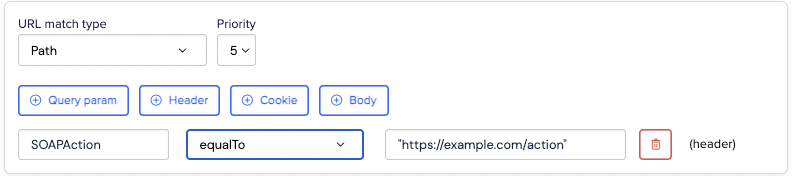
In addition, we need to match on the `SOAPAction` header and the request body XML.
## Using the SOAPAction header
SOAP APIs typically use the `SOAPAction` header to select the appropriate action for the call.
Although you can sometimes avoid this, it's usually a good idea to add a header match for `SOAPAction` as it's more
efficient and faster than relying exclusively on the XML body.
 ## Matching the request body with XML equality
When dealing with request bodies that are small and have no data of a transient nature (e.g. transaction IDs or today's date)
`equalToXml` is a straightforward way to specify a match.
For instance given a SOAP service for managing a to do list, you may wish to mock an interaction matching a specific request to add an item:
## Matching the request body with XML equality
When dealing with request bodies that are small and have no data of a transient nature (e.g. transaction IDs or today's date)
`equalToXml` is a straightforward way to specify a match.
For instance given a SOAP service for managing a to do list, you may wish to mock an interaction matching a specific request to add an item:
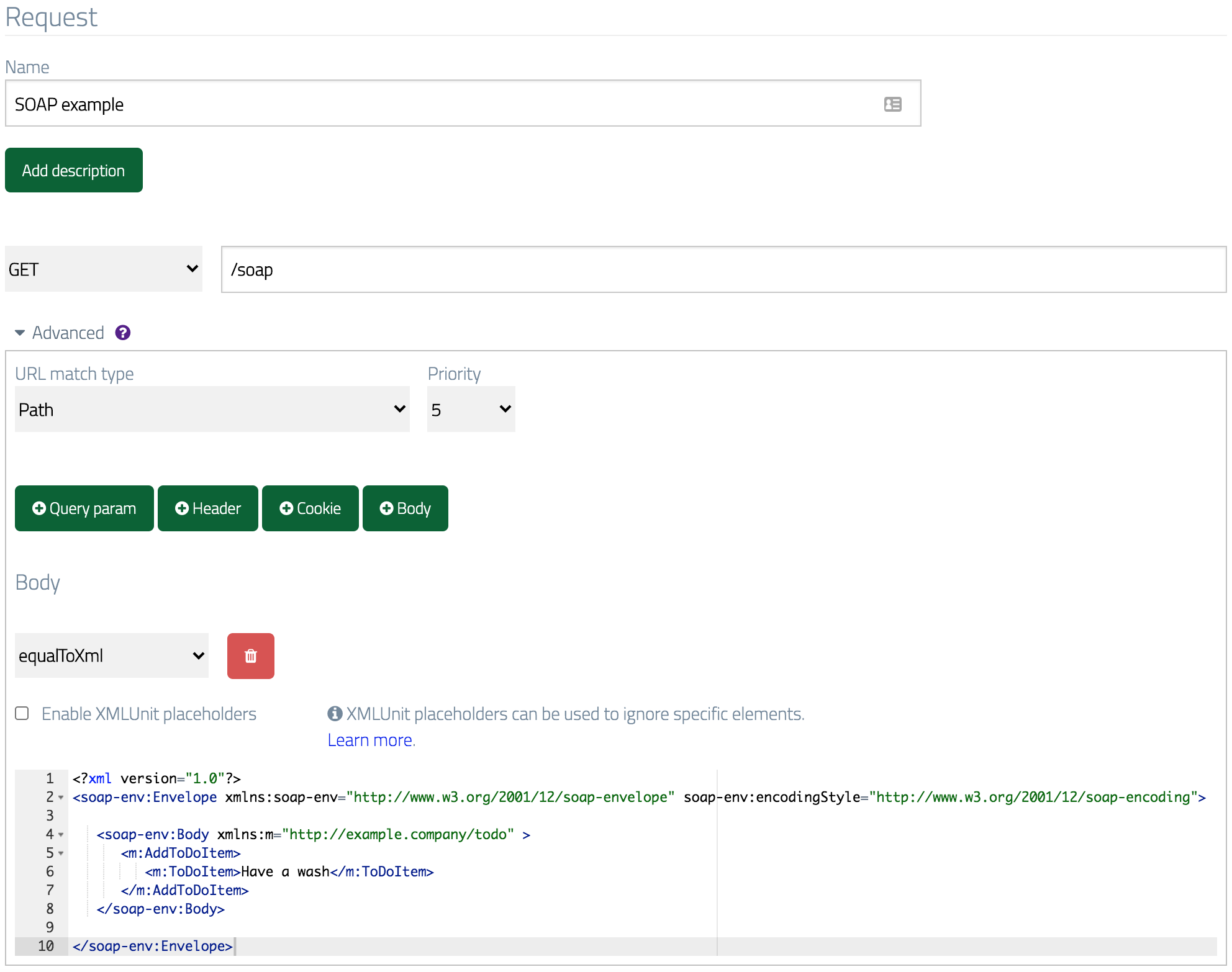 Which returns a success response:
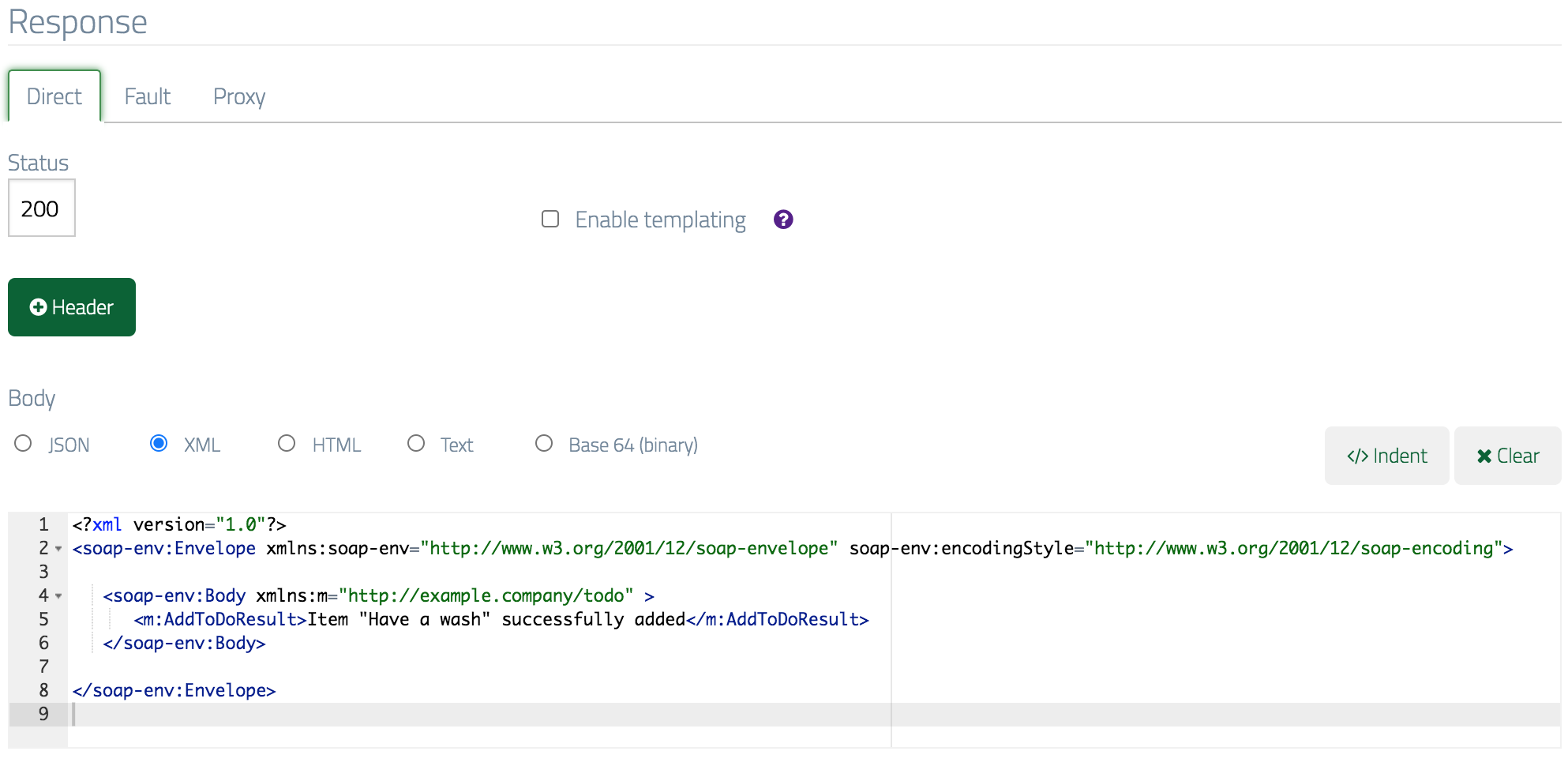 Testing this returns the expected XML response:
```bash theme={null}
$ curl -X POST -d '
Have a wash
' -H 'SOAPAction: "http://example.company/todo/AddToDoItem"' http://example.wiremockapi.cloud/soap-example -v
> POST /soap-example HTTP/1.1
> Host: example.wiremockapi.cloud
> User-Agent: curl/7.54.0
> Accept: */*
> SOAPAction: "http://example.company/todo/AddToDoItem"
> Content-Length: 355
> Content-Type: application/x-www-form-urlencoded
>
* upload completely sent off: 355 out of 355 bytes
< HTTP/1.1 200 OK
< Transfer-Encoding: chunked
<
```
```java theme={null}
String body = """
Have a wash
""";
HttpResponse response =
Unirest.post("http://example.wiremockapi.cloud/soap-example")
.header("SOAPAction", "\"http://example.company/todo/AddToDoItem\"")
.body(body)
.asString();
```
```javascript theme={null}
const soapBody = `
Have a wash
`;
const options = {
method: 'POST',
headers: { 'SOAPAction': '"http://example.company/todo/AddToDoItem"' },
body: soapBody
};
fetch('http://example.wiremockapi.cloud/soap-example', options)
.then(res => res.text())
.then(text => console.log(text));
```
```python theme={null}
import requests
body = """
Have a wash
"""
response = requests.post(
'http://example.wiremockapi.cloud/soap-example',
headers={'SOAPAction': '"http://example.company/todo/AddToDoItem"'},
data=body
)
```
```ruby theme={null}
require 'uri'
require 'net/http'
body = <<~XML
Have a wash
XML
uri = URI('http://example.wiremockapi.cloud/soap-example')
http = Net::HTTP.new(uri.host, uri.port)
request = Net::HTTP::Post.new(uri)
request['SOAPAction'] = '"http://example.company/todo/AddToDoItem"'
request.body = body
response = http.request(request)
```
```php theme={null}
Have a wash
XML;
$curl = curl_init('http://example.wiremockapi.cloud/soap-example');
curl_setopt_array($curl, [
CURLOPT_RETURNTRANSFER => true,
CURLOPT_POST => true,
CURLOPT_POSTFIELDS => $body,
CURLOPT_HTTPHEADER => [
'SOAPAction: "http://example.company/todo/AddToDoItem"',
],
]);
$response = curl_exec($curl);
```
```go theme={null}
import (
"net/http"
"strings"
)
body := `
Have a wash
`
req, _ := http.NewRequest(
"POST",
"http://example.wiremockapi.cloud/soap-example",
strings.NewReader(body),
)
req.Header.Set("SOAPAction", `"http://example.company/todo/AddToDoItem"`)
resp, _ := http.DefaultClient.Do(req)
defer resp.Body.Close()
```
The returned XML:
```xml theme={null}
Item "Have a wash" successfully added
```
### Using placeholders to ignore transient values
The above example works fine when the request body doesn't contain any transient data
such as transaction IDs or the current date. However, if data that changes on each
request is introduced it will be necessary allow a match to occur regardless of the
actual value received.
One way to do this is to use [placeholders](./advanced-stubbing/#xml-placeholders).
Let's assume the request body of our API now contains a `TransactionId` element, which
must be a unique value for each request e.g.:
```xml theme={null}
1ea094dd-9548-4a79-a43c-b44670f955c6
Have a wash
```
We can ignore this value by ticking the "Enable XMLUnit placeholders" box and
putting an ignore token into the expected XML in the form:
```xml theme={null}
${xmlunit.ignore}
```
Testing this returns the expected XML response:
```bash theme={null}
$ curl -X POST -d '
Have a wash
' -H 'SOAPAction: "http://example.company/todo/AddToDoItem"' http://example.wiremockapi.cloud/soap-example -v
> POST /soap-example HTTP/1.1
> Host: example.wiremockapi.cloud
> User-Agent: curl/7.54.0
> Accept: */*
> SOAPAction: "http://example.company/todo/AddToDoItem"
> Content-Length: 355
> Content-Type: application/x-www-form-urlencoded
>
* upload completely sent off: 355 out of 355 bytes
< HTTP/1.1 200 OK
< Transfer-Encoding: chunked
<
```
```java theme={null}
String body = """
Have a wash
""";
HttpResponse response =
Unirest.post("http://example.wiremockapi.cloud/soap-example")
.header("SOAPAction", "\"http://example.company/todo/AddToDoItem\"")
.body(body)
.asString();
```
```javascript theme={null}
const soapBody = `
Have a wash
`;
const options = {
method: 'POST',
headers: { 'SOAPAction': '"http://example.company/todo/AddToDoItem"' },
body: soapBody
};
fetch('http://example.wiremockapi.cloud/soap-example', options)
.then(res => res.text())
.then(text => console.log(text));
```
```python theme={null}
import requests
body = """
Have a wash
"""
response = requests.post(
'http://example.wiremockapi.cloud/soap-example',
headers={'SOAPAction': '"http://example.company/todo/AddToDoItem"'},
data=body
)
```
```ruby theme={null}
require 'uri'
require 'net/http'
body = <<~XML
Have a wash
XML
uri = URI('http://example.wiremockapi.cloud/soap-example')
http = Net::HTTP.new(uri.host, uri.port)
request = Net::HTTP::Post.new(uri)
request['SOAPAction'] = '"http://example.company/todo/AddToDoItem"'
request.body = body
response = http.request(request)
```
```php theme={null}
Have a wash
XML;
$curl = curl_init('http://example.wiremockapi.cloud/soap-example');
curl_setopt_array($curl, [
CURLOPT_RETURNTRANSFER => true,
CURLOPT_POST => true,
CURLOPT_POSTFIELDS => $body,
CURLOPT_HTTPHEADER => [
'SOAPAction: "http://example.company/todo/AddToDoItem"',
],
]);
$response = curl_exec($curl);
```
```go theme={null}
import (
"net/http"
"strings"
)
body := `
Have a wash
`
req, _ := http.NewRequest(
"POST",
"http://example.wiremockapi.cloud/soap-example",
strings.NewReader(body),
)
req.Header.Set("SOAPAction", `"http://example.company/todo/AddToDoItem"`)
resp, _ := http.DefaultClient.Do(req)
defer resp.Body.Close()
```
The returned XML:
```xml theme={null}
Item "Have a wash" successfully added
```
### Using placeholders to ignore transient values
The above example works fine when the request body doesn't contain any transient data
such as transaction IDs or the current date. However, if data that changes on each
request is introduced it will be necessary allow a match to occur regardless of the
actual value received.
One way to do this is to use [placeholders](./advanced-stubbing/#xml-placeholders).
Let's assume the request body of our API now contains a `TransactionId` element, which
must be a unique value for each request e.g.:
```xml theme={null}
1ea094dd-9548-4a79-a43c-b44670f955c6
Have a wash
```
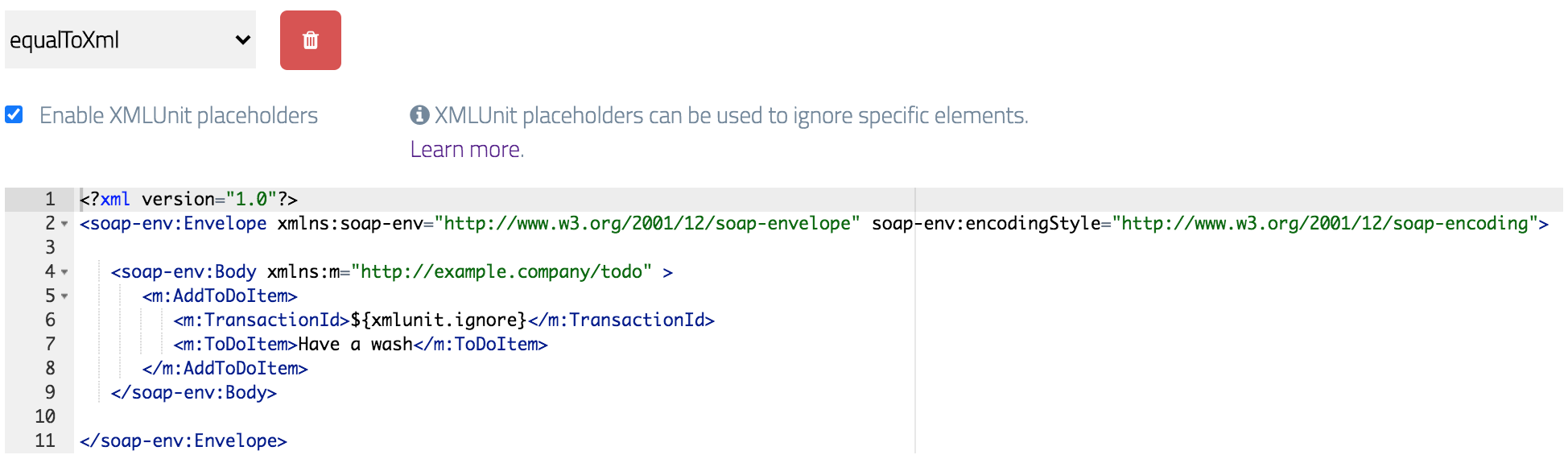
We can ignore this value by ticking the "Enable XMLUnit placeholders" box and
putting an ignore token into the expected XML in the form:
```xml theme={null}
${xmlunit.ignore}
```
 ## Matching the request body with XPath
When working with large SOAP requests `equalToXml` can become quite slow as it must perform a comparison on every node in the XML document.
It's often faster to match specific elements within the document using the `matchesXPath` operator,
and since this is a much looser approach to matching it's another way to solve
the problem described above where frequently changing values are present.
When matching using XPath, your aim should be to target as few elements/attributes as possible while being able
to reliably distinguish between requests.
Given the same request body as in the previous section, we could use the following
XPath to match just on the value of the `m:ToDoItem` element:
```xpath theme={null}
//AddToDoItem/ToDoItem[text()='Have a wash']
```
## Matching the request body with XPath
When working with large SOAP requests `equalToXml` can become quite slow as it must perform a comparison on every node in the XML document.
It's often faster to match specific elements within the document using the `matchesXPath` operator,
and since this is a much looser approach to matching it's another way to solve
the problem described above where frequently changing values are present.
When matching using XPath, your aim should be to target as few elements/attributes as possible while being able
to reliably distinguish between requests.
Given the same request body as in the previous section, we could use the following
XPath to match just on the value of the `m:ToDoItem` element:
```xpath theme={null}
//AddToDoItem/ToDoItem[text()='Have a wash']
```
 ### Using multiple XPath expressions
Sometimes you need to match on more than one XML element to be able to adequately
distinguish between requests. Although XPath supports multiple predicates with logical and/or,
often it can be easier to use multiple body matchers each targeting a single element.
Suppose we added a `UserId` field that we also wanted to target:
```xml theme={null}
1ea094dd-9548-4a79-a43c-b44670f955c6
abc123
Have a wash
```
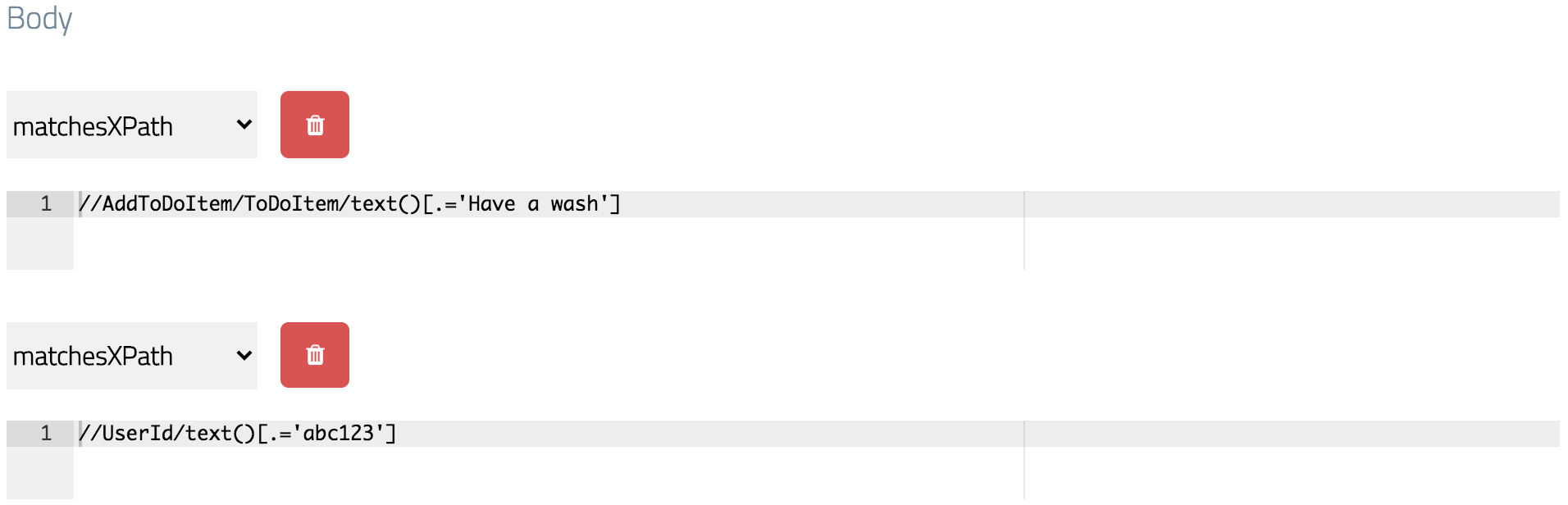
We could add one `matchesXPath` body pattern for each of the elements we
care about:
### Using multiple XPath expressions
Sometimes you need to match on more than one XML element to be able to adequately
distinguish between requests. Although XPath supports multiple predicates with logical and/or,
often it can be easier to use multiple body matchers each targeting a single element.
Suppose we added a `UserId` field that we also wanted to target:
```xml theme={null}
1ea094dd-9548-4a79-a43c-b44670f955c6
abc123
Have a wash
```
We could add one `matchesXPath` body pattern for each of the elements we
care about:
 ### A gotcha - the recursive selector: //
Given the above XML document, you might expect the following XPath expression to
produce a match:
```xpath theme={null}
//UserId[text()='abc123']
```
However, due to a quirk of how XML documents with namespaces are evaluated this won't work.
Ensuring that you select at least one node beneath the element searched for recursively
will fix this, so the above XPath can be corrected like this:
```xpath theme={null}
//UserId/text()[.='abc123']
```
### A gotcha - the recursive selector: //
Given the above XML document, you might expect the following XPath expression to
produce a match:
```xpath theme={null}
//UserId[text()='abc123']
```
However, due to a quirk of how XML documents with namespaces are evaluated this won't work.
Ensuring that you select at least one node beneath the element searched for recursively
will fix this, so the above XPath can be corrected like this:
```xpath theme={null}
//UserId/text()[.='abc123']
```