> ## Documentation Index
> Fetch the complete documentation index at: https://docs.wiremock.io/llms.txt
> Use this file to discover all available pages before exploring further.
# Dynamic Responses with Templates
> Returning dynamic responses using Handlebars templates
Some elements of WireMock Cloud stub responses can be configured generated dynamically, via the use of [Handlebars templates](https://github.com/jknack/handlebars.java).
Most commonly this is used in the response body but response header values can also
be templated. For proxy responses, the target URL can be a template.
## Enabling templating
Enable templating for a stub by ticking the "Enable templating" box in the Response section:
 Ticking this box means that header values can be templated e.g.
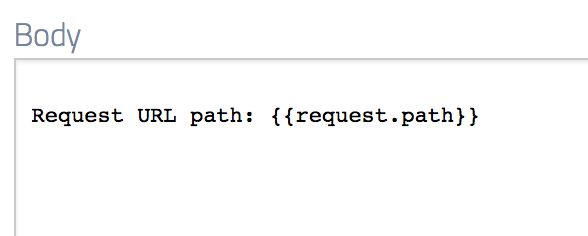
 And also the response body e.g.
 ## Handlebars overview
A complete description of the Handlebars syntax and core helpers can be found on the [Handlebars JS](https://handlebarsjs.com/guide/), but we'll cover the essentials here.
Handlebars works like many other template languages - a template is provided a data model
and uses a special tag syntax to denote dynamic elements, referred to as a "helper" in this case.
Helpers are always delimited by double or triple curly braces (`{` and `}`). In the simplest case a helper can
simply output the value of a variable in the model:
```handlebars theme={null}
{{myVariable}} // Top-level model variable
{{outerVar.innerVar}} // Nested model variable
```
### Helper parameters
Helpers can take both positional and named parameters. In both cases they are delimited by spaces.
The following helper takes three positional parameters -
the string in which the replacement should take place, the substring to find and the
replacement value:
```handlebars theme={null}
{{replace myString 'foo' 'bar'}}
```
Named values are of the form `name=value`. The following helper has a single
positional parameter followed by a parameter named `format`:
```handlebars theme={null}
{{dateFormat myDate format='yyyy-MM-dd'}}
```
### Nesting helpers
Sometimes it's necessary to apply a helper to the result of another one. This can
be achieved by nesting helpers using bracket syntax. For example, this template
will truncate the input string, then capitalise the first letter:
```handlebars theme={null}
{{capitalize (substring myString 0 4)}}
```
### Blocks
Blocks can be used to apply processing to an inner piece of content.
```handlebars theme={null}
{{#if productExists}}
// do something with the product
{{else}}
// product not found
{{/if}}
```
Blocks form the foundation of logical and looping structures in Handlebars and are [described here in more detail](/response-templating/conditional-logic-and-iteration/).
### HTML escaping
We mentioned earlier that double or triple curly braces are used to delimit helpers.
The difference between these two forms is that with double braces, Handlebars will
automatically HTML escape the output of the helper, whereas with triple braces no escaping will be
applied.
For instance, suppose we have a data model where the variable `tag` has the value ``.
The template
```handlebars theme={null}
{{tag}}
```
will output
```
<html>
```
whereas the template
```handlebars theme={null}
{{{tag}}}
```
will output
```
```
## The request model
When templates are evaluated, they have access to a data model containing information about the incoming request. For a complete reference of all available request attributes and how to access them, see the [Request Model Reference](/response-templating/request-model).
## Handlebars helpers
WireMock Cloud provides a set of Handlebars helpers that perform a variety of logical functions and transformations inside templates. These include all of the standard helpers from the [Java Handlebars implementation by jknack](https://github.com/jknack/handlebars.java).
All of the available helpers are described in detail in these articles:
* [Conditional Logic and Iteration](./conditional-logic-and-iteration/)
* [Strings](./string-helpers/)
* [String Encodings](./string-encodings/)
* [Dates & Times](./dates-and-times/)
* [Random Values](./random-values/)
* [Random Faker](./random-faker/)
* [XML](./xml/)
* [JSON](./json/)
* [JSON Web Tokens](./jwt/)
* [Miscellaneous Helpers](./misc-helpers/)
## Handlebars overview
A complete description of the Handlebars syntax and core helpers can be found on the [Handlebars JS](https://handlebarsjs.com/guide/), but we'll cover the essentials here.
Handlebars works like many other template languages - a template is provided a data model
and uses a special tag syntax to denote dynamic elements, referred to as a "helper" in this case.
Helpers are always delimited by double or triple curly braces (`{` and `}`). In the simplest case a helper can
simply output the value of a variable in the model:
```handlebars theme={null}
{{myVariable}} // Top-level model variable
{{outerVar.innerVar}} // Nested model variable
```
### Helper parameters
Helpers can take both positional and named parameters. In both cases they are delimited by spaces.
The following helper takes three positional parameters -
the string in which the replacement should take place, the substring to find and the
replacement value:
```handlebars theme={null}
{{replace myString 'foo' 'bar'}}
```
Named values are of the form `name=value`. The following helper has a single
positional parameter followed by a parameter named `format`:
```handlebars theme={null}
{{dateFormat myDate format='yyyy-MM-dd'}}
```
### Nesting helpers
Sometimes it's necessary to apply a helper to the result of another one. This can
be achieved by nesting helpers using bracket syntax. For example, this template
will truncate the input string, then capitalise the first letter:
```handlebars theme={null}
{{capitalize (substring myString 0 4)}}
```
### Blocks
Blocks can be used to apply processing to an inner piece of content.
```handlebars theme={null}
{{#if productExists}}
// do something with the product
{{else}}
// product not found
{{/if}}
```
Blocks form the foundation of logical and looping structures in Handlebars and are [described here in more detail](/response-templating/conditional-logic-and-iteration/).
### HTML escaping
We mentioned earlier that double or triple curly braces are used to delimit helpers.
The difference between these two forms is that with double braces, Handlebars will
automatically HTML escape the output of the helper, whereas with triple braces no escaping will be
applied.
For instance, suppose we have a data model where the variable `tag` has the value ``.
The template
```handlebars theme={null}
{{tag}}
```
will output
```
<html>
```
whereas the template
```handlebars theme={null}
{{{tag}}}
```
will output
```
```
## The request model
When templates are evaluated, they have access to a data model containing information about the incoming request. For a complete reference of all available request attributes and how to access them, see the [Request Model Reference](/response-templating/request-model).
## Handlebars helpers
WireMock Cloud provides a set of Handlebars helpers that perform a variety of logical functions and transformations inside templates. These include all of the standard helpers from the [Java Handlebars implementation by jknack](https://github.com/jknack/handlebars.java).
All of the available helpers are described in detail in these articles:
* [Conditional Logic and Iteration](./conditional-logic-and-iteration/)
* [Strings](./string-helpers/)
* [String Encodings](./string-encodings/)
* [Dates & Times](./dates-and-times/)
* [Random Values](./random-values/)
* [Random Faker](./random-faker/)
* [XML](./xml/)
* [JSON](./json/)
* [JSON Web Tokens](./jwt/)
* [Miscellaneous Helpers](./misc-helpers/)