> ## Documentation Index
> Fetch the complete documentation index at: https://docs.wiremock.io/llms.txt
> Use this file to discover all available pages before exploring further.
# Request Matching - Matching URLs
> Matching the request's URL
For most HTTP APIs the URL is the primary means by which the appropriate action
is selected. WireMock Cloud provides a number of different options for matching the
URL of an incoming request to a stub.
## Path vs path + query
It's important to be clear exactly which part(s) of the URL you wish to match.
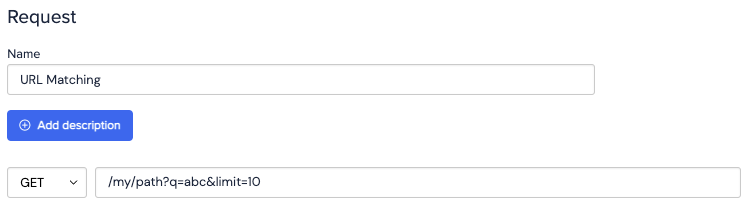
The default strategy WireMock Cloud uses is to match both the path and query parts of the
URL. For instance, if you were you to enter the following in a stub's URL field:
```
/my/path?q=abc&limit=10
```
then the stub would only be matched if that exact path and query were present e.g.
for the URL:
```
https://my-api.wiremockapi.cloud/my/path?q=abc&limit=10
```
 However, it's often desirable just to look at the path part of the URL, and either
ignore the query completely or specify it more flexibly using dedicated query parameter
matchers (see [Query Parameters](/advanced-stubbing/#advanced-request-parameter-matching)).
Dedicated query matchers can be useful if the parameter order in the URL can change,
or if you need to match more loosely on the value e.g. using `contains` rater than
exact equality.
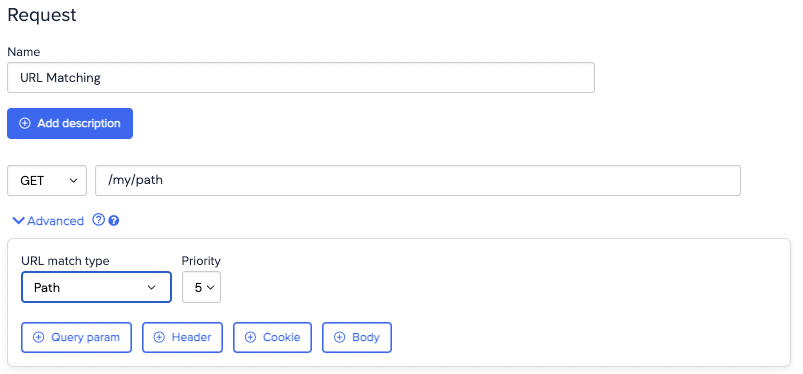
To do this, you need to change the URL match type in the Advanced section to `Path`
and ensure you only specify a path in the URL field e.g.
```
/my/path
```
This would now match any of the following URLs:
```
https://my-api.wiremockapi.cloud/my/path?q=abc
https://my-api.wiremockapi.cloud/my/path?q=abc&limit=10
https://my-api.wiremockapi.cloud/my/path
https://my-api.wiremockapi.cloud/my/path?randomqueryparam=123
```
However, it's often desirable just to look at the path part of the URL, and either
ignore the query completely or specify it more flexibly using dedicated query parameter
matchers (see [Query Parameters](/advanced-stubbing/#advanced-request-parameter-matching)).
Dedicated query matchers can be useful if the parameter order in the URL can change,
or if you need to match more loosely on the value e.g. using `contains` rater than
exact equality.
To do this, you need to change the URL match type in the Advanced section to `Path`
and ensure you only specify a path in the URL field e.g.
```
/my/path
```
This would now match any of the following URLs:
```
https://my-api.wiremockapi.cloud/my/path?q=abc
https://my-api.wiremockapi.cloud/my/path?q=abc&limit=10
https://my-api.wiremockapi.cloud/my/path
https://my-api.wiremockapi.cloud/my/path?randomqueryparam=123
```
 ## Match type - exact vs. regular expression
In addition to choosing the URL part(s) you wish to match, you can also choose whether
to check for exact equality or a regular expression match. By default WireMock Cloud uses
an equality check, but this can be changed in the Advanced section.
## Match type - exact vs. regular expression
In addition to choosing the URL part(s) you wish to match, you can also choose whether
to check for exact equality or a regular expression match. By default WireMock Cloud uses
an equality check, but this can be changed in the Advanced section.
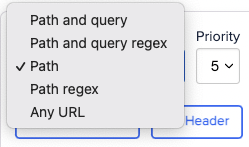 Choosing the `Path regex` match type can be particularly useful in cases where
the API you're mocking uses path parameters and you wish to provide a meaningful response
to a specific URL pattern regardless of the specific parameter values.
For instance, choosing `Path regex` as the match type with the following URL
```
/users/[0-9]+
```
would match any of the following request URLs:
```
/users/1
/users/9832749823
/users/321
```
A powerful approach is to combine this with [Response Templating](/response-templating/basics/)
so that the ID used in the URL can be inserted into the response body.
Using the Path and query regex is generally not advised. This exists primarily for compatibility with projects exported to/from WireMock.
## Path template (path parameters)
If you require a stub's URL to allow dynamic path variables, you can use the path template URL match type.
This URL match type provides a convenient way to match URLs whose path segments match certain values and/or a way to
reference a request's dynamic path segments by name in a response template, rather than the usual indexed method
(e.g. `request.path.thingId` rather than `request.path.1`).
To configure a stub to use the path template URL match type, enter a path value that declares one or more path variables
using square bracket syntax (e.g. `/things/{thingId}`) and select the "Path template" URL match type.
Now you can add path parameters that match against the value of a request's path variables.
Choosing the `Path regex` match type can be particularly useful in cases where
the API you're mocking uses path parameters and you wish to provide a meaningful response
to a specific URL pattern regardless of the specific parameter values.
For instance, choosing `Path regex` as the match type with the following URL
```
/users/[0-9]+
```
would match any of the following request URLs:
```
/users/1
/users/9832749823
/users/321
```
A powerful approach is to combine this with [Response Templating](/response-templating/basics/)
so that the ID used in the URL can be inserted into the response body.
Using the Path and query regex is generally not advised. This exists primarily for compatibility with projects exported to/from WireMock.
## Path template (path parameters)
If you require a stub's URL to allow dynamic path variables, you can use the path template URL match type.
This URL match type provides a convenient way to match URLs whose path segments match certain values and/or a way to
reference a request's dynamic path segments by name in a response template, rather than the usual indexed method
(e.g. `request.path.thingId` rather than `request.path.1`).
To configure a stub to use the path template URL match type, enter a path value that declares one or more path variables
using square bracket syntax (e.g. `/things/{thingId}`) and select the "Path template" URL match type.
Now you can add path parameters that match against the value of a request's path variables.
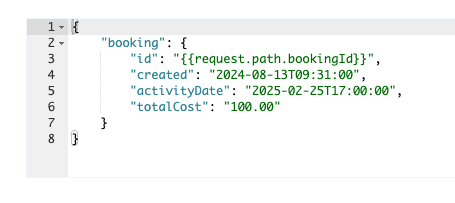
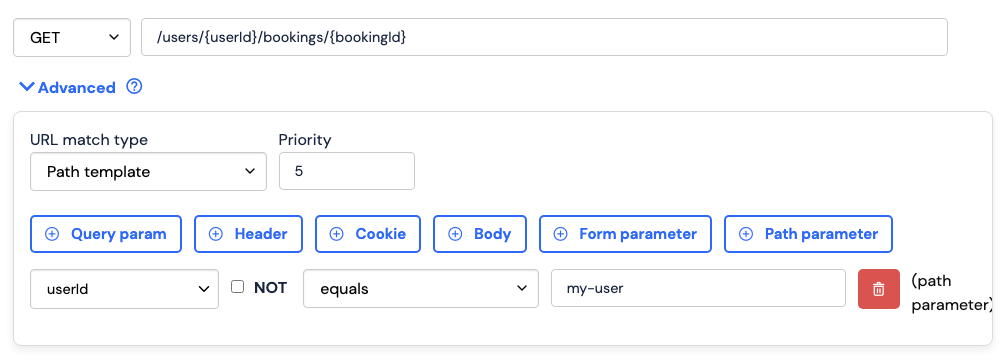 You can also now reference the value of a request's path variables by name in the response template.
 ## Matching any URL
In some cases you need a stub to match any request URL. A common use case for this
is providing a low priority default response which is matched only if nothing else does.
You might also choose to proxy the request to another endpoint in this case.
For this purpose use the `Any URL` option from the URL match type list under Advanced.
## Matching any URL
In some cases you need a stub to match any request URL. A common use case for this
is providing a low priority default response which is matched only if nothing else does.
You might also choose to proxy the request to another endpoint in this case.
For this purpose use the `Any URL` option from the URL match type list under Advanced.