> ## Documentation Index
> Fetch the complete documentation index at: https://docs.wiremock.io/llms.txt
> Use this file to discover all available pages before exploring further.
# Request Matching - Matching JSON requests
> Matching JSON
When stubbing API functions that accept JSON request bodies we may want to
return different responses based on the JSON sent. WireMock Cloud provides two match types
to supports this case - `equalToJson` and `matchesJsonPath`, which are described
in detail in this article.
## Matching via JSON equality
The `equalToJson` match operator performs a semantic comparison of the input JSON
against the expected JSON. This has a number of advantages over a straight string
comparison:
* Ignores differences in whitespace
* Can be configured to ignore differences in array order
* Can be configured to ignore extra object attributes
* Supports placeholders so that specific attributes can be excluded from the comparison
By default `equalToJson` will match only if all of the elements in the input JSON
are the same as the expected JSON, arrays are in the same order and no additional
attributes are present.
For instance, given an expected JSON document like
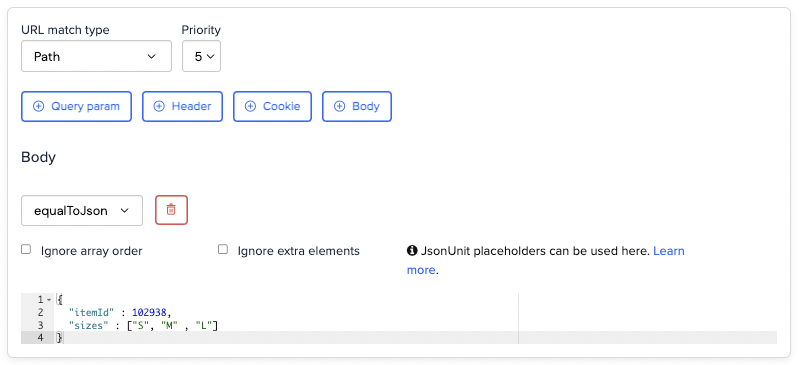 You would need to send in the request body for the stub to match exactly that JSON
in order for the stub to be matched:
```bash theme={null}
$ curl https://example.wiremockapi.cloud/json -d '{
"itemId": 102938,
"sizes": ["S", "M", "L"]
}'
```
```java theme={null}
HttpResponse response =
Unirest.post("https://example.wiremockapi.cloud/json")
.header("Content-Type", "application/json")
.body("{ \"itemId\": 102938, \"sizes\": [\"S\", \"M\", \"L\"] }")
.asString();
```
```javascript theme={null}
const options = {
method: 'POST',
headers: { 'Content-Type': 'application/json' },
body: JSON.stringify({ itemId: 102938, sizes: ['S', 'M', 'L'] })
};
fetch('https://example.wiremockapi.cloud/json', options).then(res => ...);
```
```python theme={null}
import requests
response = requests.post(
'https://example.wiremockapi.cloud/json',
json={'itemId': 102938, 'sizes': ['S', 'M', 'L']}
)
```
```ruby theme={null}
require 'uri'
require 'net/http'
require 'json'
uri = URI('https://example.wiremockapi.cloud/json')
response = Net::HTTP.post(
uri,
{ itemId: 102938, sizes: ['S', 'M', 'L'] }.to_json,
'Content-Type' => 'application/json'
)
```
```php theme={null}
true,
CURLOPT_POST => true,
CURLOPT_POSTFIELDS => json_encode([
'itemId' => 102938,
'sizes' => ['S', 'M', 'L']
]),
CURLOPT_HTTPHEADER => ['Content-Type: application/json'],
]);
$response = curl_exec($curl);
```
```go theme={null}
import (
"bytes"
"encoding/json"
"net/http"
)
body, _ := json.Marshal(map[string]any{
"itemId": 102938,
"sizes": []string{"S", "M", "L"},
})
resp, _ := http.Post("https://example.wiremockapi.cloud/json", "application/json", bytes.NewReader(body))
defer resp.Body.Close()
```
```json theme={null}
{ "result": "OK" }
```
Changing the `sizes` order would cause a non-match:
```bash theme={null}
$ curl https://example.wiremockapi.cloud/json -d '{
"itemId": 102938,
"sizes": ["L", "M", "S"]
}'
```
```java theme={null}
HttpResponse response =
Unirest.post("https://example.wiremockapi.cloud/json")
.header("Content-Type", "application/json")
.body("{ \"itemId\": 102938, \"sizes\": [\"L\", \"M\", \"S\"] }")
.asString();
```
```javascript theme={null}
const options = {
method: 'POST',
headers: { 'Content-Type': 'application/json' },
body: JSON.stringify({ itemId: 102938, sizes: ['L', 'M', 'S'] })
};
fetch('https://example.wiremockapi.cloud/json', options).then(res => ...);
```
```python theme={null}
import requests
response = requests.post(
'https://example.wiremockapi.cloud/json',
json={'itemId': 102938, 'sizes': ['L', 'M', 'S']}
)
```
```ruby theme={null}
require 'uri'
require 'net/http'
require 'json'
uri = URI('https://example.wiremockapi.cloud/json')
response = Net::HTTP.post(
uri,
{ itemId: 102938, sizes: ['L', 'M', 'S'] }.to_json,
'Content-Type' => 'application/json'
)
```
```php theme={null}
true,
CURLOPT_POST => true,
CURLOPT_POSTFIELDS => json_encode([
'itemId' => 102938,
'sizes' => ['L', 'M', 'S']
]),
CURLOPT_HTTPHEADER => ['Content-Type: application/json'],
]);
$response = curl_exec($curl);
```
```go theme={null}
import (
"bytes"
"encoding/json"
"net/http"
)
body, _ := json.Marshal(map[string]any{
"itemId": 102938,
"sizes": []string{"L", "M", "S"},
})
resp, _ := http.Post("https://example.wiremockapi.cloud/json", "application/json", bytes.NewReader(body))
defer resp.Body.Close()
```
```
Request was not matched
=======================
-------------------------------------------------------------------------------
| Closest stub | Request |
-------------------------------------------------------------------------------
|
JSON body matching |
|
POST | POST
/json | /json
|
{ | { <<<<< Body does not match
"itemId" : 102938, | "itemId" : 102938,
"sizes" : [ "S", "M", "L" ] | "sizes" : [ "L", "M", "S" ]
} | }
|
-------------------------------------------------------------------------------
```
Adding an extra attribute would also cause a non-match:
```bash theme={null}
$ curl https://example.wiremockapi.cloud/json -d '{
"itemId": 102938,
"sizes": ["S", "M", "L"],
"tag": "essentials"
}'
```
```java theme={null}
HttpResponse response =
Unirest.post("https://example.wiremockapi.cloud/json")
.header("Content-Type", "application/json")
.body("{ \"itemId\": 102938, \"sizes\": [\"S\", \"M\", \"L\"], \"tag\": \"essentials\" }")
.asString();
```
```javascript theme={null}
const options = {
method: 'POST',
headers: { 'Content-Type': 'application/json' },
body: JSON.stringify({ itemId: 102938, sizes: ['S', 'M', 'L'], tag: 'essentials' })
};
fetch('https://example.wiremockapi.cloud/json', options).then(res => ...);
```
```python theme={null}
import requests
response = requests.post(
'https://example.wiremockapi.cloud/json',
json={'itemId': 102938, 'sizes': ['S', 'M', 'L'], 'tag': 'essentials'}
)
```
```ruby theme={null}
require 'uri'
require 'net/http'
require 'json'
uri = URI('https://example.wiremockapi.cloud/json')
response = Net::HTTP.post(
uri,
{ itemId: 102938, sizes: ['S', 'M', 'L'], tag: 'essentials' }.to_json,
'Content-Type' => 'application/json'
)
```
```php theme={null}
true,
CURLOPT_POST => true,
CURLOPT_POSTFIELDS => json_encode([
'itemId' => 102938,
'sizes' => ['S', 'M', 'L'],
'tag' => 'essentials'
]),
CURLOPT_HTTPHEADER => ['Content-Type: application/json'],
]);
$response = curl_exec($curl);
```
```go theme={null}
import (
"bytes"
"encoding/json"
"net/http"
)
body, _ := json.Marshal(map[string]any{
"itemId": 102938,
"sizes": []string{"S", "M", "L"},
"tag": "essentials",
})
resp, _ := http.Post("https://example.wiremockapi.cloud/json", "application/json", bytes.NewReader(body))
defer resp.Body.Close()
```
```
Request was not matched
=======================
-------------------------------------------------------------------------------
| Closest stub | Request |
-------------------------------------------------------------------------------
|
JSON body matching |
|
POST | POST
/json | /json
|
{ | { <<<<< Body does not match
"itemId" : 102938, | "itemId" : 102938,
"sizes" : [ "S", "M", "L" ] | "sizes" : [ "S", "M", "L" ],
} | "tag" : "essentials"
| }
|
-------------------------------------------------------------------------------
```
### Ignoring array order
Sometimes the order of elements in an array is unimportant and can change arbitrarily
between multiple requests. In this case it's undesirable for your stub match to fail
due to array order, so to remedy this you can simply tick "Ignore array order".
You would need to send in the request body for the stub to match exactly that JSON
in order for the stub to be matched:
```bash theme={null}
$ curl https://example.wiremockapi.cloud/json -d '{
"itemId": 102938,
"sizes": ["S", "M", "L"]
}'
```
```java theme={null}
HttpResponse response =
Unirest.post("https://example.wiremockapi.cloud/json")
.header("Content-Type", "application/json")
.body("{ \"itemId\": 102938, \"sizes\": [\"S\", \"M\", \"L\"] }")
.asString();
```
```javascript theme={null}
const options = {
method: 'POST',
headers: { 'Content-Type': 'application/json' },
body: JSON.stringify({ itemId: 102938, sizes: ['S', 'M', 'L'] })
};
fetch('https://example.wiremockapi.cloud/json', options).then(res => ...);
```
```python theme={null}
import requests
response = requests.post(
'https://example.wiremockapi.cloud/json',
json={'itemId': 102938, 'sizes': ['S', 'M', 'L']}
)
```
```ruby theme={null}
require 'uri'
require 'net/http'
require 'json'
uri = URI('https://example.wiremockapi.cloud/json')
response = Net::HTTP.post(
uri,
{ itemId: 102938, sizes: ['S', 'M', 'L'] }.to_json,
'Content-Type' => 'application/json'
)
```
```php theme={null}
true,
CURLOPT_POST => true,
CURLOPT_POSTFIELDS => json_encode([
'itemId' => 102938,
'sizes' => ['S', 'M', 'L']
]),
CURLOPT_HTTPHEADER => ['Content-Type: application/json'],
]);
$response = curl_exec($curl);
```
```go theme={null}
import (
"bytes"
"encoding/json"
"net/http"
)
body, _ := json.Marshal(map[string]any{
"itemId": 102938,
"sizes": []string{"S", "M", "L"},
})
resp, _ := http.Post("https://example.wiremockapi.cloud/json", "application/json", bytes.NewReader(body))
defer resp.Body.Close()
```
```json theme={null}
{ "result": "OK" }
```
Changing the `sizes` order would cause a non-match:
```bash theme={null}
$ curl https://example.wiremockapi.cloud/json -d '{
"itemId": 102938,
"sizes": ["L", "M", "S"]
}'
```
```java theme={null}
HttpResponse response =
Unirest.post("https://example.wiremockapi.cloud/json")
.header("Content-Type", "application/json")
.body("{ \"itemId\": 102938, \"sizes\": [\"L\", \"M\", \"S\"] }")
.asString();
```
```javascript theme={null}
const options = {
method: 'POST',
headers: { 'Content-Type': 'application/json' },
body: JSON.stringify({ itemId: 102938, sizes: ['L', 'M', 'S'] })
};
fetch('https://example.wiremockapi.cloud/json', options).then(res => ...);
```
```python theme={null}
import requests
response = requests.post(
'https://example.wiremockapi.cloud/json',
json={'itemId': 102938, 'sizes': ['L', 'M', 'S']}
)
```
```ruby theme={null}
require 'uri'
require 'net/http'
require 'json'
uri = URI('https://example.wiremockapi.cloud/json')
response = Net::HTTP.post(
uri,
{ itemId: 102938, sizes: ['L', 'M', 'S'] }.to_json,
'Content-Type' => 'application/json'
)
```
```php theme={null}
true,
CURLOPT_POST => true,
CURLOPT_POSTFIELDS => json_encode([
'itemId' => 102938,
'sizes' => ['L', 'M', 'S']
]),
CURLOPT_HTTPHEADER => ['Content-Type: application/json'],
]);
$response = curl_exec($curl);
```
```go theme={null}
import (
"bytes"
"encoding/json"
"net/http"
)
body, _ := json.Marshal(map[string]any{
"itemId": 102938,
"sizes": []string{"L", "M", "S"},
})
resp, _ := http.Post("https://example.wiremockapi.cloud/json", "application/json", bytes.NewReader(body))
defer resp.Body.Close()
```
```
Request was not matched
=======================
-------------------------------------------------------------------------------
| Closest stub | Request |
-------------------------------------------------------------------------------
|
JSON body matching |
|
POST | POST
/json | /json
|
{ | { <<<<< Body does not match
"itemId" : 102938, | "itemId" : 102938,
"sizes" : [ "S", "M", "L" ] | "sizes" : [ "L", "M", "S" ]
} | }
|
-------------------------------------------------------------------------------
```
Adding an extra attribute would also cause a non-match:
```bash theme={null}
$ curl https://example.wiremockapi.cloud/json -d '{
"itemId": 102938,
"sizes": ["S", "M", "L"],
"tag": "essentials"
}'
```
```java theme={null}
HttpResponse response =
Unirest.post("https://example.wiremockapi.cloud/json")
.header("Content-Type", "application/json")
.body("{ \"itemId\": 102938, \"sizes\": [\"S\", \"M\", \"L\"], \"tag\": \"essentials\" }")
.asString();
```
```javascript theme={null}
const options = {
method: 'POST',
headers: { 'Content-Type': 'application/json' },
body: JSON.stringify({ itemId: 102938, sizes: ['S', 'M', 'L'], tag: 'essentials' })
};
fetch('https://example.wiremockapi.cloud/json', options).then(res => ...);
```
```python theme={null}
import requests
response = requests.post(
'https://example.wiremockapi.cloud/json',
json={'itemId': 102938, 'sizes': ['S', 'M', 'L'], 'tag': 'essentials'}
)
```
```ruby theme={null}
require 'uri'
require 'net/http'
require 'json'
uri = URI('https://example.wiremockapi.cloud/json')
response = Net::HTTP.post(
uri,
{ itemId: 102938, sizes: ['S', 'M', 'L'], tag: 'essentials' }.to_json,
'Content-Type' => 'application/json'
)
```
```php theme={null}
true,
CURLOPT_POST => true,
CURLOPT_POSTFIELDS => json_encode([
'itemId' => 102938,
'sizes' => ['S', 'M', 'L'],
'tag' => 'essentials'
]),
CURLOPT_HTTPHEADER => ['Content-Type: application/json'],
]);
$response = curl_exec($curl);
```
```go theme={null}
import (
"bytes"
"encoding/json"
"net/http"
)
body, _ := json.Marshal(map[string]any{
"itemId": 102938,
"sizes": []string{"S", "M", "L"},
"tag": "essentials",
})
resp, _ := http.Post("https://example.wiremockapi.cloud/json", "application/json", bytes.NewReader(body))
defer resp.Body.Close()
```
```
Request was not matched
=======================
-------------------------------------------------------------------------------
| Closest stub | Request |
-------------------------------------------------------------------------------
|
JSON body matching |
|
POST | POST
/json | /json
|
{ | { <<<<< Body does not match
"itemId" : 102938, | "itemId" : 102938,
"sizes" : [ "S", "M", "L" ] | "sizes" : [ "S", "M", "L" ],
} | "tag" : "essentials"
| }
|
-------------------------------------------------------------------------------
```
### Ignoring array order
Sometimes the order of elements in an array is unimportant and can change arbitrarily
between multiple requests. In this case it's undesirable for your stub match to fail
due to array order, so to remedy this you can simply tick "Ignore array order".
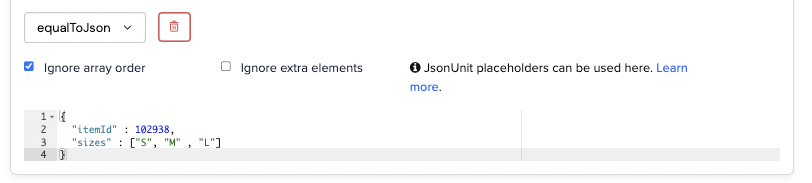 This will allow requests like the following to succeed:
```bash theme={null}
$ curl https://example.wiremockapi.cloud/json -d '{
"itemId": 102938,
"sizes": ["S", "L", "M"]
}'
```
```java theme={null}
HttpResponse response =
Unirest.post("https://example.wiremockapi.cloud/json")
.header("Content-Type", "application/json")
.body("{ \"itemId\": 102938, \"sizes\": [\"S\", \"L\", \"M\"] }")
.asString();
```
```javascript theme={null}
const options = {
method: 'POST',
headers: { 'Content-Type': 'application/json' },
body: JSON.stringify({ itemId: 102938, sizes: ['S', 'L', 'M'] })
};
fetch('https://example.wiremockapi.cloud/json', options).then(res => ...);
```
```python theme={null}
import requests
response = requests.post(
'https://example.wiremockapi.cloud/json',
json={'itemId': 102938, 'sizes': ['S', 'L', 'M']}
)
```
```ruby theme={null}
require 'uri'
require 'net/http'
require 'json'
uri = URI('https://example.wiremockapi.cloud/json')
response = Net::HTTP.post(
uri,
{ itemId: 102938, sizes: ['S', 'L', 'M'] }.to_json,
'Content-Type' => 'application/json'
)
```
```php theme={null}
true,
CURLOPT_POST => true,
CURLOPT_POSTFIELDS => json_encode([
'itemId' => 102938,
'sizes' => ['S', 'L', 'M']
]),
CURLOPT_HTTPHEADER => ['Content-Type: application/json'],
]);
$response = curl_exec($curl);
```
```go theme={null}
import (
"bytes"
"encoding/json"
"net/http"
)
body, _ := json.Marshal(map[string]any{
"itemId": 102938,
"sizes": []string{"S", "L", "M"},
})
resp, _ := http.Post("https://example.wiremockapi.cloud/json", "application/json", bytes.NewReader(body))
defer resp.Body.Close()
```
```json theme={null}
{ "result": "OK" }
```
### Ignoring extra elements
If you're only interested in matching a specific set of JSON elements and don't mind
if additional elements are present you can tick "Ignore extra elements".
This will allow requests like the following to succeed:
```bash theme={null}
$ curl https://example.wiremockapi.cloud/json -d '{
"itemId": 102938,
"sizes": ["S", "L", "M"]
}'
```
```java theme={null}
HttpResponse response =
Unirest.post("https://example.wiremockapi.cloud/json")
.header("Content-Type", "application/json")
.body("{ \"itemId\": 102938, \"sizes\": [\"S\", \"L\", \"M\"] }")
.asString();
```
```javascript theme={null}
const options = {
method: 'POST',
headers: { 'Content-Type': 'application/json' },
body: JSON.stringify({ itemId: 102938, sizes: ['S', 'L', 'M'] })
};
fetch('https://example.wiremockapi.cloud/json', options).then(res => ...);
```
```python theme={null}
import requests
response = requests.post(
'https://example.wiremockapi.cloud/json',
json={'itemId': 102938, 'sizes': ['S', 'L', 'M']}
)
```
```ruby theme={null}
require 'uri'
require 'net/http'
require 'json'
uri = URI('https://example.wiremockapi.cloud/json')
response = Net::HTTP.post(
uri,
{ itemId: 102938, sizes: ['S', 'L', 'M'] }.to_json,
'Content-Type' => 'application/json'
)
```
```php theme={null}
true,
CURLOPT_POST => true,
CURLOPT_POSTFIELDS => json_encode([
'itemId' => 102938,
'sizes' => ['S', 'L', 'M']
]),
CURLOPT_HTTPHEADER => ['Content-Type: application/json'],
]);
$response = curl_exec($curl);
```
```go theme={null}
import (
"bytes"
"encoding/json"
"net/http"
)
body, _ := json.Marshal(map[string]any{
"itemId": 102938,
"sizes": []string{"S", "L", "M"},
})
resp, _ := http.Post("https://example.wiremockapi.cloud/json", "application/json", bytes.NewReader(body))
defer resp.Body.Close()
```
```json theme={null}
{ "result": "OK" }
```
### Ignoring extra elements
If you're only interested in matching a specific set of JSON elements and don't mind
if additional elements are present you can tick "Ignore extra elements".
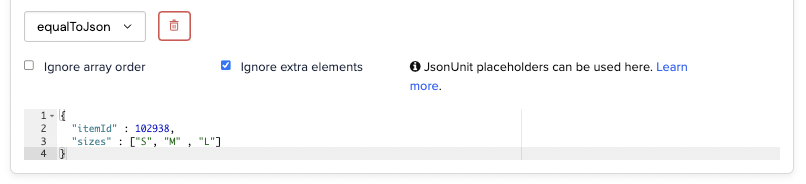 This would permit the following to match:
```bash theme={null}
$ curl https://example.wiremockapi.cloud/json -d '{
"itemId": 102938,
"sizes": ["S", "M", "L"],
"tag": "essentials"
}'
```
```java theme={null}
HttpResponse response =
Unirest.post("https://example.wiremockapi.cloud/json")
.header("Content-Type", "application/json")
.body("{ \"itemId\": 102938, \"sizes\": [\"S\", \"M\", \"L\"], \"tag\": \"essentials\" }")
.asString();
```
```javascript theme={null}
const options = {
method: 'POST',
headers: { 'Content-Type': 'application/json' },
body: JSON.stringify({ itemId: 102938, sizes: ['S', 'M', 'L'], tag: 'essentials' })
};
fetch('https://example.wiremockapi.cloud/json', options).then(res => ...);
```
```python theme={null}
import requests
response = requests.post(
'https://example.wiremockapi.cloud/json',
json={'itemId': 102938, 'sizes': ['S', 'M', 'L'], 'tag': 'essentials'}
)
```
```ruby theme={null}
require 'uri'
require 'net/http'
require 'json'
uri = URI('https://example.wiremockapi.cloud/json')
response = Net::HTTP.post(
uri,
{ itemId: 102938, sizes: ['S', 'M', 'L'], tag: 'essentials' }.to_json,
'Content-Type' => 'application/json'
)
```
```php theme={null}
true,
CURLOPT_POST => true,
CURLOPT_POSTFIELDS => json_encode([
'itemId' => 102938,
'sizes' => ['S', 'M', 'L'],
'tag' => 'essentials'
]),
CURLOPT_HTTPHEADER => ['Content-Type: application/json'],
]);
$response = curl_exec($curl);
```
```go theme={null}
import (
"bytes"
"encoding/json"
"net/http"
)
body, _ := json.Marshal(map[string]any{
"itemId": 102938,
"sizes": []string{"S", "M", "L"},
"tag": "essentials",
})
resp, _ := http.Post("https://example.wiremockapi.cloud/json", "application/json", bytes.NewReader(body))
defer resp.Body.Close()
```
### Using placeholders to ignore specific JSON attributes
If you want to check that an element is present, but don't care what the value is
then you can use JSONUnit placeholder syntax to achieve this.
Note: unlike with XML placeholders this is enabled by default.
For instance, given the following configuration:
This would permit the following to match:
```bash theme={null}
$ curl https://example.wiremockapi.cloud/json -d '{
"itemId": 102938,
"sizes": ["S", "M", "L"],
"tag": "essentials"
}'
```
```java theme={null}
HttpResponse response =
Unirest.post("https://example.wiremockapi.cloud/json")
.header("Content-Type", "application/json")
.body("{ \"itemId\": 102938, \"sizes\": [\"S\", \"M\", \"L\"], \"tag\": \"essentials\" }")
.asString();
```
```javascript theme={null}
const options = {
method: 'POST',
headers: { 'Content-Type': 'application/json' },
body: JSON.stringify({ itemId: 102938, sizes: ['S', 'M', 'L'], tag: 'essentials' })
};
fetch('https://example.wiremockapi.cloud/json', options).then(res => ...);
```
```python theme={null}
import requests
response = requests.post(
'https://example.wiremockapi.cloud/json',
json={'itemId': 102938, 'sizes': ['S', 'M', 'L'], 'tag': 'essentials'}
)
```
```ruby theme={null}
require 'uri'
require 'net/http'
require 'json'
uri = URI('https://example.wiremockapi.cloud/json')
response = Net::HTTP.post(
uri,
{ itemId: 102938, sizes: ['S', 'M', 'L'], tag: 'essentials' }.to_json,
'Content-Type' => 'application/json'
)
```
```php theme={null}
true,
CURLOPT_POST => true,
CURLOPT_POSTFIELDS => json_encode([
'itemId' => 102938,
'sizes' => ['S', 'M', 'L'],
'tag' => 'essentials'
]),
CURLOPT_HTTPHEADER => ['Content-Type: application/json'],
]);
$response = curl_exec($curl);
```
```go theme={null}
import (
"bytes"
"encoding/json"
"net/http"
)
body, _ := json.Marshal(map[string]any{
"itemId": 102938,
"sizes": []string{"S", "M", "L"},
"tag": "essentials",
})
resp, _ := http.Post("https://example.wiremockapi.cloud/json", "application/json", bytes.NewReader(body))
defer resp.Body.Close()
```
### Using placeholders to ignore specific JSON attributes
If you want to check that an element is present, but don't care what the value is
then you can use JSONUnit placeholder syntax to achieve this.
Note: unlike with XML placeholders this is enabled by default.
For instance, given the following configuration:
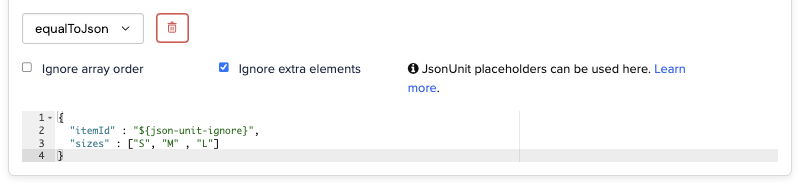 This would permit the the following to match:
```bash theme={null}
$ curl https://example.wiremockapi.cloud/json -d '{
"itemId": 8888888888,
"sizes": ["S", "M", "L"],
"tag": "essentials"
}'
```
```java theme={null}
HttpResponse response =
Unirest.post("https://example.wiremockapi.cloud/json")
.header("Content-Type", "application/json")
.body("{ \"itemId\": 8888888888, \"sizes\": [\"S\", \"M\", \"L\"], \"tag\": \"essentials\" }")
.asString();
```
```javascript theme={null}
const options = {
method: 'POST',
headers: { 'Content-Type': 'application/json' },
body: JSON.stringify({ itemId: 8888888888, sizes: ['S', 'M', 'L'], tag: 'essentials' })
};
fetch('https://example.wiremockapi.cloud/json', options).then(res => ...);
```
```python theme={null}
import requests
response = requests.post(
'https://example.wiremockapi.cloud/json',
json={'itemId': 8888888888, 'sizes': ['S', 'M', 'L'], 'tag': 'essentials'}
)
```
```ruby theme={null}
require 'uri'
require 'net/http'
require 'json'
uri = URI('https://example.wiremockapi.cloud/json')
response = Net::HTTP.post(
uri,
{ itemId: 8888888888, sizes: ['S', 'M', 'L'], tag: 'essentials' }.to_json,
'Content-Type' => 'application/json'
)
```
```php theme={null}
true,
CURLOPT_POST => true,
CURLOPT_POSTFIELDS => json_encode([
'itemId' => 8888888888,
'sizes' => ['S', 'M', 'L'],
'tag' => 'essentials'
]),
CURLOPT_HTTPHEADER => ['Content-Type: application/json'],
]);
$response = curl_exec($curl);
```
```go theme={null}
import (
"bytes"
"encoding/json"
"net/http"
)
body, _ := json.Marshal(map[string]any{
"itemId": 8888888888,
"sizes": []string{"S", "M", "L"},
"tag": "essentials",
})
resp, _ := http.Post("https://example.wiremockapi.cloud/json", "application/json", bytes.NewReader(body))
defer resp.Body.Close()
```
When using `${json-unit.ignore}`, the element's type is also ignored (in addition to its value),
so in the above case a string, boolean etc. could have been used in place of the numeric ID.
If you want to constrain an element to a specific type but still ignore the value
you can use one of the following placeholders:
* `${json-unit.regex}[A-Z]+` (any Java-style regular expression can be used)
* `${json-unit.any-string}`
* `${json-unit.any-boolean}`
* `${json-unit.any-number}`
## Matching via JSONPath - `matchesJsonPath`
[JSONPath](https://github.com/json-path/JsonPath) is an expression language,
similar in concept to XPath that permits elements or collections of elements
to be queried from a JSON document.
WireMock Cloud supports stub matching using JSONPath expressions, optionally sub-matching
the result using WireMock Cloud's own operators (`equalTo`, `matches` etc.).
Given the following configration:
This would permit the the following to match:
```bash theme={null}
$ curl https://example.wiremockapi.cloud/json -d '{
"itemId": 8888888888,
"sizes": ["S", "M", "L"],
"tag": "essentials"
}'
```
```java theme={null}
HttpResponse response =
Unirest.post("https://example.wiremockapi.cloud/json")
.header("Content-Type", "application/json")
.body("{ \"itemId\": 8888888888, \"sizes\": [\"S\", \"M\", \"L\"], \"tag\": \"essentials\" }")
.asString();
```
```javascript theme={null}
const options = {
method: 'POST',
headers: { 'Content-Type': 'application/json' },
body: JSON.stringify({ itemId: 8888888888, sizes: ['S', 'M', 'L'], tag: 'essentials' })
};
fetch('https://example.wiremockapi.cloud/json', options).then(res => ...);
```
```python theme={null}
import requests
response = requests.post(
'https://example.wiremockapi.cloud/json',
json={'itemId': 8888888888, 'sizes': ['S', 'M', 'L'], 'tag': 'essentials'}
)
```
```ruby theme={null}
require 'uri'
require 'net/http'
require 'json'
uri = URI('https://example.wiremockapi.cloud/json')
response = Net::HTTP.post(
uri,
{ itemId: 8888888888, sizes: ['S', 'M', 'L'], tag: 'essentials' }.to_json,
'Content-Type' => 'application/json'
)
```
```php theme={null}
true,
CURLOPT_POST => true,
CURLOPT_POSTFIELDS => json_encode([
'itemId' => 8888888888,
'sizes' => ['S', 'M', 'L'],
'tag' => 'essentials'
]),
CURLOPT_HTTPHEADER => ['Content-Type: application/json'],
]);
$response = curl_exec($curl);
```
```go theme={null}
import (
"bytes"
"encoding/json"
"net/http"
)
body, _ := json.Marshal(map[string]any{
"itemId": 8888888888,
"sizes": []string{"S", "M", "L"},
"tag": "essentials",
})
resp, _ := http.Post("https://example.wiremockapi.cloud/json", "application/json", bytes.NewReader(body))
defer resp.Body.Close()
```
When using `${json-unit.ignore}`, the element's type is also ignored (in addition to its value),
so in the above case a string, boolean etc. could have been used in place of the numeric ID.
If you want to constrain an element to a specific type but still ignore the value
you can use one of the following placeholders:
* `${json-unit.regex}[A-Z]+` (any Java-style regular expression can be used)
* `${json-unit.any-string}`
* `${json-unit.any-boolean}`
* `${json-unit.any-number}`
## Matching via JSONPath - `matchesJsonPath`
[JSONPath](https://github.com/json-path/JsonPath) is an expression language,
similar in concept to XPath that permits elements or collections of elements
to be queried from a JSON document.
WireMock Cloud supports stub matching using JSONPath expressions, optionally sub-matching
the result using WireMock Cloud's own operators (`equalTo`, `matches` etc.).
Given the following configration:
 The following JSON will be matched:
```bash theme={null}
curl https://example.wiremockapi.cloud/json -d '{
"itemId": 102938,
"itemName": "Socks"
}'
```
```java theme={null}
HttpResponse response =
Unirest.post("https://example.wiremockapi.cloud/json")
.header("Content-Type", "application/json")
.body("{ \"itemId\": 102938, \"itemName\": \"Socks\" }")
.asString();
```
```javascript theme={null}
const options = {
method: 'POST',
headers: { 'Content-Type': 'application/json' },
body: JSON.stringify({ itemId: 102938, itemName: 'Socks' })
};
fetch('https://example.wiremockapi.cloud/json', options).then(res => ...);
```
```python theme={null}
import requests
response = requests.post(
'https://example.wiremockapi.cloud/json',
json={'itemId': 102938, 'itemName': 'Socks'}
)
```
```ruby theme={null}
require 'uri'
require 'net/http'
require 'json'
uri = URI('https://example.wiremockapi.cloud/json')
response = Net::HTTP.post(
uri,
{ itemId: 102938, itemName: 'Socks' }.to_json,
'Content-Type' => 'application/json'
)
```
```php theme={null}
true,
CURLOPT_POST => true,
CURLOPT_POSTFIELDS => json_encode([
'itemId' => 102938,
'itemName' => 'Socks'
]),
CURLOPT_HTTPHEADER => ['Content-Type: application/json'],
$response = curl_exec($curl);
```
```go theme={null}
import (
"bytes"
"encoding/json"
"net/http"
)
body, _ := json.Marshal(map[string]any{
"itemId": 102938,
"itemName": "Socks",
})
resp, _ := http.Post("https://example.wiremockapi.cloud/json", "application/json", bytes.NewReader(body))
defer resp.Body.Close()
```
### Expression only vs. expression + sub-match
It is possible to match a JSON document without a sub-match by selecting "is present"
from the drop-down:
The following JSON will be matched:
```bash theme={null}
curl https://example.wiremockapi.cloud/json -d '{
"itemId": 102938,
"itemName": "Socks"
}'
```
```java theme={null}
HttpResponse response =
Unirest.post("https://example.wiremockapi.cloud/json")
.header("Content-Type", "application/json")
.body("{ \"itemId\": 102938, \"itemName\": \"Socks\" }")
.asString();
```
```javascript theme={null}
const options = {
method: 'POST',
headers: { 'Content-Type': 'application/json' },
body: JSON.stringify({ itemId: 102938, itemName: 'Socks' })
};
fetch('https://example.wiremockapi.cloud/json', options).then(res => ...);
```
```python theme={null}
import requests
response = requests.post(
'https://example.wiremockapi.cloud/json',
json={'itemId': 102938, 'itemName': 'Socks'}
)
```
```ruby theme={null}
require 'uri'
require 'net/http'
require 'json'
uri = URI('https://example.wiremockapi.cloud/json')
response = Net::HTTP.post(
uri,
{ itemId: 102938, itemName: 'Socks' }.to_json,
'Content-Type' => 'application/json'
)
```
```php theme={null}
true,
CURLOPT_POST => true,
CURLOPT_POSTFIELDS => json_encode([
'itemId' => 102938,
'itemName' => 'Socks'
]),
CURLOPT_HTTPHEADER => ['Content-Type: application/json'],
$response = curl_exec($curl);
```
```go theme={null}
import (
"bytes"
"encoding/json"
"net/http"
)
body, _ := json.Marshal(map[string]any{
"itemId": 102938,
"itemName": "Socks",
})
resp, _ := http.Post("https://example.wiremockapi.cloud/json", "application/json", bytes.NewReader(body))
defer resp.Body.Close()
```
### Expression only vs. expression + sub-match
It is possible to match a JSON document without a sub-match by selecting "is present"
from the drop-down:
 If you do this, the JSON input will be considered a match if the expression returns
1 or more elements.
This feature is primarily present for compatibility with WireMock projects, and
generally it is better to use sub-matches as this results in simpler JSONPath
expressions and more useful debug output when there is a non-match.
### Common JSONPath examples
Matching on a specific array element by position.
`$.sizes[1]` `equal to` `M`
would match:
```json theme={null}
{
"sizes": ["S", "M", "L"]
}
```
Matching on an element of an object found via another element.
`$.addresses[?(@.type == 'business')].postcode` `contains` `N11NN`
would match:
```json theme={null}
{
"addresses": [
{
"type": "home",
"postcode": "Z55ZZ"
},
{
"type": "business",
"postcode": "N11NN"
}
]
}
```
It is necessary to use `contains` in this instance as a JSONPath expression containing
a query part (between the `[?` and `]`) will always return a collection
of results.
Matching an element found recursively.
`$..postcode` `contains` `N11NN`
would match:
```json theme={null}
{
"addresses": [
{
"type": "home",
"postcode": "Z55ZZ"
},
{
"type": "business",
"postcode": "N11NN"
}
]
}
```
and would also match:
```json theme={null}
{
"address": {
"type": "business",
"postcode": "N11NN"
}
}
```
If you do this, the JSON input will be considered a match if the expression returns
1 or more elements.
This feature is primarily present for compatibility with WireMock projects, and
generally it is better to use sub-matches as this results in simpler JSONPath
expressions and more useful debug output when there is a non-match.
### Common JSONPath examples
Matching on a specific array element by position.
`$.sizes[1]` `equal to` `M`
would match:
```json theme={null}
{
"sizes": ["S", "M", "L"]
}
```
Matching on an element of an object found via another element.
`$.addresses[?(@.type == 'business')].postcode` `contains` `N11NN`
would match:
```json theme={null}
{
"addresses": [
{
"type": "home",
"postcode": "Z55ZZ"
},
{
"type": "business",
"postcode": "N11NN"
}
]
}
```
It is necessary to use `contains` in this instance as a JSONPath expression containing
a query part (between the `[?` and `]`) will always return a collection
of results.
Matching an element found recursively.
`$..postcode` `contains` `N11NN`
would match:
```json theme={null}
{
"addresses": [
{
"type": "home",
"postcode": "Z55ZZ"
},
{
"type": "business",
"postcode": "N11NN"
}
]
}
```
and would also match:
```json theme={null}
{
"address": {
"type": "business",
"postcode": "N11NN"
}
}
```