> ## Documentation Index
> Fetch the complete documentation index at: https://docs.wiremock.io/llms.txt
> Use this file to discover all available pages before exploring further.
# Request Matching – Expression Matcher
> Advanced expression-based matching
The Expression Matcher allows you to define complex request matching logic using
Handlebars templates. This feature enables matching scenarios that go beyond what
standard matchers can achieve.
The Expression Matcher is an Enterprise only feature. Accounts on the free and trial
plan do not have access to this feature. If you are on the free or trial plans and would
like access to this feature, [contact the WireMock team today](https://www.wiremock.io/contact-now)
to discuss an enterprise plan for your organisation.
## How It Works
The Expression Matcher evaluates a Handlebars template that must return the string
`true` for the request to match. If the template evaluates to anything other than `true`
then the stub won't match. You have access to the full `request` object within the
template, for example:
* `request.body` - the request body as a string
* `request.query..[0]` - query parameter values (as arrays)
* `request.headers.` - header values
* `request.method` - the HTTP method
* `request.path` - the request path
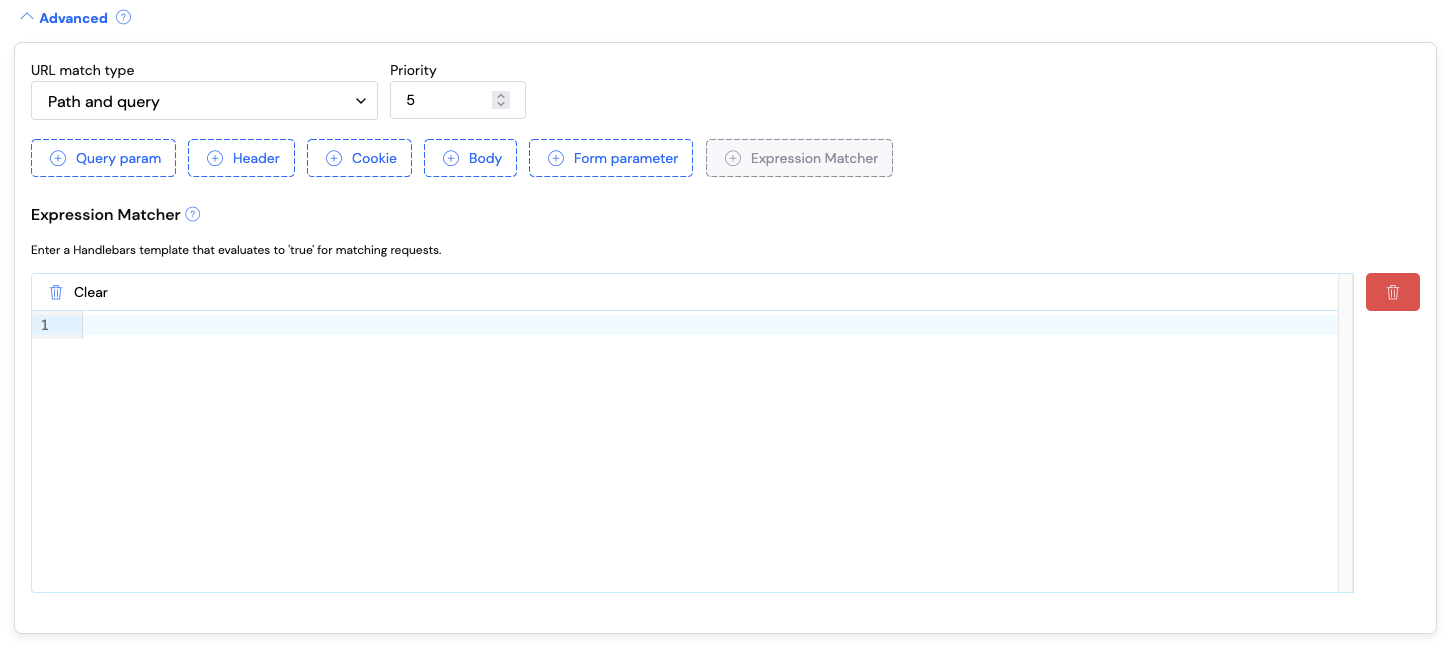
The expression matcher can be found in the **Advanced Matching** section of the stub
editor. Unlike the other matchers, only one expression matcher can be defined per stub:
 ## When to Use The Expression Matcher
**Prefer standard matchers when possible.** WireMock's built-in matchers (equality,
regex, JSON path, etc.) are optimized for their specific tasks and should be your
first choice. Use the Expression Matcher when you need:
* **Comparative logic** – comparing values from different parts of the request
* **OR conditions** - matching when any one of several conditions is true
* **Complex boolean logic** – combining multiple conditions with AND/OR/NOT
* **Cross-field validation** – validating relationships between different request fields
> **Note:** The Expression Matcher works alongside standard matchers. You can use
> query parameter matchers, header matchers, body matchers, and the Expression Matcher
> together on the same stub. The request will only match if ALL matchers pass.
## Examples
### Example 1: Comparing Date Query Parameters
**Scenario:** You have an API endpoint that accepts `startDate` and `endDate` query
parameters as ISO 8601 timestamps. You want to ensure `startDate` is before `endDate`.
Standard matchers can validate that each date exists and matches a format, but they
cannot compare the two values against each other.
**Expression Matcher Template:**
```handlebars theme={null}
{{lt request.query.startDate.[0] request.query.endDate.[0]}}
```
**Combined with standard matchers:**
* Query param `startDate` matches regex `^\d{4}-\d{2}-\d{2}T\d{2}:\d{2}:\d{2}\.\d{3}Z$`
* Query param `endDate` matches regex `^\d{4}-\d{2}-\d{2}T\d{2}:\d{2}:\d{2}\.\d{3}Z$`
* Expression Matcher: `{{lt request.query.startDate.[0] request.query.endDate.[0]}}`
**Example request:**
```
GET /api/events?startDate=2025-05-27T07:01:01.000Z&endDate=2025-06-15T14:30:00.000Z
```
This ensures both dates are in the correct ISO 8601 format (via standard matchers) AND
that the start date is less than the end date (via Expression Matcher). Since ISO 8601
timestamps are lexicographically sortable, string comparison works correctly for date
ordering.
To change this into a match for an error stub that matches if the `endDate` is before
`startDate`, you can change the Expression Matcher to:
```handlebars theme={null}
{{gt request.query.startDate.[0] request.query.endDate.[0]}}
```
### Example 2: OR Logic for Query Parameter Validation
**Scenario:** Your API requires query parameters `W`, `X`, `Y`, and `Z`, each needing
to match a specific regex pattern. If ANY parameter fails validation, you want to
return a 400 Bad Request with a helpful error message.
Without the Expression Matcher, you would need to create 4 separate stubs—one for
each parameter that could fail. With the Expression Matcher, you can handle this with
a single stub.
**Expression Matcher Template (matches when ANY parameter is invalid):**
```handlebars theme={null}
{{or
(not (matches request.query.W.[0] '^[A-Z]{3}$'))
(not (matches request.query.X.[0] '^\d{4}$'))
(not (matches request.query.Y.[0] '^[a-z]+@[a-z]+\.[a-z]+$'))
(not (matches request.query.Z.[0] '^(true|false)$'))
}}
```
**Example request:**
```
GET /my-api?W=ABC&X=1234&Y=test@example.com&Z=NOTTRUE
```
Again, this can be combined with standard matchers to ensure the query parameters are
present
### Example 3: Validating JSON Body Field Relationships
**Scenario:** You're mocking a payment API where the request body contains `amount`
and `currency`. For GBP transactions, the amount must be at least 100 (100 pence).
For USD transactions, the amount must be at least 50 (50 cents).
**Expression Matcher Template:**
```handlebars theme={null}
{{or
(and
(eq (jsonPath request.body '$.currency') 'GBP')
(gte (jsonPath request.body '$.amount') 100)
)
(and
(eq (jsonPath request.body '$.currency') 'USD')
(gte (jsonPath request.body '$.amount') 50)
)
}}
```
**Request body example:**
```json theme={null}
{
"currency": "GBP",
"amount": 150,
"description": "Test payment"
}
```
This template ensures the minimum amount rule is applied based on the currency in the same request.
### Example 4: Header-Based Conditional Matching
**Scenario:** Your API supports both API key and Bearer token authentication. You
want a stub that matches requests with EITHER a valid `X-API-Key` header OR a valid
`Authorization` header with a Bearer token.
**Expression Matcher Template:**
```handlebars theme={null}
{{or
(matches (val request.headers.X-API-Key.[0] or='') "^sk_live_[A-Za-z0-9]{24}$")
(matches (val request.headers.Authorization.[0] or='') "^Bearer [A-Za-z0-9\\-_]+\\.[A-Za-z0-9\\-_]+\\.[A-Za-z0-9\\-_]+$")
}}
```
```
POST /payments
X-API-Key: sk_live_a1B2c3D4e5F6g7H8i9J0K1L2
Content-Type: application/json
{
"amount": 1000,
"currency": "GBP"
}
```
This allows the stub to match requests using either authentication method, without
needing to create duplicate stubs. The use of the `val` helper ensures the header value
is extracted as a string and handles empty values correctly.
### Example 5: Cross-Request Validation (Header Must Match Body Field)
**Scenario:** Your API requires that the `X-Idempotency-Key` header matches the
`requestId` field in the JSON body. This ensures clients are correctly correlating
their idempotency keys with their request payloads.
**Expression Matcher Template:**
```handlebars theme={null}
{{eq (val request.headers.X-Idempotency-Key.[0] or='') (jsonPath request.body '$.requestId')}}
```
**Example matching request:**
```
POST /api/orders
X-Idempotency-Key: order-12345
Content-Type: application/json
{
"requestId": "order-12345",
"items": [...]
}
```
This validates that the header and body field are synchronized.
***
## Debugging
When your Expression Matcher template isn't working as expected, you can use the
request log to help debug the issue.
**How it works:** Any content in your Handlebars template that doesn't resolve to
`true` or `false` will be output in the serve event for the request in the request log.
This allows you to inspect the actual values being evaluated.
**Debugging technique:** Temporarily modify your template to output the values you're working with:
```handlebars theme={null}
startDate: {{request.query.startDate.[0]}}
endDate: {{request.query.endDate.[0]}}
{{lt request.query.startDate.[0] request.query.endDate.[0]}}
```
When a request is made, check the request log's serve event to see the rendered output:
```
startDate: 2025-05-27T07:01:01.000Z endDate: 2025-05-10T14:30:00.000Z
```
This helps you verify:
* That you're accessing the correct request fields
* The actual values being compared
* Whether values are in the expected format
Once you've identified the issue, update your template to the correct boolean expression and the output will return to `true` or `false`.
***
## Available Helpers
The Expression Matcher supports all the same helpers you can use when writing [dynamic response templates](/response-templating/helper-reference).
## Best Practices
1. **Use standard matchers first** - They're optimized for their specific tasks
2. **Combine matchers** - Use standard matchers for basic validation, Expression Matcher for complex logic
3. **Use debugging output** - When templates aren't working, output values to the request log to diagnose issues
## When to Use The Expression Matcher
**Prefer standard matchers when possible.** WireMock's built-in matchers (equality,
regex, JSON path, etc.) are optimized for their specific tasks and should be your
first choice. Use the Expression Matcher when you need:
* **Comparative logic** – comparing values from different parts of the request
* **OR conditions** - matching when any one of several conditions is true
* **Complex boolean logic** – combining multiple conditions with AND/OR/NOT
* **Cross-field validation** – validating relationships between different request fields
> **Note:** The Expression Matcher works alongside standard matchers. You can use
> query parameter matchers, header matchers, body matchers, and the Expression Matcher
> together on the same stub. The request will only match if ALL matchers pass.
## Examples
### Example 1: Comparing Date Query Parameters
**Scenario:** You have an API endpoint that accepts `startDate` and `endDate` query
parameters as ISO 8601 timestamps. You want to ensure `startDate` is before `endDate`.
Standard matchers can validate that each date exists and matches a format, but they
cannot compare the two values against each other.
**Expression Matcher Template:**
```handlebars theme={null}
{{lt request.query.startDate.[0] request.query.endDate.[0]}}
```
**Combined with standard matchers:**
* Query param `startDate` matches regex `^\d{4}-\d{2}-\d{2}T\d{2}:\d{2}:\d{2}\.\d{3}Z$`
* Query param `endDate` matches regex `^\d{4}-\d{2}-\d{2}T\d{2}:\d{2}:\d{2}\.\d{3}Z$`
* Expression Matcher: `{{lt request.query.startDate.[0] request.query.endDate.[0]}}`
**Example request:**
```
GET /api/events?startDate=2025-05-27T07:01:01.000Z&endDate=2025-06-15T14:30:00.000Z
```
This ensures both dates are in the correct ISO 8601 format (via standard matchers) AND
that the start date is less than the end date (via Expression Matcher). Since ISO 8601
timestamps are lexicographically sortable, string comparison works correctly for date
ordering.
To change this into a match for an error stub that matches if the `endDate` is before
`startDate`, you can change the Expression Matcher to:
```handlebars theme={null}
{{gt request.query.startDate.[0] request.query.endDate.[0]}}
```
### Example 2: OR Logic for Query Parameter Validation
**Scenario:** Your API requires query parameters `W`, `X`, `Y`, and `Z`, each needing
to match a specific regex pattern. If ANY parameter fails validation, you want to
return a 400 Bad Request with a helpful error message.
Without the Expression Matcher, you would need to create 4 separate stubs—one for
each parameter that could fail. With the Expression Matcher, you can handle this with
a single stub.
**Expression Matcher Template (matches when ANY parameter is invalid):**
```handlebars theme={null}
{{or
(not (matches request.query.W.[0] '^[A-Z]{3}$'))
(not (matches request.query.X.[0] '^\d{4}$'))
(not (matches request.query.Y.[0] '^[a-z]+@[a-z]+\.[a-z]+$'))
(not (matches request.query.Z.[0] '^(true|false)$'))
}}
```
**Example request:**
```
GET /my-api?W=ABC&X=1234&Y=test@example.com&Z=NOTTRUE
```
Again, this can be combined with standard matchers to ensure the query parameters are
present
### Example 3: Validating JSON Body Field Relationships
**Scenario:** You're mocking a payment API where the request body contains `amount`
and `currency`. For GBP transactions, the amount must be at least 100 (100 pence).
For USD transactions, the amount must be at least 50 (50 cents).
**Expression Matcher Template:**
```handlebars theme={null}
{{or
(and
(eq (jsonPath request.body '$.currency') 'GBP')
(gte (jsonPath request.body '$.amount') 100)
)
(and
(eq (jsonPath request.body '$.currency') 'USD')
(gte (jsonPath request.body '$.amount') 50)
)
}}
```
**Request body example:**
```json theme={null}
{
"currency": "GBP",
"amount": 150,
"description": "Test payment"
}
```
This template ensures the minimum amount rule is applied based on the currency in the same request.
### Example 4: Header-Based Conditional Matching
**Scenario:** Your API supports both API key and Bearer token authentication. You
want a stub that matches requests with EITHER a valid `X-API-Key` header OR a valid
`Authorization` header with a Bearer token.
**Expression Matcher Template:**
```handlebars theme={null}
{{or
(matches (val request.headers.X-API-Key.[0] or='') "^sk_live_[A-Za-z0-9]{24}$")
(matches (val request.headers.Authorization.[0] or='') "^Bearer [A-Za-z0-9\\-_]+\\.[A-Za-z0-9\\-_]+\\.[A-Za-z0-9\\-_]+$")
}}
```
```
POST /payments
X-API-Key: sk_live_a1B2c3D4e5F6g7H8i9J0K1L2
Content-Type: application/json
{
"amount": 1000,
"currency": "GBP"
}
```
This allows the stub to match requests using either authentication method, without
needing to create duplicate stubs. The use of the `val` helper ensures the header value
is extracted as a string and handles empty values correctly.
### Example 5: Cross-Request Validation (Header Must Match Body Field)
**Scenario:** Your API requires that the `X-Idempotency-Key` header matches the
`requestId` field in the JSON body. This ensures clients are correctly correlating
their idempotency keys with their request payloads.
**Expression Matcher Template:**
```handlebars theme={null}
{{eq (val request.headers.X-Idempotency-Key.[0] or='') (jsonPath request.body '$.requestId')}}
```
**Example matching request:**
```
POST /api/orders
X-Idempotency-Key: order-12345
Content-Type: application/json
{
"requestId": "order-12345",
"items": [...]
}
```
This validates that the header and body field are synchronized.
***
## Debugging
When your Expression Matcher template isn't working as expected, you can use the
request log to help debug the issue.
**How it works:** Any content in your Handlebars template that doesn't resolve to
`true` or `false` will be output in the serve event for the request in the request log.
This allows you to inspect the actual values being evaluated.
**Debugging technique:** Temporarily modify your template to output the values you're working with:
```handlebars theme={null}
startDate: {{request.query.startDate.[0]}}
endDate: {{request.query.endDate.[0]}}
{{lt request.query.startDate.[0] request.query.endDate.[0]}}
```
When a request is made, check the request log's serve event to see the rendered output:
```
startDate: 2025-05-27T07:01:01.000Z endDate: 2025-05-10T14:30:00.000Z
```
This helps you verify:
* That you're accessing the correct request fields
* The actual values being compared
* Whether values are in the expected format
Once you've identified the issue, update your template to the correct boolean expression and the output will return to `true` or `false`.
***
## Available Helpers
The Expression Matcher supports all the same helpers you can use when writing [dynamic response templates](/response-templating/helper-reference).
## Best Practices
1. **Use standard matchers first** - They're optimized for their specific tasks
2. **Combine matchers** - Use standard matchers for basic validation, Expression Matcher for complex logic
3. **Use debugging output** - When templates aren't working, output values to the request log to diagnose issues