> ## Documentation Index
> Fetch the complete documentation index at: https://docs.wiremock.io/llms.txt
> Use this file to discover all available pages before exploring further.
# OpenAPI Mocking and Prototyping
> Overview of the OpenAPI mock API type and two-way mock generation
WireMock Cloud supports an OpenAPI mock API type that provides both incremental generation of stubs from OpenAPI and OpenAPI generation from stubs. Mock APIs of this type also have an associated auto-generated set of public documentation pages.
This supports two types of workflow:
1. Automatic generation/amendment of a mock API from an existing OpenAPI doc as it evolves,
2. API prototyping - defining API behaviour via stubs and auto-generating OpenAPI + documentation.
These workflows can be combined i.e. when prototyping new behaviour for an existing API.
## Getting started
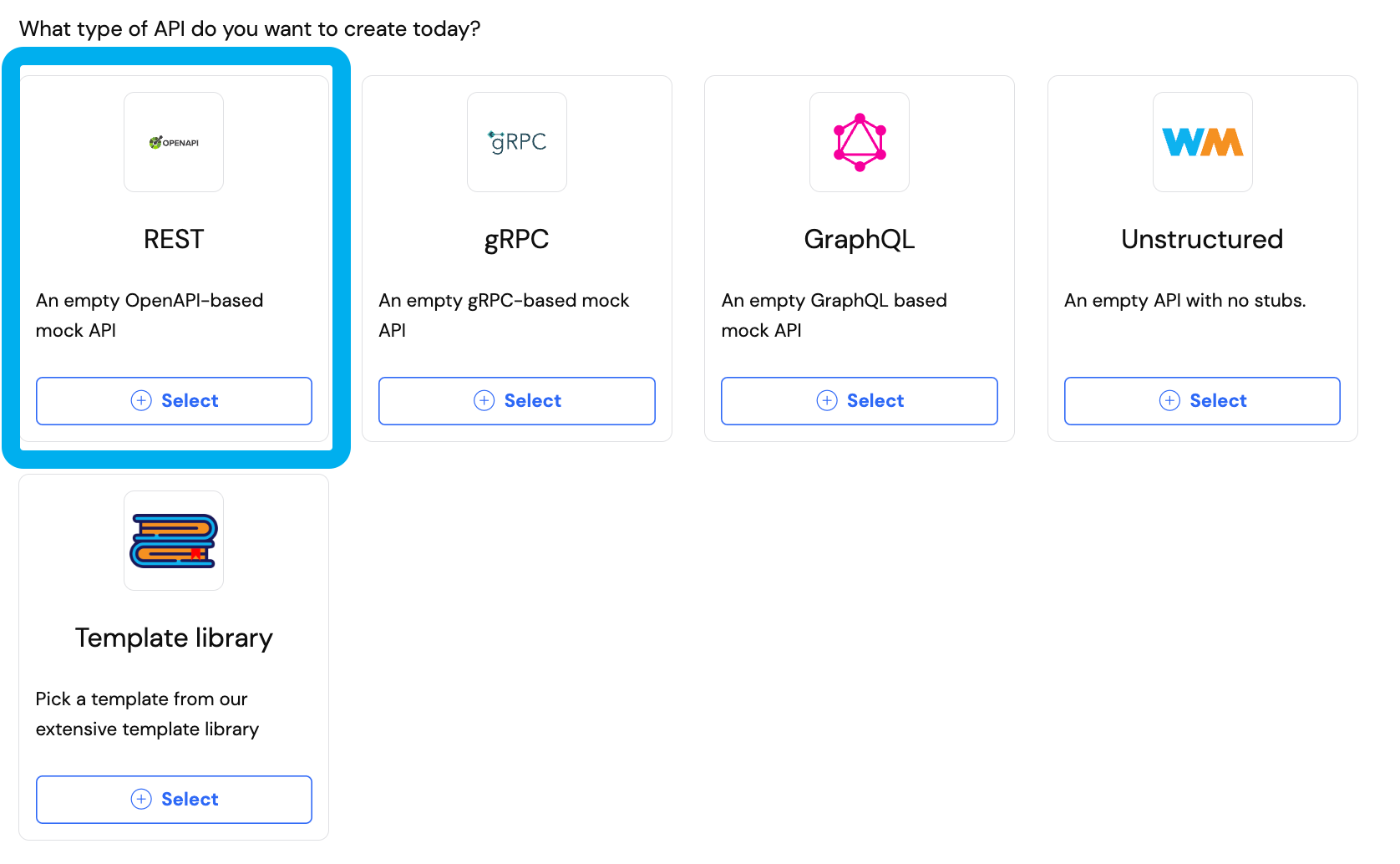
From the app's home screen, create a new mock API and choose the OpenAPI type:
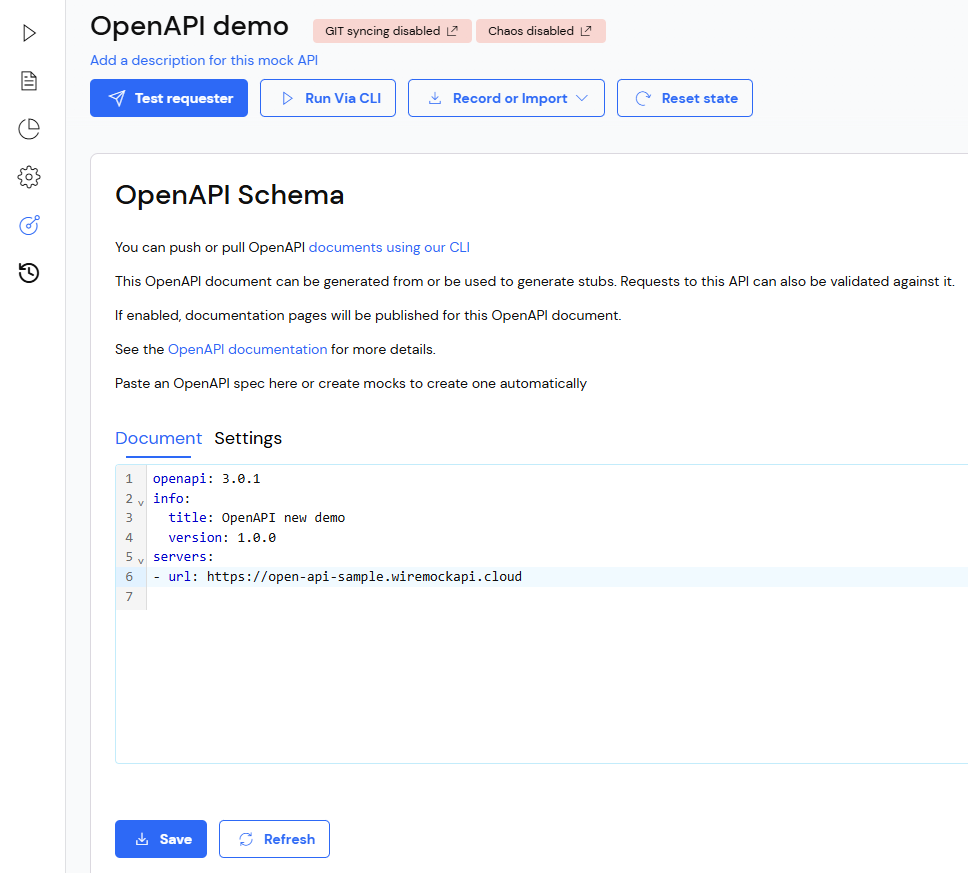
 When the new mock API is created an extra item will be present on the left-hand nav bar, taking you to the OpenAPI editor page:
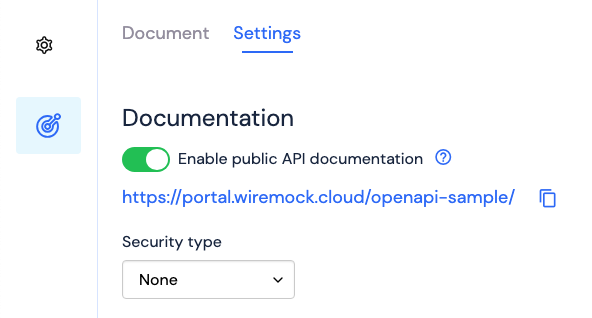
 Navigating to the Settings tab on the same page, toggling on "Enable public API documentation" and clicking the link underneath will show the public API documentation (which will be initially empty apart from header information since there are no paths defined in the OpenAPI doc).
 ## Generating stubs from OpenAPI
Stubs will be created or updated whenever changes are saved to the OpenAPI doc.
Add a new path entry and click Save:
## Generating stubs from OpenAPI
Stubs will be created or updated whenever changes are saved to the OpenAPI doc.
Add a new path entry and click Save:
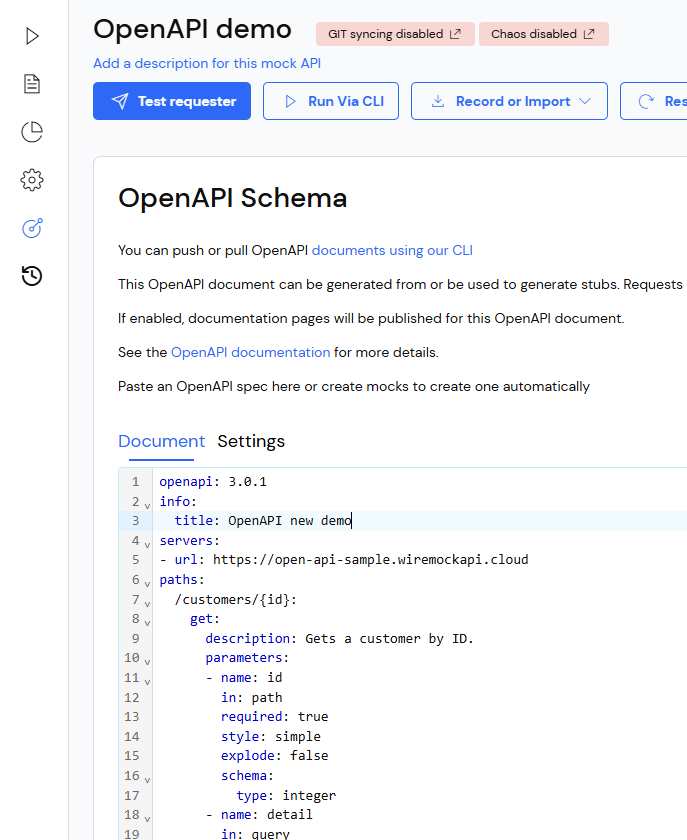 Then navigate to the Stubs page and see that two new stubs have been created - one with specific request parameters required and one "default" i.e. will match regardless of specific parameter values provided the method and URL path are correct.
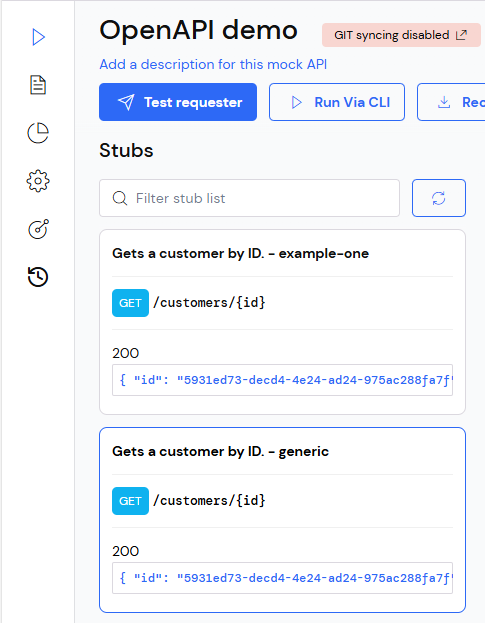 Stubs will be generated following the [stub generation rules](#stub-generation-rules).
### Updating an OpenAPI doc
When an OpenAPI doc is updated, for every `path-method-status-contentType`, existing stubs will be updated if any of the following apply:
* The existing stub was generated from an example and the example hasn't changed its name.
* If there is one example within the given `path-method-status-contentType` which shares the response body with the existing stub.
* If the `path-method-status-contentType` only provides a single example.
* If the `path-method-status-contentType` doesn't provide examples at all.
If none of the conditions above are satisfied, one or more stubs will be generated following the [stub generation rules](#stub-generation-rules).
WireMock Cloud takes a non-destructive approach to your stubs. This means that if you delete a path, method, status
or contentType, the stub that represents that OpenAPI element will remain in your Mock API. This also applies to updating
elements in your OpenAPI. For example, if you update a path in your OpenAPI from `/orders` to `/v1/orders` the path
will be classed as a new path and a new stub will be created. The old stub will not be deleted.
If you are modeling new data scenarios and you add new stubs to your Mock API after generating stubs from an OpenAPI
specification, these stubs will not always be updated when you update your OpenAPI specification. If those new stubs
do not match an example in your OpenAPI specification, they will not be updated when you update your OpenAPI specification
(adding a new parameter for example) and you will need to update those manually.
### Stub generation rules
When updating an OpenAPI doc, the resulting stubs from new OpenAPI elements will be added.
Stub generation will be based on the following rules:
* `304` response:
* Request header matcher `If-None-Match` with specific value `12345`.
* `422` response:
* Only one stub will be generated, with a request body matcher not matching the schema or missing.
* If more than one response example provided, it will pick one randomly as the response body.
* If no response example provided, the response body will be autogenerated based on the schema.
* `400` response:
* Only one stub will be generated, with neither request parameters nor body present or matching the schema.
* If more than one response example provided, it will pick one randomly as the response body.
* If no response example provided, the response body will be autogenerated based on the schema.
* Any other response status:
* If no example is provided, it will generate a stub with autogenerated request parameters and response, based on schema.
* If at least one example is provided:
* It will generate one stub per example, using specific request parameter matchers and taking the example as the response body.
* The request parameter matchers will be autogenerated based on the schema, unless the extension `x-parameter-values` is provided (as explained [here](./swagger)), in which case it will be used to generate the expected values of the parameter matchers.
### Controlling generated parameter values in your stubs
If an OpenAPI element has a parameter (header for example) that is set to `required: true` then the stub will be generated
or updated with that parameter. WireMock Cloud adds a value for that parameter to match on. You can control the value
generated in your stubs using various OpenAPI elements:
If no min or max length are provided in the schema, defaults of a minimum of 3 and a maximum of
200 is used. Therefore, an OpenAPI specification snippet like the following:
```yaml theme={null}
paths:
/trips/{tripId}:
delete:
summary: Cancel a booked trip
parameters:
- name: tripId
in: path
required: true
```
Could generate a `tripId` equalsTo matcher with the following value - `gtpq1fggnuolb31tya6rrc1tye1am5bkzw5kjxxeyscx9lb3zhla`
Adding a `minLength` and a `maxLength` to the schema will control the size of the random string. The snippet below:
```yaml theme={null}
paths:
/trips/{tripId}:
delete:
summary: Cancel a booked trip
parameters:
- name: tripId
in: path
required: true
schema:
type: string
maxLength: 5
minLength: 2
```
Could generate a `tripId` equalsTo matcher with the following value - `aspp`
You can force a value to be used in the matcher by creating an enum with only one value. This is effectively the same as
generating a constant:
```yaml theme={null}
paths:
/trips/{tripId}:
delete:
summary: Cancel a booked trip
parameters:
- name: tripId
in: path
required: true
schema:
type: string
enum:
- "1"
```
If an enum is used with multiple values, then a random item from the enum is used in the matcher.
Alternatively, a regex pattern can be used in the schema to further control the value used in the matcher:
```yaml theme={null}
paths:
/trips/{tripId}:
delete:
summary: Cancel a booked trip
parameters:
- name: tripId
in: path
required: true
schema:
type: string
pattern: "^trip-id-\\d{8}$"
```
Could generate a `tripId` equalsTo matcher with the following value - `trip-id-68975013`.
Optional `minLength` and `maxLength` elements can be used to further control the generated value:
```yaml theme={null}
paths:
/trips/{tripId}:
delete:
summary: Cancel a booked trip
parameters:
- name: tripId
in: path
required: true
schema:
type: string
pattern: "^trip-id-\\d{8}$"
maxLength: 9
minLength: 2
```
Could generate a `tripId` equalsTo matcher with the following value - `trip-id-6`.
#### Default stubs
[//]: # "WARNING: This heading is referenced by the UI. Do not change it without changing the link in the UI."
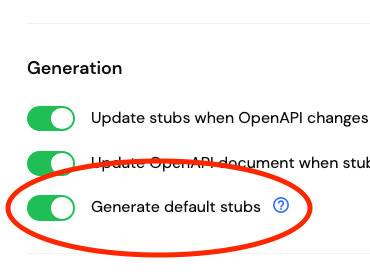
Optionally, for each path and method in the OpenAPI specification with a response status of 2xx, a "default" stub can also be generated.
This default stub will not contain any specific request parameter matchers, only a request body matcher that matches the request body schema in the OpenAPI specification, if a schema is provided.
To turn on/off the generation of default stubs, go to the Settings tab of the OpenAPI page, where the toggle is located.
Stubs will be generated following the [stub generation rules](#stub-generation-rules).
### Updating an OpenAPI doc
When an OpenAPI doc is updated, for every `path-method-status-contentType`, existing stubs will be updated if any of the following apply:
* The existing stub was generated from an example and the example hasn't changed its name.
* If there is one example within the given `path-method-status-contentType` which shares the response body with the existing stub.
* If the `path-method-status-contentType` only provides a single example.
* If the `path-method-status-contentType` doesn't provide examples at all.
If none of the conditions above are satisfied, one or more stubs will be generated following the [stub generation rules](#stub-generation-rules).
WireMock Cloud takes a non-destructive approach to your stubs. This means that if you delete a path, method, status
or contentType, the stub that represents that OpenAPI element will remain in your Mock API. This also applies to updating
elements in your OpenAPI. For example, if you update a path in your OpenAPI from `/orders` to `/v1/orders` the path
will be classed as a new path and a new stub will be created. The old stub will not be deleted.
If you are modeling new data scenarios and you add new stubs to your Mock API after generating stubs from an OpenAPI
specification, these stubs will not always be updated when you update your OpenAPI specification. If those new stubs
do not match an example in your OpenAPI specification, they will not be updated when you update your OpenAPI specification
(adding a new parameter for example) and you will need to update those manually.
### Stub generation rules
When updating an OpenAPI doc, the resulting stubs from new OpenAPI elements will be added.
Stub generation will be based on the following rules:
* `304` response:
* Request header matcher `If-None-Match` with specific value `12345`.
* `422` response:
* Only one stub will be generated, with a request body matcher not matching the schema or missing.
* If more than one response example provided, it will pick one randomly as the response body.
* If no response example provided, the response body will be autogenerated based on the schema.
* `400` response:
* Only one stub will be generated, with neither request parameters nor body present or matching the schema.
* If more than one response example provided, it will pick one randomly as the response body.
* If no response example provided, the response body will be autogenerated based on the schema.
* Any other response status:
* If no example is provided, it will generate a stub with autogenerated request parameters and response, based on schema.
* If at least one example is provided:
* It will generate one stub per example, using specific request parameter matchers and taking the example as the response body.
* The request parameter matchers will be autogenerated based on the schema, unless the extension `x-parameter-values` is provided (as explained [here](./swagger)), in which case it will be used to generate the expected values of the parameter matchers.
### Controlling generated parameter values in your stubs
If an OpenAPI element has a parameter (header for example) that is set to `required: true` then the stub will be generated
or updated with that parameter. WireMock Cloud adds a value for that parameter to match on. You can control the value
generated in your stubs using various OpenAPI elements:
If no min or max length are provided in the schema, defaults of a minimum of 3 and a maximum of
200 is used. Therefore, an OpenAPI specification snippet like the following:
```yaml theme={null}
paths:
/trips/{tripId}:
delete:
summary: Cancel a booked trip
parameters:
- name: tripId
in: path
required: true
```
Could generate a `tripId` equalsTo matcher with the following value - `gtpq1fggnuolb31tya6rrc1tye1am5bkzw5kjxxeyscx9lb3zhla`
Adding a `minLength` and a `maxLength` to the schema will control the size of the random string. The snippet below:
```yaml theme={null}
paths:
/trips/{tripId}:
delete:
summary: Cancel a booked trip
parameters:
- name: tripId
in: path
required: true
schema:
type: string
maxLength: 5
minLength: 2
```
Could generate a `tripId` equalsTo matcher with the following value - `aspp`
You can force a value to be used in the matcher by creating an enum with only one value. This is effectively the same as
generating a constant:
```yaml theme={null}
paths:
/trips/{tripId}:
delete:
summary: Cancel a booked trip
parameters:
- name: tripId
in: path
required: true
schema:
type: string
enum:
- "1"
```
If an enum is used with multiple values, then a random item from the enum is used in the matcher.
Alternatively, a regex pattern can be used in the schema to further control the value used in the matcher:
```yaml theme={null}
paths:
/trips/{tripId}:
delete:
summary: Cancel a booked trip
parameters:
- name: tripId
in: path
required: true
schema:
type: string
pattern: "^trip-id-\\d{8}$"
```
Could generate a `tripId` equalsTo matcher with the following value - `trip-id-68975013`.
Optional `minLength` and `maxLength` elements can be used to further control the generated value:
```yaml theme={null}
paths:
/trips/{tripId}:
delete:
summary: Cancel a booked trip
parameters:
- name: tripId
in: path
required: true
schema:
type: string
pattern: "^trip-id-\\d{8}$"
maxLength: 9
minLength: 2
```
Could generate a `tripId` equalsTo matcher with the following value - `trip-id-6`.
#### Default stubs
[//]: # "WARNING: This heading is referenced by the UI. Do not change it without changing the link in the UI."
Optionally, for each path and method in the OpenAPI specification with a response status of 2xx, a "default" stub can also be generated.
This default stub will not contain any specific request parameter matchers, only a request body matcher that matches the request body schema in the OpenAPI specification, if a schema is provided.
To turn on/off the generation of default stubs, go to the Settings tab of the OpenAPI page, where the toggle is located.
 ## Prototyping - generating OpenAPI from stubs
OpenAPI elements will be generated or updated when stubs are created or changed.
Try creating a stub with a new path template that doesn't yet exist in the OpenAPI document:
## Prototyping - generating OpenAPI from stubs
OpenAPI elements will be generated or updated when stubs are created or changed.
Try creating a stub with a new path template that doesn't yet exist in the OpenAPI document:
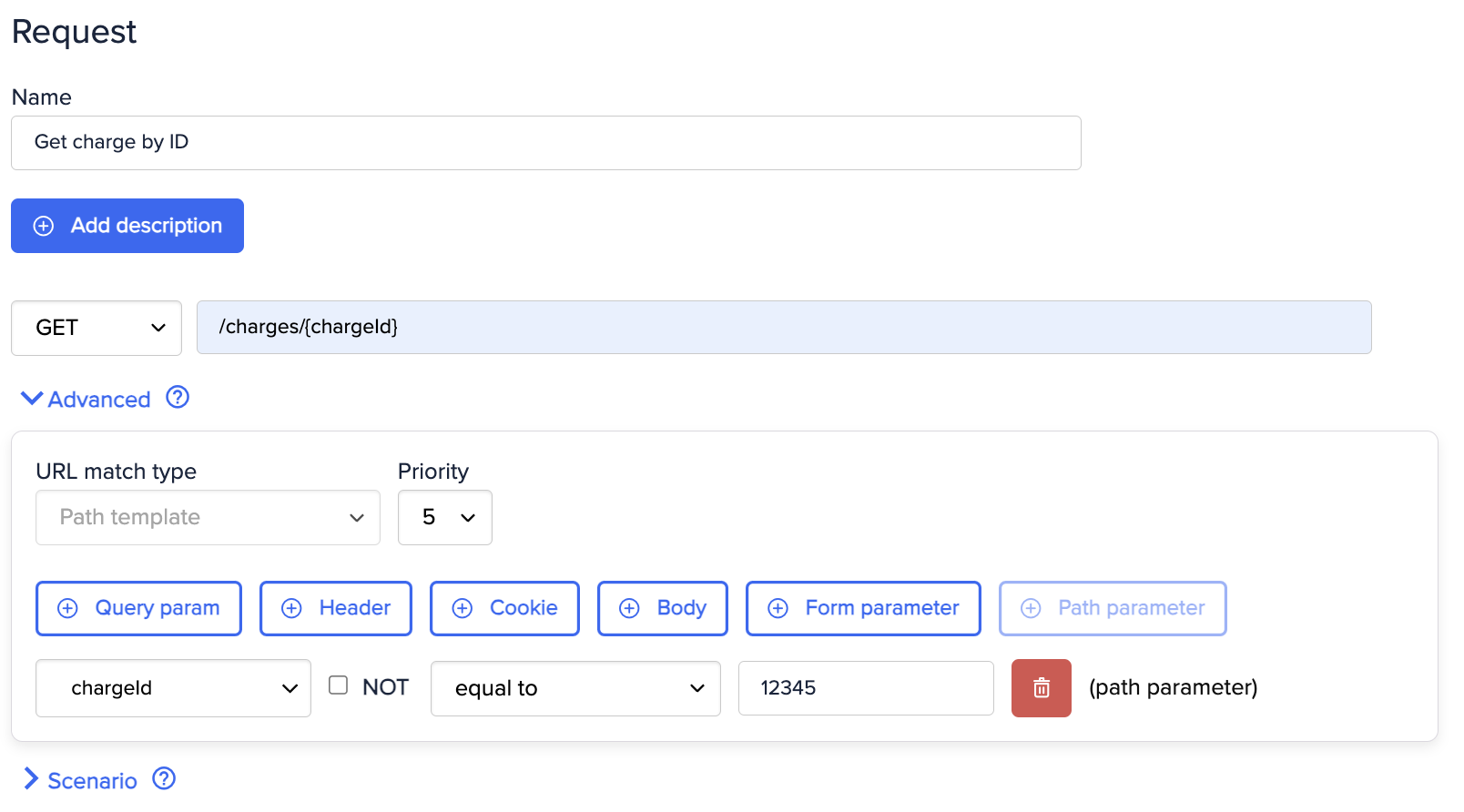
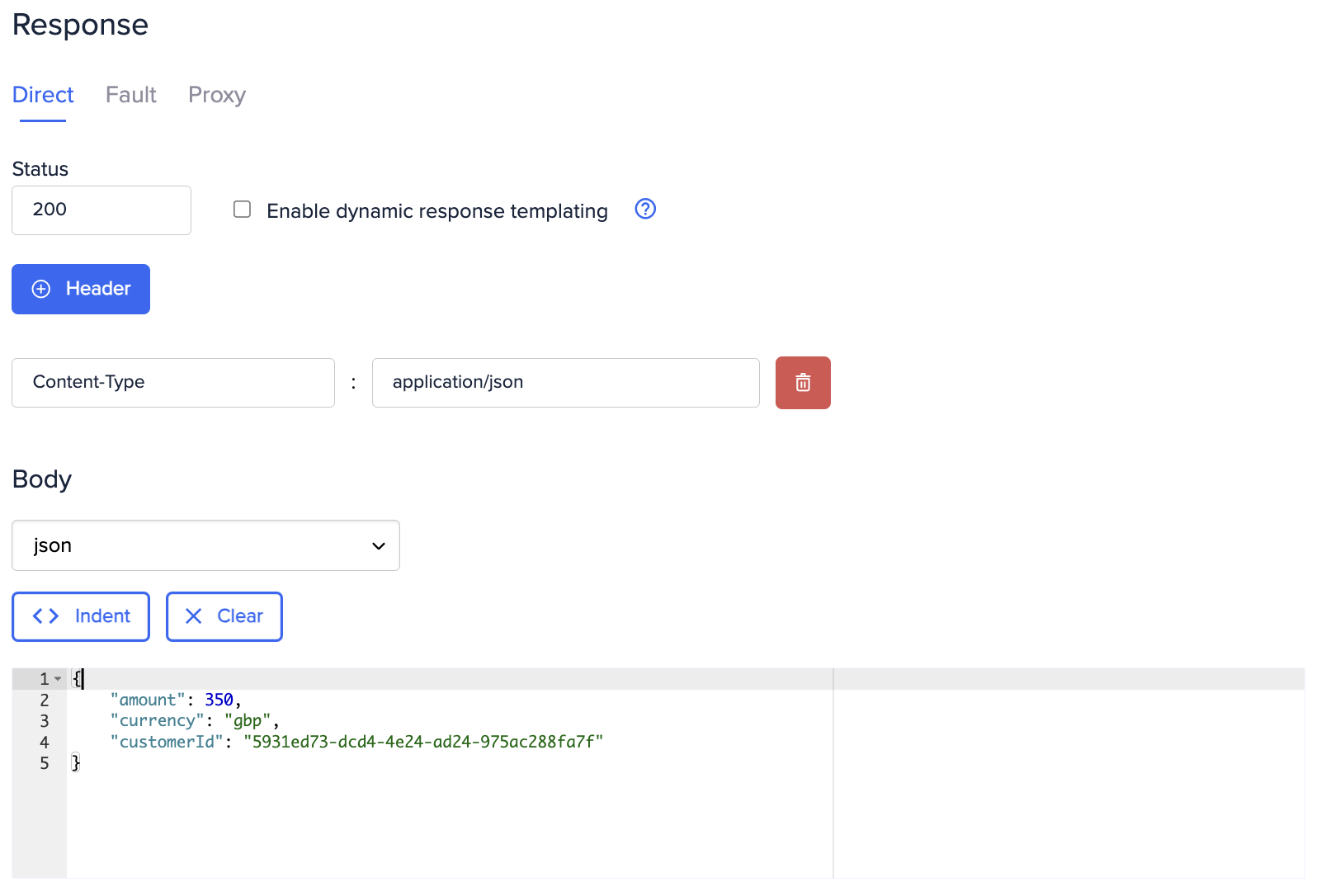 On save, the path plus operation, responses, schemas and examples will be added to the OpenAPI spec and also to the public documentation.
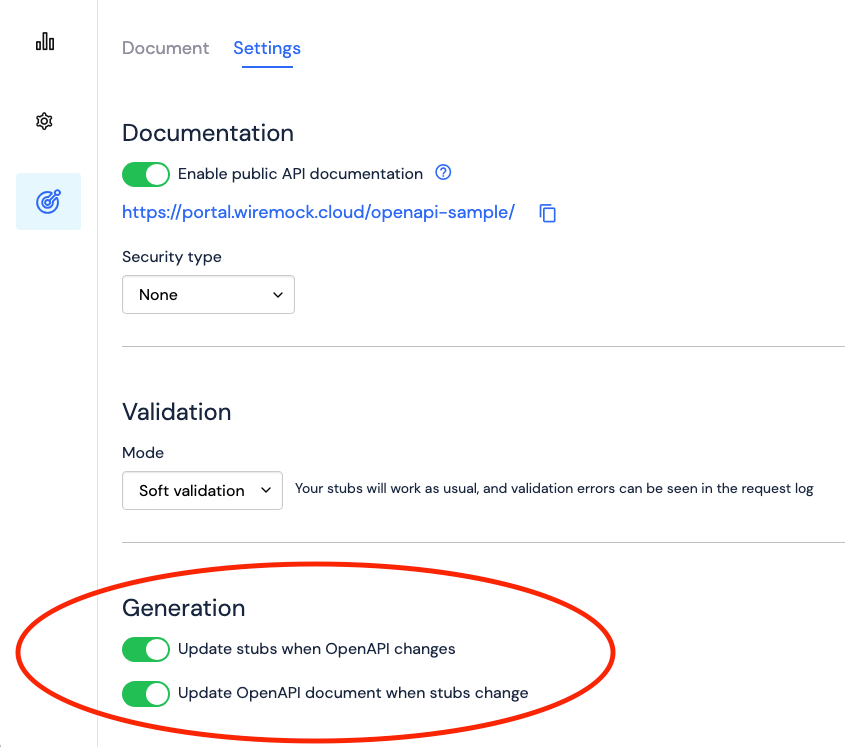
Automatic generation of OpenAPI to stubs and vice versa can be turned off in the Settings tab of the OpenAPI page.
On save, the path plus operation, responses, schemas and examples will be added to the OpenAPI spec and also to the public documentation.
Automatic generation of OpenAPI to stubs and vice versa can be turned off in the Settings tab of the OpenAPI page.