> ## Documentation Index
> Fetch the complete documentation index at: https://docs.wiremock.io/llms.txt
> Use this file to discover all available pages before exploring further.
# Simulating GraphQL APIs
> Simulating your GraphQL APIs.
As well as REST, SOAP and gRPC support, WireMock Cloud has native support for mocking your GraphQL APIs.
Out of the box, GraphQL mock APIs will respond with generated mock data for any valid GraphQL queries, and more
fine-grained control over response data can be added with ease.
## Usage
### Creating a GraphQL mock API
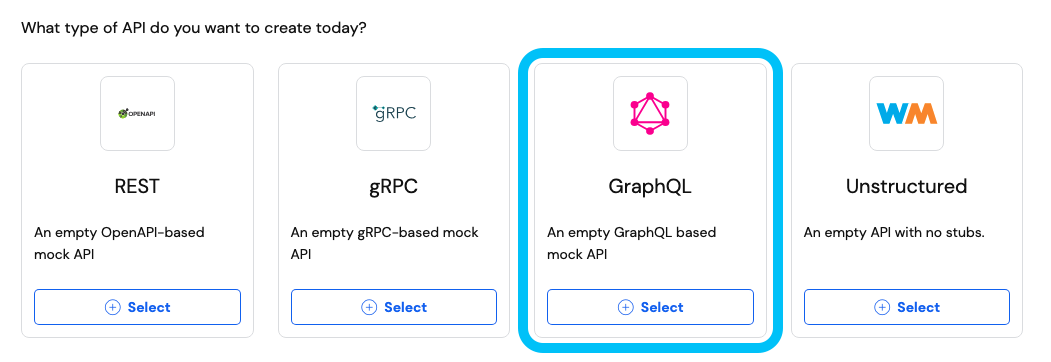
To create a GraphQL mock API, select the GraphQL API template on the mock API creation page and give it a name (and
optional custom hostname) of your choosing.
 ### Uploading a schema
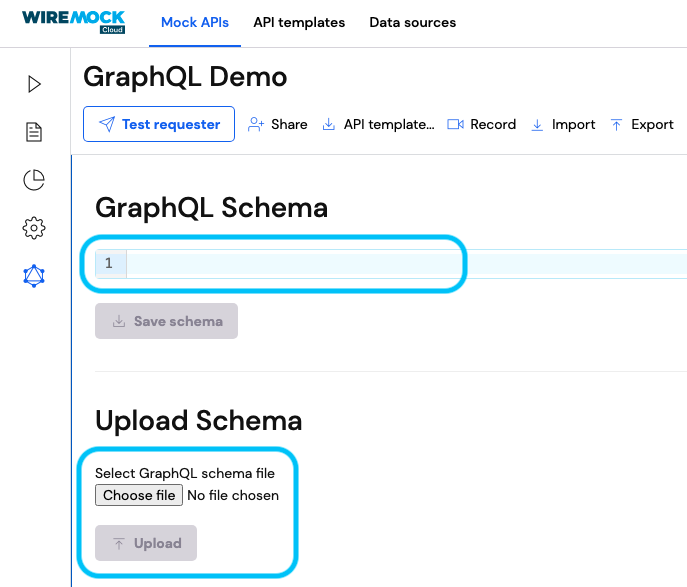
Once your API is created, the first step to take before you can configure your stubs is to upload a GraphQL schema that
describes the operations you want to perform with your mock API.
Navigate to your mock API's GraphQL page and select a schema file from your file system or paste a schema directly into
the schema text field.
### Uploading a schema
Once your API is created, the first step to take before you can configure your stubs is to upload a GraphQL schema that
describes the operations you want to perform with your mock API.
Navigate to your mock API's GraphQL page and select a schema file from your file system or paste a schema directly into
the schema text field.
 An example of a very simple GraphQL schema for querying user data is provided below:
```graphql theme={null}
type Query {
user(id: ID): User
users: [User]
}
type User {
id: ID
name: String
dob: String
enabled: Boolean
loginCount: Int
hobbies: [String]
}
```
From this page, you can edit your API's schema at any time.
### Querying your mock API
Now that your mock API has a schema to work with, it can automatically respond to any valid GraphQL query it receives
that matches the schema.
The simplest way to start querying your mock API is via the [Apollo Sandbox](https://studio.apollographql.com/sandbox/explorer),
but any spec compliant GraphQL client will work.
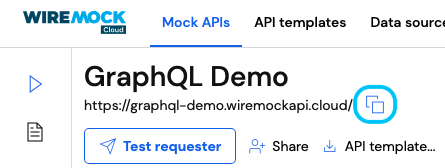
To start querying your mock API using [Apollo Sandbox](https://studio.apollographql.com/sandbox/explorer), copy your
mock API's base URL into the sandbox endpoint input.
An example of a very simple GraphQL schema for querying user data is provided below:
```graphql theme={null}
type Query {
user(id: ID): User
users: [User]
}
type User {
id: ID
name: String
dob: String
enabled: Boolean
loginCount: Int
hobbies: [String]
}
```
From this page, you can edit your API's schema at any time.
### Querying your mock API
Now that your mock API has a schema to work with, it can automatically respond to any valid GraphQL query it receives
that matches the schema.
The simplest way to start querying your mock API is via the [Apollo Sandbox](https://studio.apollographql.com/sandbox/explorer),
but any spec compliant GraphQL client will work.
To start querying your mock API using [Apollo Sandbox](https://studio.apollographql.com/sandbox/explorer), copy your
mock API's base URL into the sandbox endpoint input.
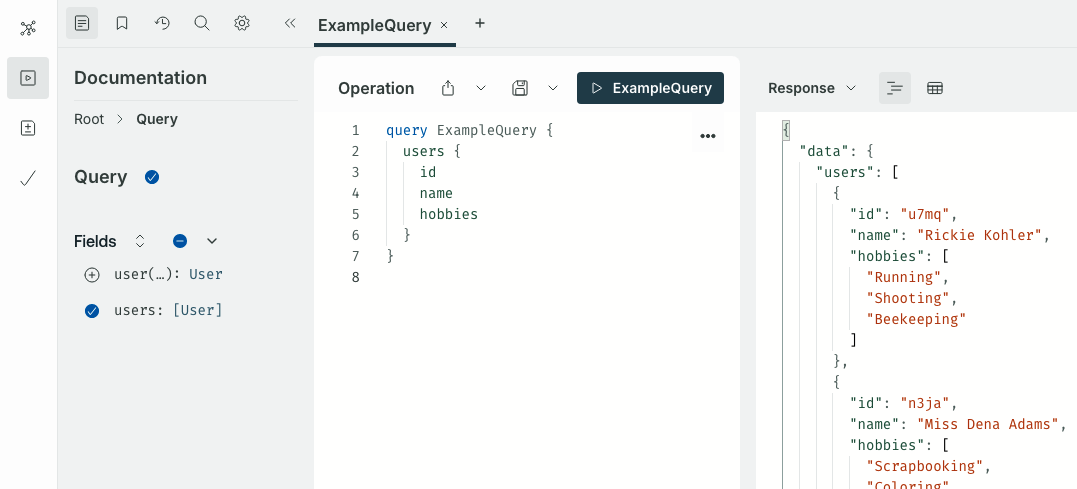
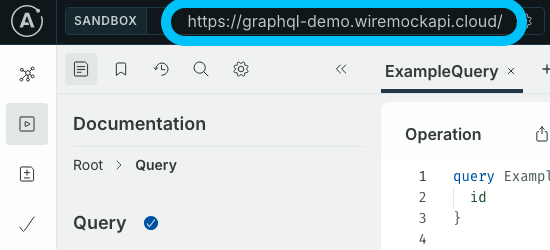 Once the sandbox is pointing at your mock API, it should pick up the API's schema and present a helpful interface for
constructing queries. Construct a query, either by writing one manually or with the help of the sandbox's documentation
interface, then execute the query. You should see a matching response that contains generated mock data. Executing the
query multiple times should return new data each time.
Once the sandbox is pointing at your mock API, it should pick up the API's schema and present a helpful interface for
constructing queries. Construct a query, either by writing one manually or with the help of the sandbox's documentation
interface, then execute the query. You should see a matching response that contains generated mock data. Executing the
query multiple times should return new data each time.
 ### Configuring the default GraphQL stub
As we've seen, the default behaviour for a GraphQL mock API is to respond to valid queries with automatically generated
mock data.
This behaviour is defined by a default stub that is added to all GraphQL mock APIs on creation.
You can view this stub on the Stubs page of your mock API.
### Configuring the default GraphQL stub
As we've seen, the default behaviour for a GraphQL mock API is to respond to valid queries with automatically generated
mock data.
This behaviour is defined by a default stub that is added to all GraphQL mock APIs on creation.
You can view this stub on the Stubs page of your mock API.
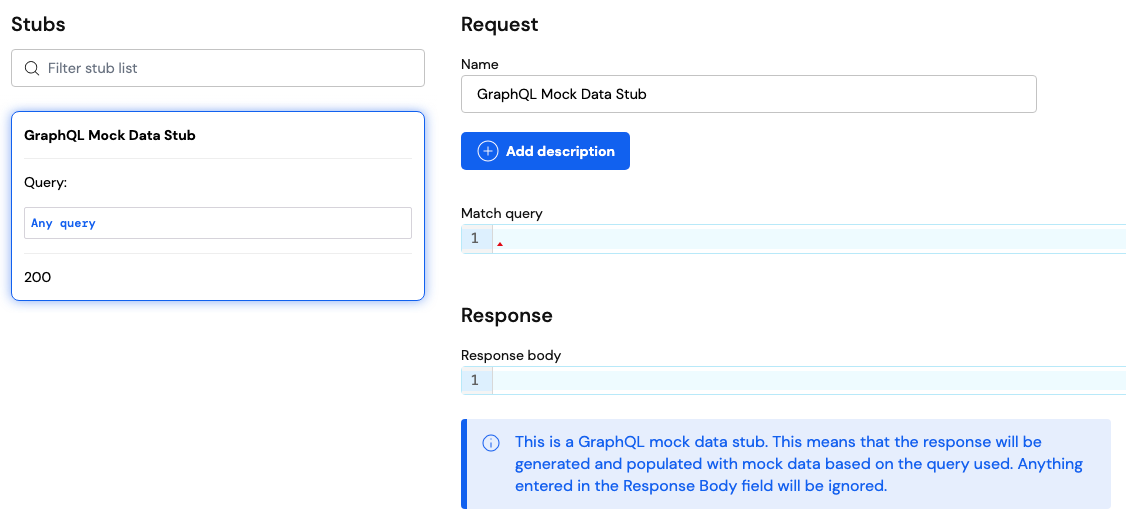 Out-of-the-box, this stub will attempt to serve any HTTP request the API receives, regardless of HTTP method or path.
The stub expects the request to contain a GraphQL query, either in the request query parameters for `GET` requests, or
the request body for all other request methods.
More detail on the request query format can be found on [the official GraphQL site](https://graphql.org/learn/serving-over-http/#methods).
If the request query is valid and matches [the API's schema](#uploading-a-schema), the stub will respond with a 200
status and a JSON payload with [the standard GraphQL response body format](https://graphql.org/learn/serving-over-http/#body).
If you want more control over the format of the data that this default stub generates, there are a few configuration
options available for GraphQL's built-in types.
Out-of-the-box, this stub will attempt to serve any HTTP request the API receives, regardless of HTTP method or path.
The stub expects the request to contain a GraphQL query, either in the request query parameters for `GET` requests, or
the request body for all other request methods.
More detail on the request query format can be found on [the official GraphQL site](https://graphql.org/learn/serving-over-http/#methods).
If the request query is valid and matches [the API's schema](#uploading-a-schema), the stub will respond with a 200
status and a JSON payload with [the standard GraphQL response body format](https://graphql.org/learn/serving-over-http/#body).
If you want more control over the format of the data that this default stub generates, there are a few configuration
options available for GraphQL's built-in types.
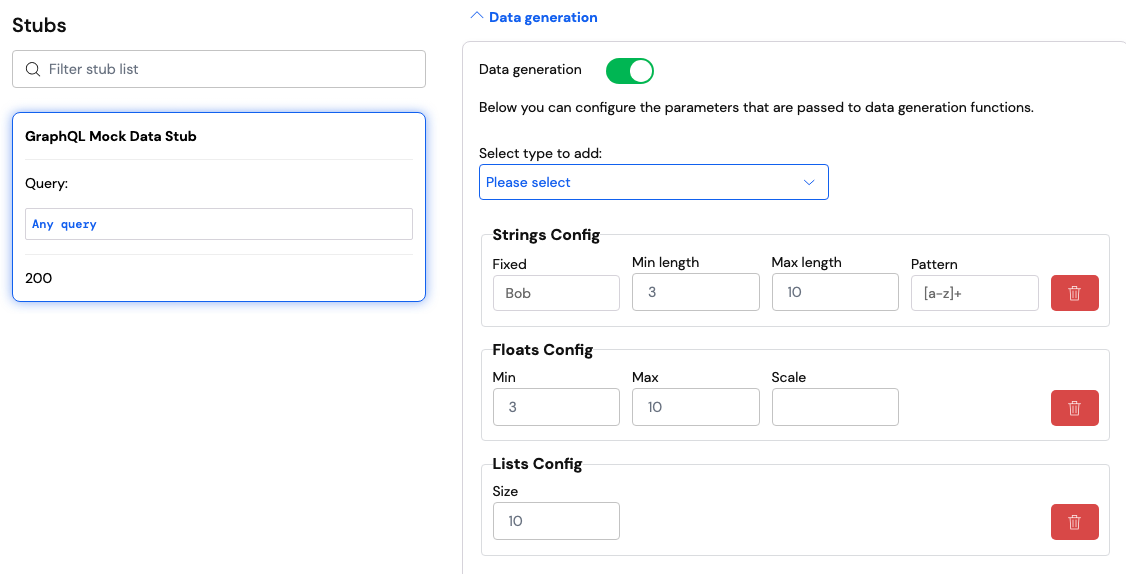 String and ID values can be configured to always return a fixed value, values with a minimum and/or maximum length, or
values that match a given regular expression pattern, such as `[A-F0-9]+` (a string of one or more random characters
between `A` and `F` or `0` and `9`) or `(enabled|disabled)` (either `enabled` or `disabled`).
Int and float values can be configured to only return values above a minimum and/or below a maximum.
An additional option is available for floats that sets the scale of all float values (i.e. the number of digits to the
right of the decimal point). For example, in the number `123.45`, the scale is `2`. The default scale is `2`.
Boolean values can be fixed to always return `true` or always return `false`.
Lists can be configured to always return a fixed amount of items. The default is `3`.
### Configuring custom GraphQL stubs
The default GraphQL stub is a great starting point for configuring your mock API, but often we want more control over
the data our mock API returns for a given query.
That's where creating and configuring our own stubs comes in.
Custom stubs allow your mock API to match on specific GraphQL queries and return static or dynamic responses to those
requests.
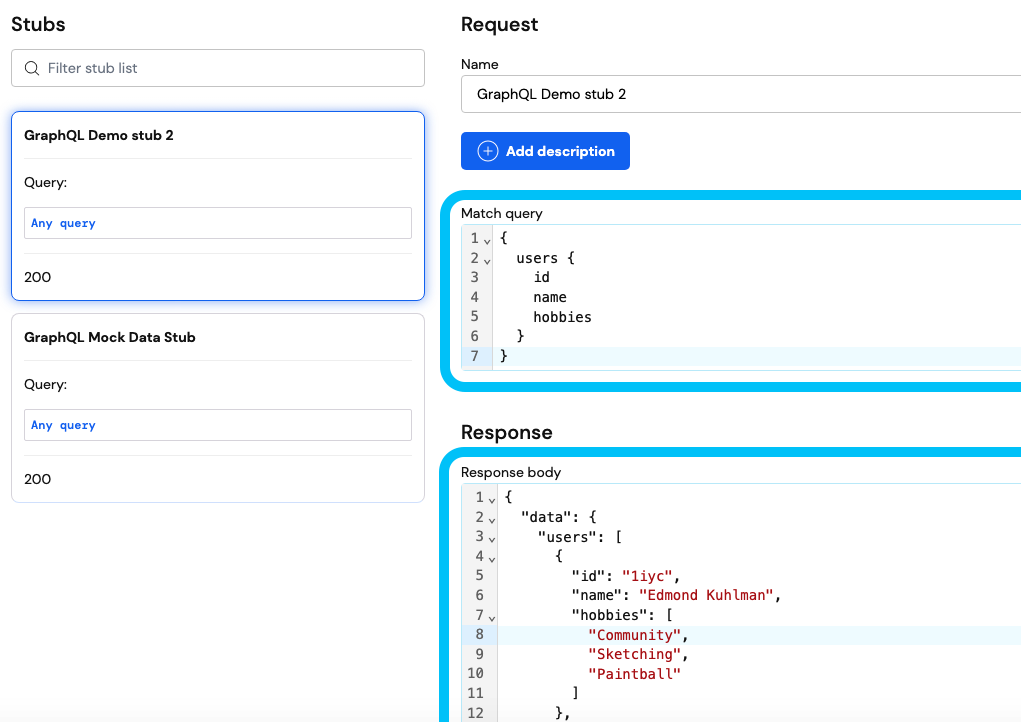
To match on a specific query, enter a valid GraphQL query into the `Match query` field of your stub.
When matching, the GraphQL query matcher retrieves a request's query (either from the query parameters for `GET`
requests, or from the request body for other request methods) and check if it is [*semantically* similar](#semantic-query-matching)
to the expected query.
If it is, this will be considered a match.
To return a specific response body, enter this into the `Response body` field as usual.
If you want to return a valid GraphQL response body in JSON format, you'll need to specify the full JSON, including
the root fields (i.e. `"data"`, `"errors"`, `"extensions"`), [as outlined in the GraphQL official documentation](https://graphql.org/learn/serving-over-http/#body).
[Dynamic response templating](/response-templating) is available for GraphQL stubs, like all other API types.
String and ID values can be configured to always return a fixed value, values with a minimum and/or maximum length, or
values that match a given regular expression pattern, such as `[A-F0-9]+` (a string of one or more random characters
between `A` and `F` or `0` and `9`) or `(enabled|disabled)` (either `enabled` or `disabled`).
Int and float values can be configured to only return values above a minimum and/or below a maximum.
An additional option is available for floats that sets the scale of all float values (i.e. the number of digits to the
right of the decimal point). For example, in the number `123.45`, the scale is `2`. The default scale is `2`.
Boolean values can be fixed to always return `true` or always return `false`.
Lists can be configured to always return a fixed amount of items. The default is `3`.
### Configuring custom GraphQL stubs
The default GraphQL stub is a great starting point for configuring your mock API, but often we want more control over
the data our mock API returns for a given query.
That's where creating and configuring our own stubs comes in.
Custom stubs allow your mock API to match on specific GraphQL queries and return static or dynamic responses to those
requests.
To match on a specific query, enter a valid GraphQL query into the `Match query` field of your stub.
When matching, the GraphQL query matcher retrieves a request's query (either from the query parameters for `GET`
requests, or from the request body for other request methods) and check if it is [*semantically* similar](#semantic-query-matching)
to the expected query.
If it is, this will be considered a match.
To return a specific response body, enter this into the `Response body` field as usual.
If you want to return a valid GraphQL response body in JSON format, you'll need to specify the full JSON, including
the root fields (i.e. `"data"`, `"errors"`, `"extensions"`), [as outlined in the GraphQL official documentation](https://graphql.org/learn/serving-over-http/#body).
[Dynamic response templating](/response-templating) is available for GraphQL stubs, like all other API types.
 ### Converting request logs to stubs
The simplest way to create a stub with some pre-configured data is to navigate to an existing request in your mock
API's Request Log and click the `Convert to stub` button at the bottom of the page.
### Converting request logs to stubs
The simplest way to create a stub with some pre-configured data is to navigate to an existing request in your mock
API's Request Log and click the `Convert to stub` button at the bottom of the page.
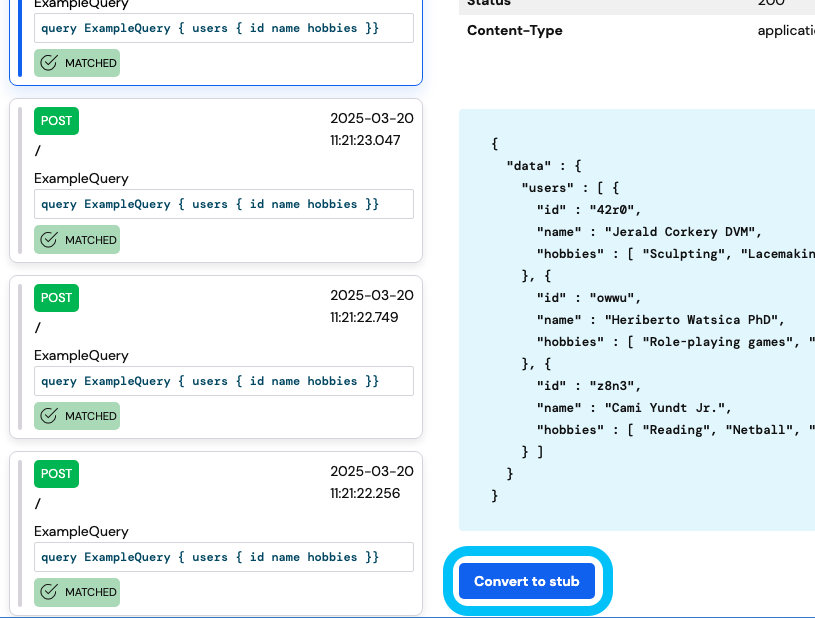 This will create a new stub in your mock API with a query matcher containing the same query that was sent in the
original request, as well as a response body that matches the one returned to that request.
From here, you can customize your stub to suit your needs.
## Semantic query matching
Similar to WireMock Cloud's JSON equality matcher, WireMock Cloud's GraphQL query matcher performs semantic comparison
when checking if a request's query matches the expected query.
This means that the ordering of a query's fields, arguments, etc. is irrelevant.
For example, the two queries below would be considered a semantic match:
```graphql theme={null}
query GetPosts { posts(limit: 20, offset: 60) { id name } }
```
```graphql theme={null}
query GetPosts { posts(offset: 60, limit: 20) { name id } }
```
### Ignoring unused definitions
Additionally, schema definitions (SDL) and unused operations are ignored when comparing two queries.
For example, consider the two queries below:
```graphql theme={null}
query GetUser { user(id: 123) { id } }
type User { id: ID }
```
```graphql theme={null}
query GetUser { user(id: 123) { id } }
query GetUsers { users { id username } }
union StringOrBool = String | Boolean
schema { query: Query }
```
When these two queries are compared, the SDL definitions (i.e. `type User`, `union StringOrBool` and `schema`) will
always be ignored.
As for the queries, only the query operation that was specified in the request will be compared.
If the supplied operation name for the request was `GetUser`, the two queries would be considered a match, as the only
part being compared would be
```graphql theme={null}
query GetUser { user(id: 123) { id } }
```
However, if the supplied operation name was `GetUsers`, the two queries would not be considered a match, as the first
query does not even contain an operation with that name.
### Variable resolution
When a request uses variables in its query, these variables are resolved *before* matching is performed.
This means that the names of variables and their definitions are irrelevant when matching.
Only their resolved values, supplied in the request, are relevant.
For example, consider the following queries:
```graphql theme={null}
query GetUser { user(id: 123) { id } }
```
```graphql theme={null}
query GetUser($userId: ID) { user(id: $userId) { id } }
```
When comparing these two queries, the variable definition (`$userId: ID`) will be removed, and all references to this
variable (e.g. `id: $userId`) will be replaced with the value of `$userId` supplied by the request.
So, if the request's variables looked like
```json theme={null}
{ "userId": 123 }
```
then the second query defined above would resolve to
```graphql theme={null}
query GetUser { user(id: 123) { id } }
```
which is identical to the first query, so would be considered a match.
Note that variable resolution is performed on both the expected query and the request query.
Therefore, it's possible to specify that a particular value in a query is irrelevant by using a variable reference for
that value in both the expected query and request query.
For example, the following query will always match itself, regardless of what the `$userId` variable resolves to.
```graphql theme={null}
query GetUser($userId: ID) { user(id: $userId) { id } }
```
Variable defaults (e.g. `$userId: ID = 321`) will be used if no variable is supplied in the request.
If a variable is defined in the query, but is not supplied by the request and does not have a default value, the
variable's value will resolve to `null`.
## GraphQL Validation
Validation settings can be used to ensure that requests made to your mock API and responses returned by your mock API
are compliant with your GraphQL schema, as well as [the GraphQL specification](https://spec.graphql.org/draft/).
Settings for GraphQL validation can be found on the GraphQL page of your mock API.
There are three options for GraphQL validation: no validation (the default), soft validation, and hard validation.
This will create a new stub in your mock API with a query matcher containing the same query that was sent in the
original request, as well as a response body that matches the one returned to that request.
From here, you can customize your stub to suit your needs.
## Semantic query matching
Similar to WireMock Cloud's JSON equality matcher, WireMock Cloud's GraphQL query matcher performs semantic comparison
when checking if a request's query matches the expected query.
This means that the ordering of a query's fields, arguments, etc. is irrelevant.
For example, the two queries below would be considered a semantic match:
```graphql theme={null}
query GetPosts { posts(limit: 20, offset: 60) { id name } }
```
```graphql theme={null}
query GetPosts { posts(offset: 60, limit: 20) { name id } }
```
### Ignoring unused definitions
Additionally, schema definitions (SDL) and unused operations are ignored when comparing two queries.
For example, consider the two queries below:
```graphql theme={null}
query GetUser { user(id: 123) { id } }
type User { id: ID }
```
```graphql theme={null}
query GetUser { user(id: 123) { id } }
query GetUsers { users { id username } }
union StringOrBool = String | Boolean
schema { query: Query }
```
When these two queries are compared, the SDL definitions (i.e. `type User`, `union StringOrBool` and `schema`) will
always be ignored.
As for the queries, only the query operation that was specified in the request will be compared.
If the supplied operation name for the request was `GetUser`, the two queries would be considered a match, as the only
part being compared would be
```graphql theme={null}
query GetUser { user(id: 123) { id } }
```
However, if the supplied operation name was `GetUsers`, the two queries would not be considered a match, as the first
query does not even contain an operation with that name.
### Variable resolution
When a request uses variables in its query, these variables are resolved *before* matching is performed.
This means that the names of variables and their definitions are irrelevant when matching.
Only their resolved values, supplied in the request, are relevant.
For example, consider the following queries:
```graphql theme={null}
query GetUser { user(id: 123) { id } }
```
```graphql theme={null}
query GetUser($userId: ID) { user(id: $userId) { id } }
```
When comparing these two queries, the variable definition (`$userId: ID`) will be removed, and all references to this
variable (e.g. `id: $userId`) will be replaced with the value of `$userId` supplied by the request.
So, if the request's variables looked like
```json theme={null}
{ "userId": 123 }
```
then the second query defined above would resolve to
```graphql theme={null}
query GetUser { user(id: 123) { id } }
```
which is identical to the first query, so would be considered a match.
Note that variable resolution is performed on both the expected query and the request query.
Therefore, it's possible to specify that a particular value in a query is irrelevant by using a variable reference for
that value in both the expected query and request query.
For example, the following query will always match itself, regardless of what the `$userId` variable resolves to.
```graphql theme={null}
query GetUser($userId: ID) { user(id: $userId) { id } }
```
Variable defaults (e.g. `$userId: ID = 321`) will be used if no variable is supplied in the request.
If a variable is defined in the query, but is not supplied by the request and does not have a default value, the
variable's value will resolve to `null`.
## GraphQL Validation
Validation settings can be used to ensure that requests made to your mock API and responses returned by your mock API
are compliant with your GraphQL schema, as well as [the GraphQL specification](https://spec.graphql.org/draft/).
Settings for GraphQL validation can be found on the GraphQL page of your mock API.
There are three options for GraphQL validation: no validation (the default), soft validation, and hard validation.
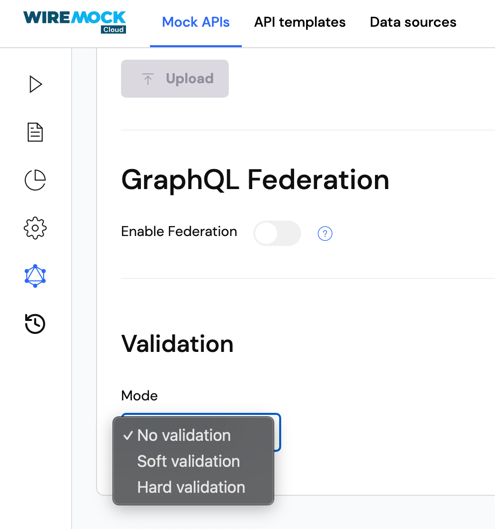 The "No validation" option will have no effect on your mock API.
Enabling soft validation will cause non-compliant requests to contain validation warnings in your mock API's request log.
Any request to the mock API and/or any response returned by the mock API containing data/attributes that do not conform
to the GraphQL spec or the mock API's GraphQL schema will be highlighted on the request log page.
Details of how the request/response was invalid can also be viewed in the request log.
The "No validation" option will have no effect on your mock API.
Enabling soft validation will cause non-compliant requests to contain validation warnings in your mock API's request log.
Any request to the mock API and/or any response returned by the mock API containing data/attributes that do not conform
to the GraphQL spec or the mock API's GraphQL schema will be highlighted on the request log page.
Details of how the request/response was invalid can also be viewed in the request log.
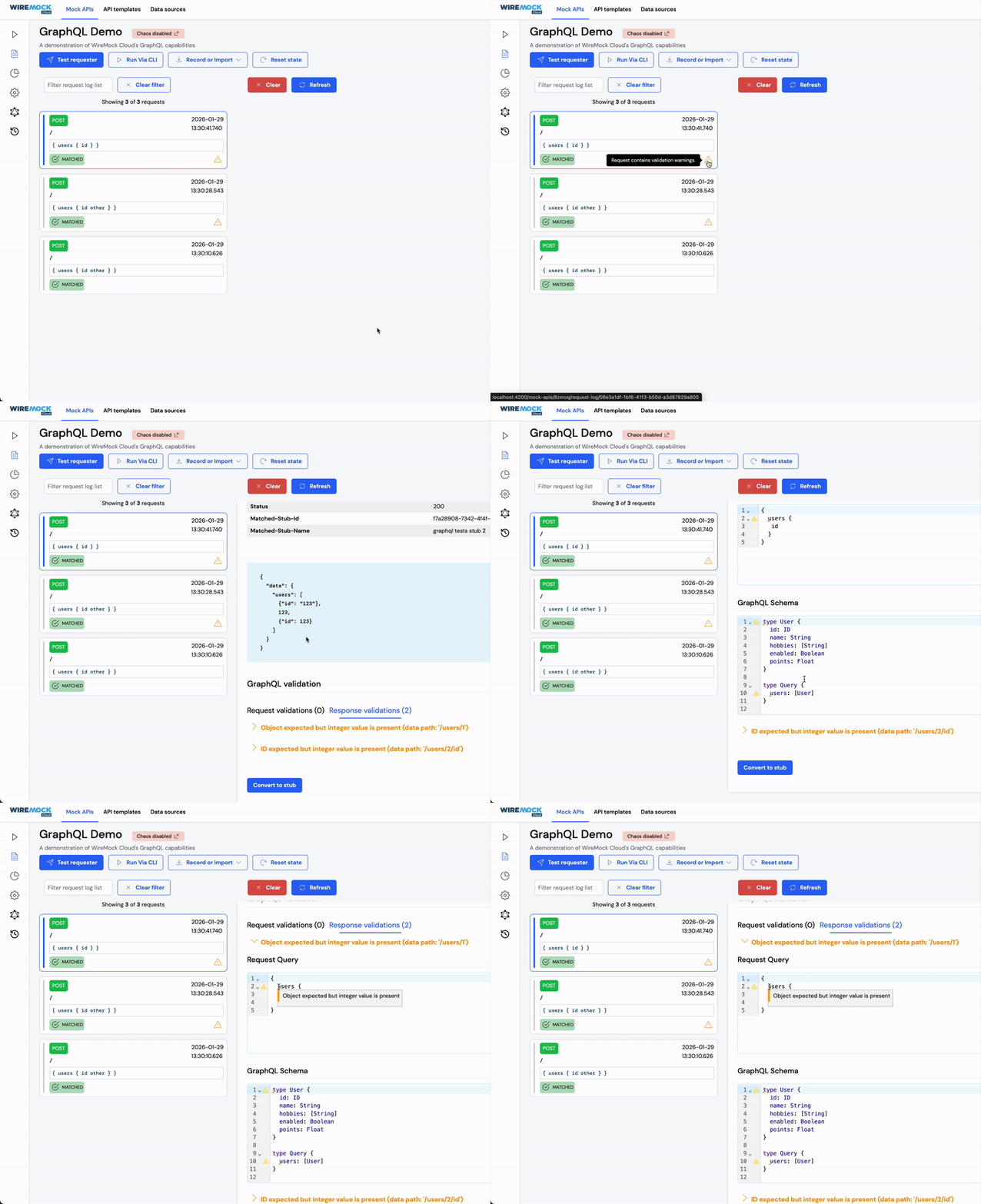 Enabling hard validation will cause the same request log behavior as soft validation, with the added functionality of
returning `4xx`/`5xx` error responses containing details of validation issues.
## Current limitations
There are certain features that are not yet supported by GraphQL stubs:
* [Advanced stubbing](/advanced-stubbing)
* [Webhooks](/webhooks)
* [Chaos testing](/chaos)
* [Response delays](/delays)
* [Proxying requests](/proxying)
* [API rate limits](/user-rate-limits)
As well as additional GraphQL specific matchers and template helpers.
If you have feedback or questions on our GraphQL functionality as it evolves, we'd love to hear from you.
Please [get in touch](mailto:support@wiremock.io).
Enabling hard validation will cause the same request log behavior as soft validation, with the added functionality of
returning `4xx`/`5xx` error responses containing details of validation issues.
## Current limitations
There are certain features that are not yet supported by GraphQL stubs:
* [Advanced stubbing](/advanced-stubbing)
* [Webhooks](/webhooks)
* [Chaos testing](/chaos)
* [Response delays](/delays)
* [Proxying requests](/proxying)
* [API rate limits](/user-rate-limits)
As well as additional GraphQL specific matchers and template helpers.
If you have feedback or questions on our GraphQL functionality as it evolves, we'd love to hear from you.
Please [get in touch](mailto:support@wiremock.io).