> ## Documentation Index
> Fetch the complete documentation index at: https://docs.wiremock.io/llms.txt
> Use this file to discover all available pages before exploring further.
# Simulating federated GraphQL APIs
> Using mock APIs to create a federated GraphQL API.
GraphQL Federation is an architectural pattern that allows multiple, independently managed GraphQL APIs (called
"subgraphs") to be combined and queried from a single, overarching GraphQL API (called a "supergraph").
WireMock Cloud provides support for GraphQL Federation, allowing your GraphQL mock APIs to be used as subgraphs.
## Usage
To enable GraphQL Federation in your GraphQL mock API, click the Federation toggle on the GraphQL page of your mock API.
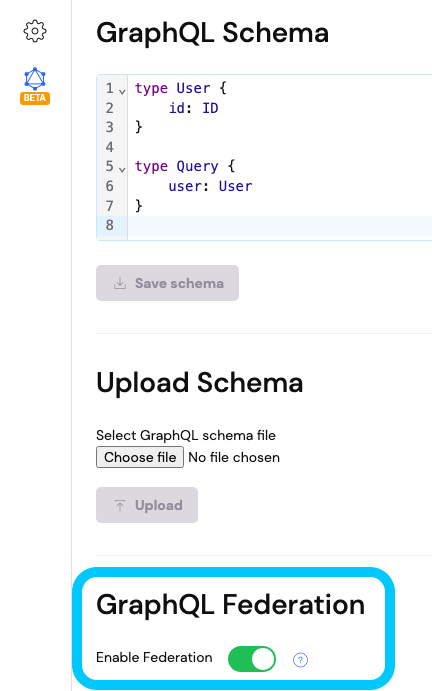 Enabling Federation will add the appropriate federation fields to your GraphQL schema that an Apollo Federation
supergraph requires to make calls to your subgraph.
It also ensures that data returned by [mock data generation stubs](/graphql/overview#configuring-the-default-graphql-stub)
is compliant with the entity queries supplied by the supergraph.
Now that Federation is enabled, you can upload a Federation compliant GraphQL schema to your mock API.
Once your subgraph mock API is ready, point your supergraph at this subgraph and start making requests to the supergraph.
Your supergraph will begin making calls to your subgraph to retrieve the requested data.
To add more subgraph mocks to your supergraph, create multiple GraphQL mock APIs and repeat the above steps in each.
## Usage Example
Below is a simple example showcasing how to set up some GraphQL mock subgraphs in WireMock Cloud, and query them from a
supergraph running on your local machine.
This example uses [Apollo's Rover CLI tool](https://www.apollographql.com/docs/rover) to run a supergraph locally.
If you want to try out this example yourself, ensure that you have Rover installed on your machine.
More information on installing Rover can be found [here](https://www.apollographql.com/docs/rover/getting-started).
First, we need to configure some subgraphs to point our supergraph at.
We'll set up three subgraph mock APIs in WireMock Cloud: a `users` subgraph, a `products` subgraph and a `review`
subgraph.
The schemas for each subgraph are below:
```graphql theme={null}
extend schema
@link(url: "https://specs.apollo.dev/federation/v2.0", import: ["@key"])
type Query {
user: User
}
type User @key(fields: "id") {
id: ID!
username: String!
previousSessions: [ID!]
loyaltyPoints: Int
}
```
```graphql theme={null}
extend schema
@link(url: "https://specs.apollo.dev/federation/v2.0", import: ["@key"])
type Query {
listAllProducts: [Product]
product(id: ID!): Product
}
type Product @key(fields: "id") @key(fields: "upc") {
id: ID!
upc: ID!
title: String
description: String
}
```
```graphql theme={null}
extend schema
@link(url: "https://specs.apollo.dev/federation/v2.0", import: ["@key"])
type Review @key(fields: "id") {
id: ID!
body: String
user: User
product: Product
}
type Product @key(fields: "upc") {
upc: ID!
reviews: [Review!]
}
type User @key(fields: "id", resolvable: false) {
id: ID!
}
```
To configure each subgraph, create a GraphQL mock API in WireMock Cloud, enable GraphQL Federation, and upload the
respective subgraph schema to each.
Make a note of the URL for each of these mock APIs, as we will need these to configure our supergraph.
Next, create a supergraph configuration file on our machine called `supergraph-config.yaml`.
Rover will use this file to run a supergraph that will call our mock subgraphs.
Paste the following config into the file, replacing the `subgraph_url` values with the URLs of your subgraph mock APIs:
```yaml supergraph-config.yaml theme={null}
federation_version: =2.8.1
subgraphs:
users:
schema:
subgraph_url: https://users-federated-graphql.wiremockapi.cloud
products:
schema:
subgraph_url: https://products-federated-graphql.wiremockapi.cloud
reviews:
schema:
subgraph_url: https://reviews-federated-graphql.wiremockapi.cloud
```
In your terminal, run the following command to start up a supergraph:
```shell theme={null}
rover dev --supergraph-config supergraph-config.yaml
```
Once up and running, the terminal should display the address where your supergraph is running (e.g.
`http://localhost:4000`).
Navigate to your supergraph's address in your browser where you'll be greeted with [the Apollo Sandbox](https://www.apollographql.com/docs/apollo-sandbox).
Execute some queries to your supergraph and observe that your subgraph mocks are receiving requests.
To stop your supergraph, enter `Ctrl` + `C` in your terminal window where rover is running.
You have successfully creating a GraphQL Federation supergraph, powered by subgraphs running in WireMock Cloud!
For more information on the concepts of GraphQL Federation and designing subgraph schemas, see [the official GraphQL
documentation](https://graphql.org/learn/federation/),
as well as [the Apollo Federation documentation](https://www.apollographql.com/docs/graphos/schema-design/federated-schemas/federation).
If you have feedback or questions on our GraphQL functionality as it evolves, we'd love to hear from you.
Please [get in touch](mailto:support@wiremock.io).
Enabling Federation will add the appropriate federation fields to your GraphQL schema that an Apollo Federation
supergraph requires to make calls to your subgraph.
It also ensures that data returned by [mock data generation stubs](/graphql/overview#configuring-the-default-graphql-stub)
is compliant with the entity queries supplied by the supergraph.
Now that Federation is enabled, you can upload a Federation compliant GraphQL schema to your mock API.
Once your subgraph mock API is ready, point your supergraph at this subgraph and start making requests to the supergraph.
Your supergraph will begin making calls to your subgraph to retrieve the requested data.
To add more subgraph mocks to your supergraph, create multiple GraphQL mock APIs and repeat the above steps in each.
## Usage Example
Below is a simple example showcasing how to set up some GraphQL mock subgraphs in WireMock Cloud, and query them from a
supergraph running on your local machine.
This example uses [Apollo's Rover CLI tool](https://www.apollographql.com/docs/rover) to run a supergraph locally.
If you want to try out this example yourself, ensure that you have Rover installed on your machine.
More information on installing Rover can be found [here](https://www.apollographql.com/docs/rover/getting-started).
First, we need to configure some subgraphs to point our supergraph at.
We'll set up three subgraph mock APIs in WireMock Cloud: a `users` subgraph, a `products` subgraph and a `review`
subgraph.
The schemas for each subgraph are below:
```graphql theme={null}
extend schema
@link(url: "https://specs.apollo.dev/federation/v2.0", import: ["@key"])
type Query {
user: User
}
type User @key(fields: "id") {
id: ID!
username: String!
previousSessions: [ID!]
loyaltyPoints: Int
}
```
```graphql theme={null}
extend schema
@link(url: "https://specs.apollo.dev/federation/v2.0", import: ["@key"])
type Query {
listAllProducts: [Product]
product(id: ID!): Product
}
type Product @key(fields: "id") @key(fields: "upc") {
id: ID!
upc: ID!
title: String
description: String
}
```
```graphql theme={null}
extend schema
@link(url: "https://specs.apollo.dev/federation/v2.0", import: ["@key"])
type Review @key(fields: "id") {
id: ID!
body: String
user: User
product: Product
}
type Product @key(fields: "upc") {
upc: ID!
reviews: [Review!]
}
type User @key(fields: "id", resolvable: false) {
id: ID!
}
```
To configure each subgraph, create a GraphQL mock API in WireMock Cloud, enable GraphQL Federation, and upload the
respective subgraph schema to each.
Make a note of the URL for each of these mock APIs, as we will need these to configure our supergraph.
Next, create a supergraph configuration file on our machine called `supergraph-config.yaml`.
Rover will use this file to run a supergraph that will call our mock subgraphs.
Paste the following config into the file, replacing the `subgraph_url` values with the URLs of your subgraph mock APIs:
```yaml supergraph-config.yaml theme={null}
federation_version: =2.8.1
subgraphs:
users:
schema:
subgraph_url: https://users-federated-graphql.wiremockapi.cloud
products:
schema:
subgraph_url: https://products-federated-graphql.wiremockapi.cloud
reviews:
schema:
subgraph_url: https://reviews-federated-graphql.wiremockapi.cloud
```
In your terminal, run the following command to start up a supergraph:
```shell theme={null}
rover dev --supergraph-config supergraph-config.yaml
```
Once up and running, the terminal should display the address where your supergraph is running (e.g.
`http://localhost:4000`).
Navigate to your supergraph's address in your browser where you'll be greeted with [the Apollo Sandbox](https://www.apollographql.com/docs/apollo-sandbox).
Execute some queries to your supergraph and observe that your subgraph mocks are receiving requests.
To stop your supergraph, enter `Ctrl` + `C` in your terminal window where rover is running.
You have successfully creating a GraphQL Federation supergraph, powered by subgraphs running in WireMock Cloud!
For more information on the concepts of GraphQL Federation and designing subgraph schemas, see [the official GraphQL
documentation](https://graphql.org/learn/federation/),
as well as [the Apollo Federation documentation](https://www.apollographql.com/docs/graphos/schema-design/federated-schemas/federation).
If you have feedback or questions on our GraphQL functionality as it evolves, we'd love to hear from you.
Please [get in touch](mailto:support@wiremock.io).