> ## Documentation Index
> Fetch the complete documentation index at: https://docs.wiremock.io/llms.txt
> Use this file to discover all available pages before exploring further.
# Stateful Mocking and Scenarios
> Return different responses based on a state machine
Some testing activities require that different responses be served for a sequence of identical requests. For instance if you are testing a to-do list application [such as this one](../samples/exploratory-testing-tutorial/) you may wish to start with no to-do list items, post a new item, then see the item appear in the list.
Assuming there is a "list to-do items" API call used to fetch the list, this must be called twice during the above test, returning no items on the first invocation, and the newly added item on the second. Since both of these requests will be identical (same URL, method, request headers), something additional is required for WireMock Cloud to differentiate the first and
second cases.
WireMock Cloud's Scenarios solve this problem by providing finite state machines that can be used as additional stub matching conditions.
They allow more than one definition of an otherwise identical stub with different responses based on the current state of the machine.
## Stateful mocking vs. Scenarios
WireMock Cloud provides scenarios as a way to create advanced, pre-defined testing conditions. Alternatively, you can use our [dynamic states feature](../dynamic-state/overview) for truly stateful mocking that allows you to define operations and context to use in dynamic test sessions concurrently.
## Example
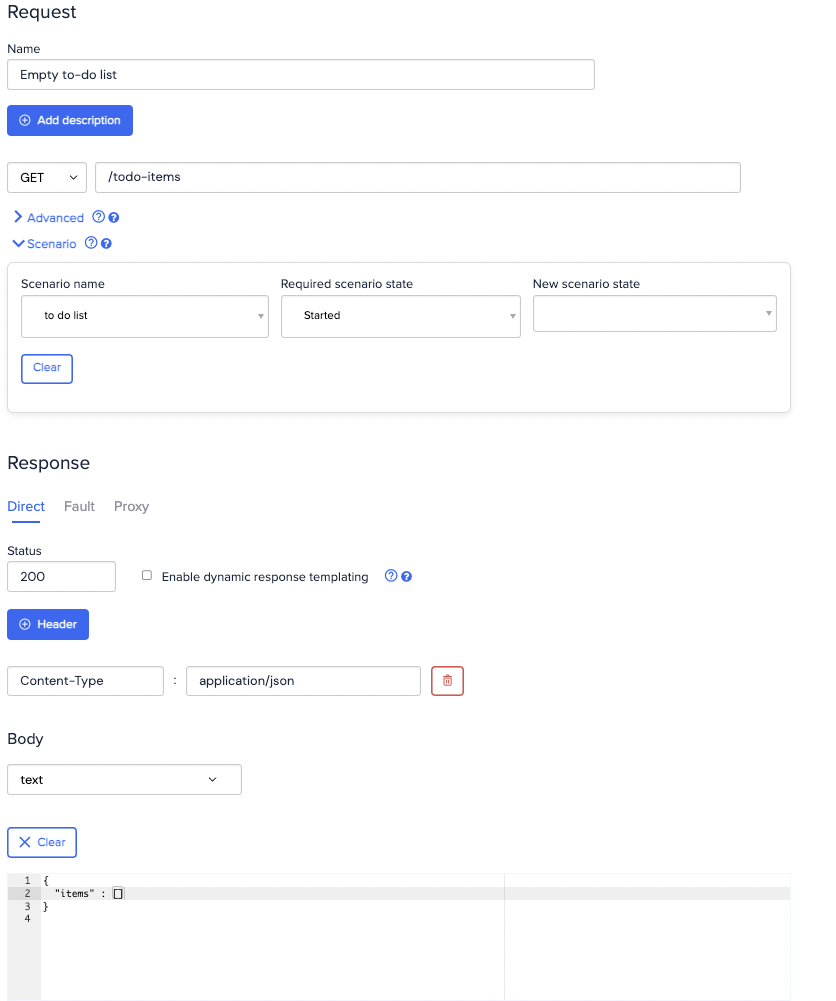
To implement the above case, you would declare that the stub returning the empty list is only matched when the scenario state is "Started",
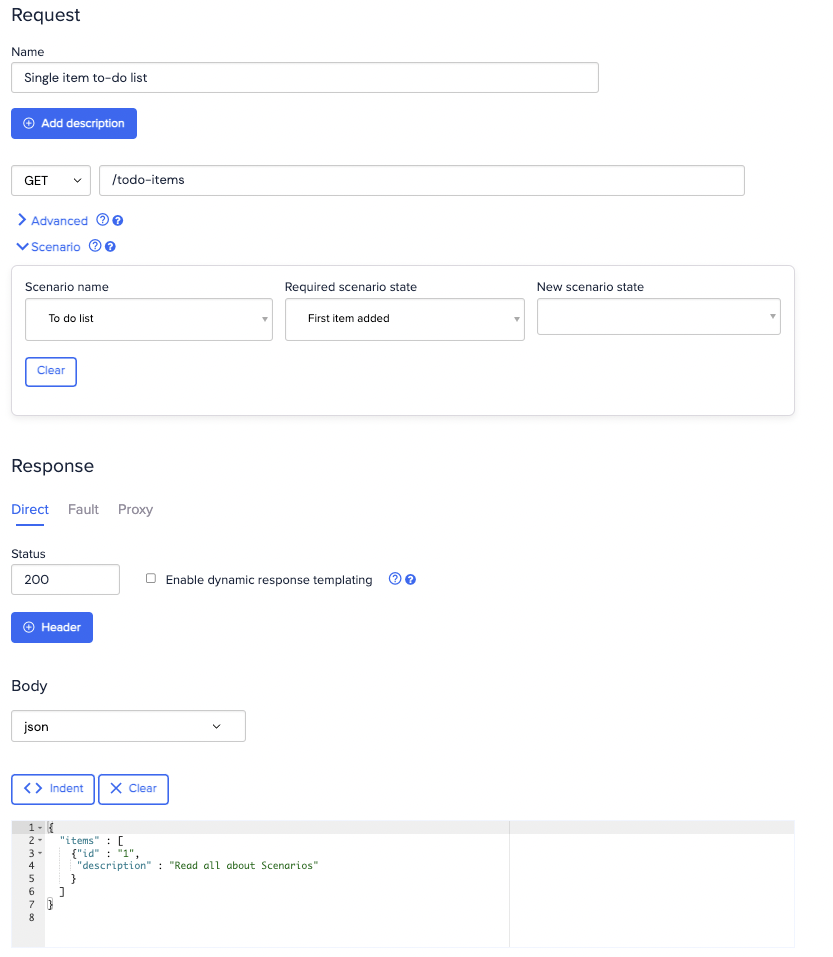
while the stub returning the list with one item is only matched when the scenario state is "First item added".
Start by creating the empty list stub, which is matched only when the scenario named "To do list" is in the "Started" state:
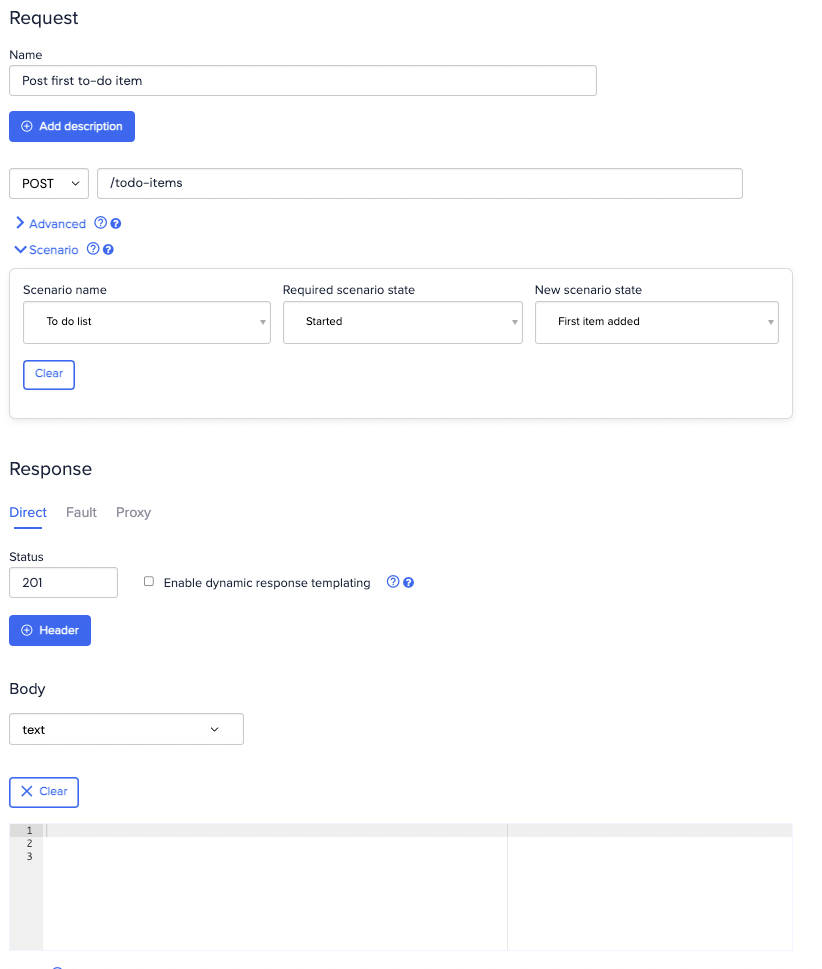
 Then create a stub to handle posting of the first list item. When triggered this stub will move the scenario state to "First item added":
 Finally, create a stub to return the list containing one item, which is matched only when the scenario is in the "First item added" state:
 ## Testing
First, make a `GET` request to fetch the list, which should be empty. You should be able to do this any number of times
without the result changing:
```bash theme={null}
$ curl http://example.wiremockapi.cloud/todo-items
```
```java theme={null}
HttpResponse response =
Unirest.get("http://example.wiremockapi.cloud/todo-items").asString();
```
```javascript theme={null}
fetch('http://example.wiremockapi.cloud/todo-items').then(res => ...);
```
```python theme={null}
import requests
response = requests.get('http://example.wiremockapi.cloud/todo-items')
```
```ruby theme={null}
require 'uri'
require 'net/http'
uri = URI('http://example.wiremockapi.cloud/todo-items')
response = Net::HTTP.get_response(uri)
```
```php theme={null}
true,
]);
$response = curl_exec($curl);
```
```go theme={null}
import "net/http"
resp, _ := http.Get("http://example.wiremockapi.cloud/todo-items")
defer resp.Body.Close()
```
```json theme={null}
{
"items": []
}
```
Now `POST` a new item (it actually doesn't matter what the request body contains, since we didn't specify a body matcher in the stub):
```bash theme={null}
$ curl http://example.wiremockapi.cloud/todo-items -X POST
```
```java theme={null}
HttpResponse response =
Unirest.post("http://example.wiremockapi.cloud/todo-items").asString();
```
```javascript theme={null}
const options = { method: 'POST' }
fetch('http://example.wiremockapi.cloud/todo-items', options).then(res => ...);
```
```python theme={null}
import requests
response = requests.post('http://example.wiremockapi.cloud/todo-items')
```
```ruby theme={null}
require 'uri'
require 'net/http'
uri = URI('http://example.wiremockapi.cloud/todo-items')
response = Net::HTTP.post(uri, '')
```
```php theme={null}
true,
CURLOPT_POST => true,
]);
$response = curl_exec($curl);
```
```go theme={null}
import "net/http"
resp, _ := http.Post("http://example.wiremockapi.cloud/todo-items", "", nil)
defer resp.Body.Close()
```
This should now have moved the scenario state to "First item added". Getting the list of items again should now return one item:
```bash theme={null}
$ curl http://example.wiremockapi.cloud/todo-items
```
```java theme={null}
HttpResponse response =
Unirest.get("http://example.wiremockapi.cloud/todo-items").asString();
```
```javascript theme={null}
fetch('http://example.wiremockapi.cloud/todo-items').then(res => ...);
```
```python theme={null}
import requests
response = requests.get('http://example.wiremockapi.cloud/todo-items')
```
```ruby theme={null}
require 'uri'
require 'net/http'
uri = URI('http://example.wiremockapi.cloud/todo-items')
response = Net::HTTP.get_response(uri)
```
```php theme={null}
true,
]);
$response = curl_exec($curl);
```
```go theme={null}
import "net/http"
resp, _ := http.Get("http://example.wiremockapi.cloud/todo-items")
defer resp.Body.Close()
```
```json theme={null}
{
"items": [
{
"id": "1",
"description": "Read all about Scenarios"
}
]
}
```
## Scenario reset
All scenarios can be reset to their "Started" state by clicking Reset.
## Testing
First, make a `GET` request to fetch the list, which should be empty. You should be able to do this any number of times
without the result changing:
```bash theme={null}
$ curl http://example.wiremockapi.cloud/todo-items
```
```java theme={null}
HttpResponse response =
Unirest.get("http://example.wiremockapi.cloud/todo-items").asString();
```
```javascript theme={null}
fetch('http://example.wiremockapi.cloud/todo-items').then(res => ...);
```
```python theme={null}
import requests
response = requests.get('http://example.wiremockapi.cloud/todo-items')
```
```ruby theme={null}
require 'uri'
require 'net/http'
uri = URI('http://example.wiremockapi.cloud/todo-items')
response = Net::HTTP.get_response(uri)
```
```php theme={null}
true,
]);
$response = curl_exec($curl);
```
```go theme={null}
import "net/http"
resp, _ := http.Get("http://example.wiremockapi.cloud/todo-items")
defer resp.Body.Close()
```
```json theme={null}
{
"items": []
}
```
Now `POST` a new item (it actually doesn't matter what the request body contains, since we didn't specify a body matcher in the stub):
```bash theme={null}
$ curl http://example.wiremockapi.cloud/todo-items -X POST
```
```java theme={null}
HttpResponse response =
Unirest.post("http://example.wiremockapi.cloud/todo-items").asString();
```
```javascript theme={null}
const options = { method: 'POST' }
fetch('http://example.wiremockapi.cloud/todo-items', options).then(res => ...);
```
```python theme={null}
import requests
response = requests.post('http://example.wiremockapi.cloud/todo-items')
```
```ruby theme={null}
require 'uri'
require 'net/http'
uri = URI('http://example.wiremockapi.cloud/todo-items')
response = Net::HTTP.post(uri, '')
```
```php theme={null}
true,
CURLOPT_POST => true,
]);
$response = curl_exec($curl);
```
```go theme={null}
import "net/http"
resp, _ := http.Post("http://example.wiremockapi.cloud/todo-items", "", nil)
defer resp.Body.Close()
```
This should now have moved the scenario state to "First item added". Getting the list of items again should now return one item:
```bash theme={null}
$ curl http://example.wiremockapi.cloud/todo-items
```
```java theme={null}
HttpResponse response =
Unirest.get("http://example.wiremockapi.cloud/todo-items").asString();
```
```javascript theme={null}
fetch('http://example.wiremockapi.cloud/todo-items').then(res => ...);
```
```python theme={null}
import requests
response = requests.get('http://example.wiremockapi.cloud/todo-items')
```
```ruby theme={null}
require 'uri'
require 'net/http'
uri = URI('http://example.wiremockapi.cloud/todo-items')
response = Net::HTTP.get_response(uri)
```
```php theme={null}
true,
]);
$response = curl_exec($curl);
```
```go theme={null}
import "net/http"
resp, _ := http.Get("http://example.wiremockapi.cloud/todo-items")
defer resp.Body.Close()
```
```json theme={null}
{
"items": [
{
"id": "1",
"description": "Read all about Scenarios"
}
]
}
```
## Scenario reset
All scenarios can be reset to their "Started" state by clicking Reset.