> ## Documentation Index
> Fetch the complete documentation index at: https://docs.wiremock.io/llms.txt
> Use this file to discover all available pages before exploring further.
# Dynamic State Basics
> Creating and Calling Stateful Stubs
WireMock Cloud provides the ability to set and use dynamic state in your stubs. This allows you to mock stateful
journeys, such as creating a resource and then retrieving it. This is useful for situations where you may want to mock
things like account balances, changing user attributes or any session where the data may need to be dynamically
modified.
State can be managed within a *context* of your choosing. This could, for instance, allow you to use a context per user
so that the same stateful journey using the same stubs can be run multiple times simultaneously without affecting each
other. It could also be used to allow you to use the same set of stubs to do CRUD operations on the state of multiple
collections - see [the workable Dynamic Shopping Basket example](./basket-example/).
Dynamic State is a more sophisticated and powerful replacement for
[the existing Scenarios functionality](/dynamic-state/stateful-scenarios), which only offers a simple global state machine.
## Concepts
* **State Value**\
A State Value is a mutable string, stored against a Key within a Context. It can be used in request matching; created,
changed or removed in State Operations; and rendered in response bodies and webhook request bodies. It is typically
defined dynamically using a [Handlebars template](https://handlebarsjs.com/). It is also worth knowing that state values can be used in webhook headers and webhook URLs, as well.
State Values are stored in a Least Recently Used cache, and no guarantee is made about how long they will persist.
* **Variable**\
A Variable is similar to a State Value, but it does not have a Context and does not need the `state` Handlebars helper
to render it in a Handlebars template. Instead, it lives only for the lifetime of the request, and is accessible at
the top level of the Handlebars model. It can be used in State Operations and Variable Definitions, and rendered in
response bodies and webhook request bodies. It is typically defined dynamically using a Handlebars template. It cannot
be one of our reserved words: `request`, `response`, `parameters`, `data`, `event`, `config`, `originalRequest` or
`originalResponse`.
* **Key**\
A key is a string identifier such as `itemId`. A State Value is stored and looked up using a Key. A Key references
different State Values in different Contexts. For keys defined on state operations, a Handlebars template that has
access to the request model, such as `{{ request.path.userId }}`, can be used to build the key. This is not the case
for keys defined on request variables, which must be plain strings.
* **Context**\
A Context is a string identifier. It is typically built dynamically using a Handlebars template that has access to the
request model. The combination of a Key in a Context identifies a unique State Value. Contexts are all scoped to a
Mock API, so no State Value can be retrieved in a different Mock API.
* **Request Matcher**\
When using Dynamic State, a Request Matcher is part of a stub's definition that uses a State Value to decide
whether the current stub matches. Matching occurs **before** State Operations and Variable Definitions are evaluated,
and operations and definitions are only evaluated if the stub matches.
* **State Operation**\
A State Operation is a part of a stub's definition that mutates a State Value - either by setting it or deleting it.
It requires a Key and a Context to identify the Value. A `SET` operation uses a Handlebars template that has access to
the request model and the `previousValue` (`null` if not present in that Context) of the State Value in order to emit
the new State Value.
* **Variable Definition**\
A Variable Definition is a part of a stub's definition that defines a Variable and its value for the rest of the
stub serve event's lifecycle. It uses a Handlebars template that has access to the request model to emit the value of
the Variable.
When a stub matches, and its configuration contains multiple State Operations and / or Variable Definitions, they are
applied **in order**. The result of a State Operation / Variable Definition is visible in the Handlebars model available
to subsequent State Operations and Variable Definitions, and when rendering the response body and any webhook request
bodies.
## Usage
### Setting & rendering simple state
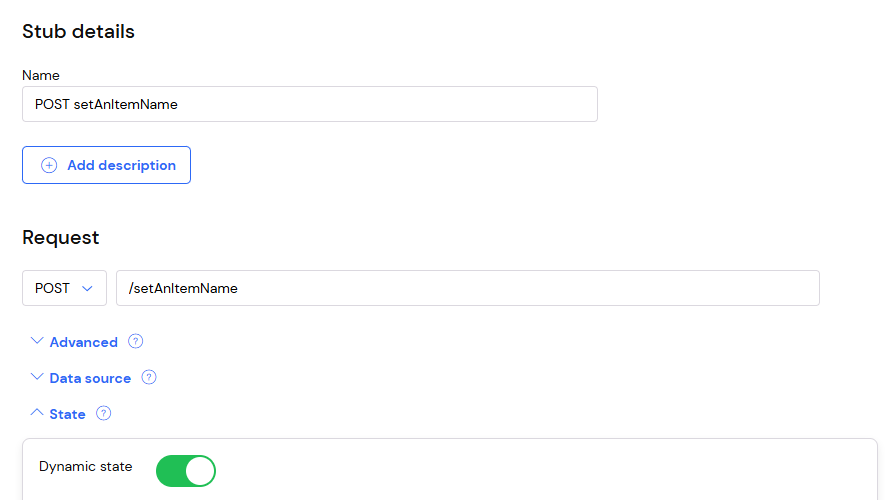
In a stub's request definition, change the method to `POST` and the path to `/setAnItemName`.
Open the "State" section and toggle on "Dynamic state":
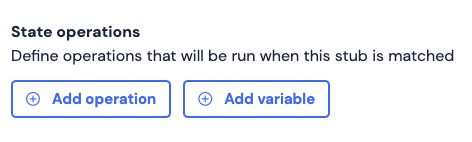
 Under "State operations", click "Add operation":
 For now, leave the Context as "Default context" and the Operation as `SET`. Add a Key called `itemName` with a value of
"Socks":
For now, leave the Context as "Default context" and the Operation as `SET`. Add a Key called `itemName` with a value of
"Socks":
 Under Response, check "Enable dynamic response templating" and put the following in the body text area:
```handlebars theme={null}
State itemName was set to {{ state 'itemName' }}
```
Under Response, check "Enable dynamic response templating" and put the following in the body text area:
```handlebars theme={null}
State itemName was set to {{ state 'itemName' }}
```
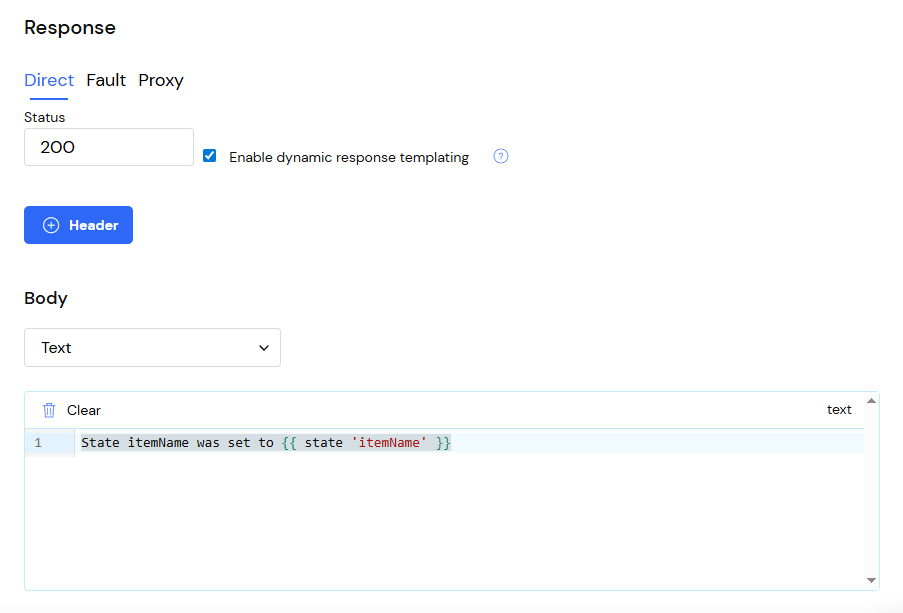 Try making a `POST` to `/setAnItemName` - you should get a response with a body "State itemName was set to Socks".
You can now use the Handlebars helper `{{ state 'itemName' }}` in the Response body of any stub to return the state
value currently associated with the `itemName` key in the default context. For instance if you add a new stub for
`GET /someItemName`, check "Enable dynamic response templating" and put the following in the body
text area:
```handlebars theme={null}
The current itemName is {{ state 'itemName' }}
```
then subsequent requests for that stub will return "The current itemName is Socks"
### Setting state dynamically
The "Value" field on a `SET` State operation supports Handlebars templating in order to dynamically set the value based
on the contents of an incoming request. The model available in the template is [the same request data model that is provided in the response template](/response-templating/basics/#the-data-model),
along with a `previousValue` containing the value of the Key in this Context before the operation was run, or `null` if
it had no value.
For example, we could change the "Value" in the example above to `{{ request.body }}`. Now the
`itemName` state key in the default context will be associated with the request body that was last sent as a `POST` to
`/setAnItemName`. For instance a `POST` to `/setAnItemName` with body "Shoes" will return "State itemName was set to
Shoes", and a subsequent `GET` to `/someItemName` will then return "The current itemName is Shoes".
While state values are stored as strings, it is normally convenient to make those strings valid JSON and use
[WireMock Cloud's rich set of JSON helpers](/response-templating/json) to manipulate those values using the template
in the "Value" field.
### Setting state in a context
When a value is assigned to a key, this value is confined to a particular context. That context can be defaulted for an
entire Mock API, and unless changed it is effectively a global context. When you render a value in a template using
`{{ state '' }}` you will be rendering the value from the Mock API's default context.
You can specify an explicit context both when setting state and when rendering it.
#### Setting state in an explicit context
When you define a State operation you can click in the "Context" field and enter a template. The model available in the
template is once again [the same request data model that is provided in the response template](/response-templating/basics/#the-data-model).
For instance you could set it to:
```handlebars theme={null}
{{ request.headers.x-test-id }}
```
Now a `POST` to `/setAnItemName` with a body of "Shirts" and a header `x-test-id: 1`, and a `POST` to `/setAnItemName` with a body
of "Trousers" and a header `x-test-id: 2` will set `itemName` to "Shirts" in the context called "1" and to "Trousers" in
the context called "2".
#### Rendering a state value from an explicit context
There are two ways to render state from an explicit context:
Inline:
```handlebars theme={null}
The current itemName is {{ state 'itemName' context=request.headers.x-test-id }}
```
Here we pass the context as a parameter to the `state` helper. You can see it can be a template, allowing you to set the
context dynamically on render just as you could set it dynamically when making a State operation.
Block:
```handlebars theme={null}
{{#stateContext request.headers.x-test-id}}
The current itemName is {{ state 'itemName' }}
{{/stateContext}}
```
Here all `state` helpers within the `stateContext` block are evaluated with the context specified in that block, saving
unnecessary repetition.
#### Rendering all state values within a context
It is possible to access all values within a given context using the `listState` helper.
Template:
```handlebars theme={null}
{{ listState request.headers.x-test-id }}
```
Example result:
```
[my-value-1, a second value, third-value]
```
The `listState` helper returns a collection containing every state value within the provided context. In the case above,
the context to list items from is `request.headers.x-test-id`, which will resolve to the request's `x-test-id` header.
### Setting the default context
It is common to want all or most state values to have the same dynamic context; for instance you may want all state to
be scoped by a user's current `Authorization` header so that they are isolated from changes made by any other user.
Having to specify `{{request.headers.Authorization}}` as the context of every state SET operation, and wrap every
template that uses state in `{{#stateContext request.headers.Authorization}}{{/stateContext}}` would be tedious.
Consequently WireMock Cloud allows setting a template for the default context
In the Mock API's Settings, find the State section. Here you can set the Default context to e.g.
`{{request.headers.x-test-id}}`. State operations using the Default context will now use that value as the context, and
`{{ state }}` helpers which do not specify a context and are not nested in a `{{#stateContext}}` block will also use that
value as the context.
### Removing state values
A stub can delete a key / value pair from a context. Under "State operations" click "Add operation". Set the "Operation"
to `DELETE`. The "Context" & "Key" fields are the same as for a `SET` operation. Whenever this stub matches it will now
delete the given key from the given context.
### Deleting state contexts
A stub can delete all key / value pairs in a context. Under "State operations" click "Add operation". Set the
"Operation" to `DELETE_CONTEXT`. The "Context" field is the same as for a `SET` or `DELETE` operation. Whenever this
stub matches it will now delete all keys from the given context.
### Matching on state
In addition to setting and deleting state values, a stub can use a state value as part of its matching criteria.
For instance, you may want to define two `GET /someItemName` stubs, the existing one which returns a `200` with the `itemName`
value if it exists, and one which returns a 404 if it does not.
Under "State -> Request matching" click "Add request matcher".
For the `200` stub add a matcher with Key: `itemId` NOT `is absent`.
For the `404` stub add a matcher with Key: `itemId` `is absent`.
### Resetting state
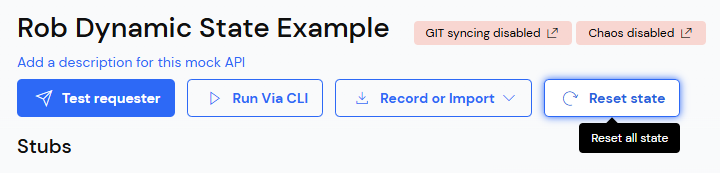
All state for the Mock API (including any Scenarios) can be reset using the "Reset state" button on the Mock API:
Try making a `POST` to `/setAnItemName` - you should get a response with a body "State itemName was set to Socks".
You can now use the Handlebars helper `{{ state 'itemName' }}` in the Response body of any stub to return the state
value currently associated with the `itemName` key in the default context. For instance if you add a new stub for
`GET /someItemName`, check "Enable dynamic response templating" and put the following in the body
text area:
```handlebars theme={null}
The current itemName is {{ state 'itemName' }}
```
then subsequent requests for that stub will return "The current itemName is Socks"
### Setting state dynamically
The "Value" field on a `SET` State operation supports Handlebars templating in order to dynamically set the value based
on the contents of an incoming request. The model available in the template is [the same request data model that is provided in the response template](/response-templating/basics/#the-data-model),
along with a `previousValue` containing the value of the Key in this Context before the operation was run, or `null` if
it had no value.
For example, we could change the "Value" in the example above to `{{ request.body }}`. Now the
`itemName` state key in the default context will be associated with the request body that was last sent as a `POST` to
`/setAnItemName`. For instance a `POST` to `/setAnItemName` with body "Shoes" will return "State itemName was set to
Shoes", and a subsequent `GET` to `/someItemName` will then return "The current itemName is Shoes".
While state values are stored as strings, it is normally convenient to make those strings valid JSON and use
[WireMock Cloud's rich set of JSON helpers](/response-templating/json) to manipulate those values using the template
in the "Value" field.
### Setting state in a context
When a value is assigned to a key, this value is confined to a particular context. That context can be defaulted for an
entire Mock API, and unless changed it is effectively a global context. When you render a value in a template using
`{{ state '' }}` you will be rendering the value from the Mock API's default context.
You can specify an explicit context both when setting state and when rendering it.
#### Setting state in an explicit context
When you define a State operation you can click in the "Context" field and enter a template. The model available in the
template is once again [the same request data model that is provided in the response template](/response-templating/basics/#the-data-model).
For instance you could set it to:
```handlebars theme={null}
{{ request.headers.x-test-id }}
```
Now a `POST` to `/setAnItemName` with a body of "Shirts" and a header `x-test-id: 1`, and a `POST` to `/setAnItemName` with a body
of "Trousers" and a header `x-test-id: 2` will set `itemName` to "Shirts" in the context called "1" and to "Trousers" in
the context called "2".
#### Rendering a state value from an explicit context
There are two ways to render state from an explicit context:
Inline:
```handlebars theme={null}
The current itemName is {{ state 'itemName' context=request.headers.x-test-id }}
```
Here we pass the context as a parameter to the `state` helper. You can see it can be a template, allowing you to set the
context dynamically on render just as you could set it dynamically when making a State operation.
Block:
```handlebars theme={null}
{{#stateContext request.headers.x-test-id}}
The current itemName is {{ state 'itemName' }}
{{/stateContext}}
```
Here all `state` helpers within the `stateContext` block are evaluated with the context specified in that block, saving
unnecessary repetition.
#### Rendering all state values within a context
It is possible to access all values within a given context using the `listState` helper.
Template:
```handlebars theme={null}
{{ listState request.headers.x-test-id }}
```
Example result:
```
[my-value-1, a second value, third-value]
```
The `listState` helper returns a collection containing every state value within the provided context. In the case above,
the context to list items from is `request.headers.x-test-id`, which will resolve to the request's `x-test-id` header.
### Setting the default context
It is common to want all or most state values to have the same dynamic context; for instance you may want all state to
be scoped by a user's current `Authorization` header so that they are isolated from changes made by any other user.
Having to specify `{{request.headers.Authorization}}` as the context of every state SET operation, and wrap every
template that uses state in `{{#stateContext request.headers.Authorization}}{{/stateContext}}` would be tedious.
Consequently WireMock Cloud allows setting a template for the default context
In the Mock API's Settings, find the State section. Here you can set the Default context to e.g.
`{{request.headers.x-test-id}}`. State operations using the Default context will now use that value as the context, and
`{{ state }}` helpers which do not specify a context and are not nested in a `{{#stateContext}}` block will also use that
value as the context.
### Removing state values
A stub can delete a key / value pair from a context. Under "State operations" click "Add operation". Set the "Operation"
to `DELETE`. The "Context" & "Key" fields are the same as for a `SET` operation. Whenever this stub matches it will now
delete the given key from the given context.
### Deleting state contexts
A stub can delete all key / value pairs in a context. Under "State operations" click "Add operation". Set the
"Operation" to `DELETE_CONTEXT`. The "Context" field is the same as for a `SET` or `DELETE` operation. Whenever this
stub matches it will now delete all keys from the given context.
### Matching on state
In addition to setting and deleting state values, a stub can use a state value as part of its matching criteria.
For instance, you may want to define two `GET /someItemName` stubs, the existing one which returns a `200` with the `itemName`
value if it exists, and one which returns a 404 if it does not.
Under "State -> Request matching" click "Add request matcher".
For the `200` stub add a matcher with Key: `itemId` NOT `is absent`.
For the `404` stub add a matcher with Key: `itemId` `is absent`.
### Resetting state
All state for the Mock API (including any Scenarios) can be reset using the "Reset state" button on the Mock API:
 ### State concurrency semantics
A Mock API can receive multiple concurrent requests. These may contain state operations that operate on a
`previousValue`; for instance you might store a `requestCount` state value, and make the SET operation increment it as
so: `{{math previousValue '+' 1}}`. WireMock Cloud guarantees that SET operations on a particular
Key in a particular Context will happen sequentially, so 5 concurrent requests to that stub would increment the
`requestCount` 5 times.
## Limits
You can read more about [plan limits here](./plan-limits/).
## Examples
* [An example of modelling a shopping basket with dynamic state](./basket-example/)
### State concurrency semantics
A Mock API can receive multiple concurrent requests. These may contain state operations that operate on a
`previousValue`; for instance you might store a `requestCount` state value, and make the SET operation increment it as
so: `{{math previousValue '+' 1}}`. WireMock Cloud guarantees that SET operations on a particular
Key in a particular Context will happen sequentially, so 5 concurrent requests to that stub would increment the
`requestCount` 5 times.
## Limits
You can read more about [plan limits here](./plan-limits/).
## Examples
* [An example of modelling a shopping basket with dynamic state](./basket-example/)