> ## Documentation Index
> Fetch the complete documentation index at: https://docs.wiremock.io/llms.txt
> Use this file to discover all available pages before exploring further.
# Serving a Default Response
> Configuring a stub to serve a default response when a specific match for the request is not is found
By default, WireMock Cloud will serve a generic 404 page if an incoming HTTP request is not matched to any stub mapping.
Often this is not a problem, but in some instances it is desirable to serve your own response.
This can be achieved using the Priority parameter when creating stubs. By creating a stub which has loose (non-specific)
matching criteria and a low priority setting, requests will "fall through" to this if they're not matched to a more specific stub.
## Example
Suppose you want to serve a `403 Unauthorized` response with a meaningful response body when a request is not matched rather than the default 404. Additionally you
want to serve 200 response when a `GET` request is made to `/examples/12`.
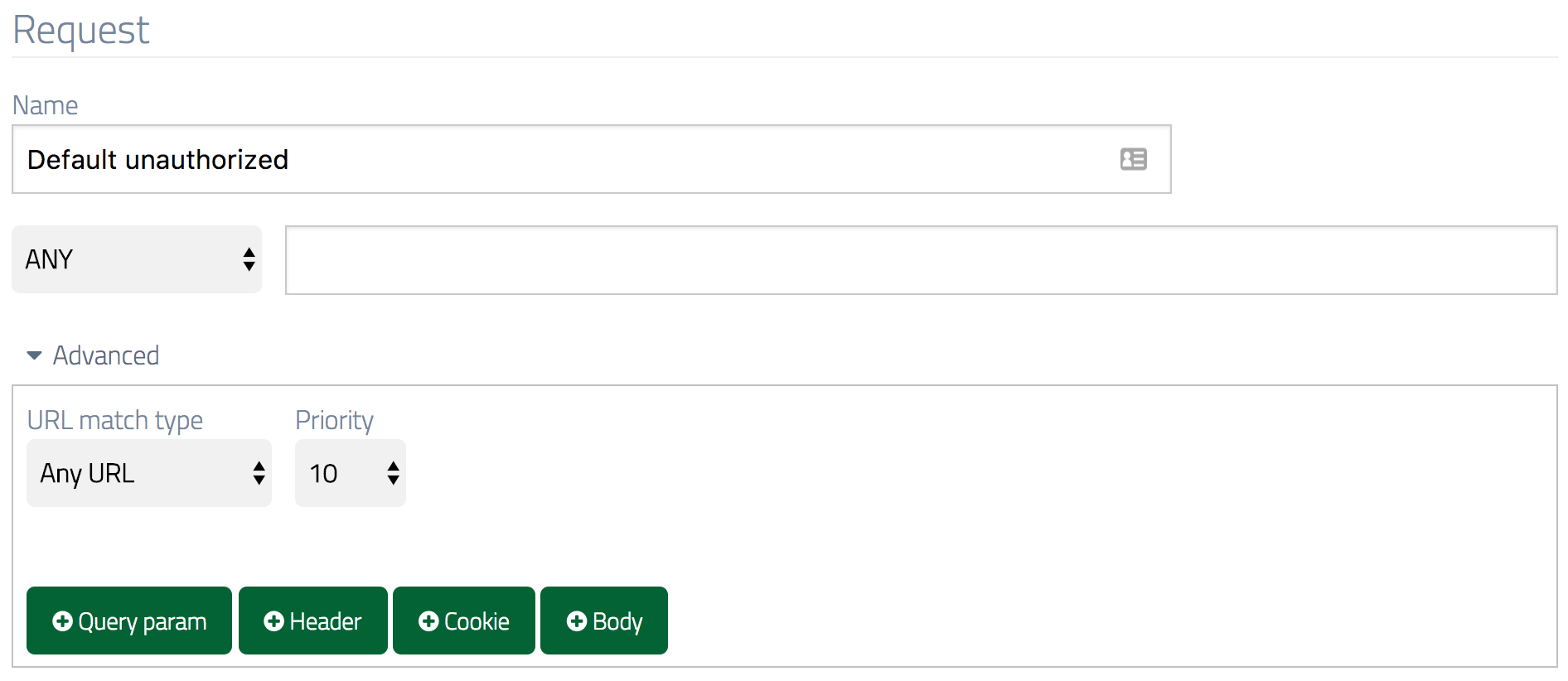
Start by creating a stub with `ANY` as the method. Open the Advanced section and change the URL match type to `Any URL`.
Also in the Advanced section set the Priority to 10 (the lowest).
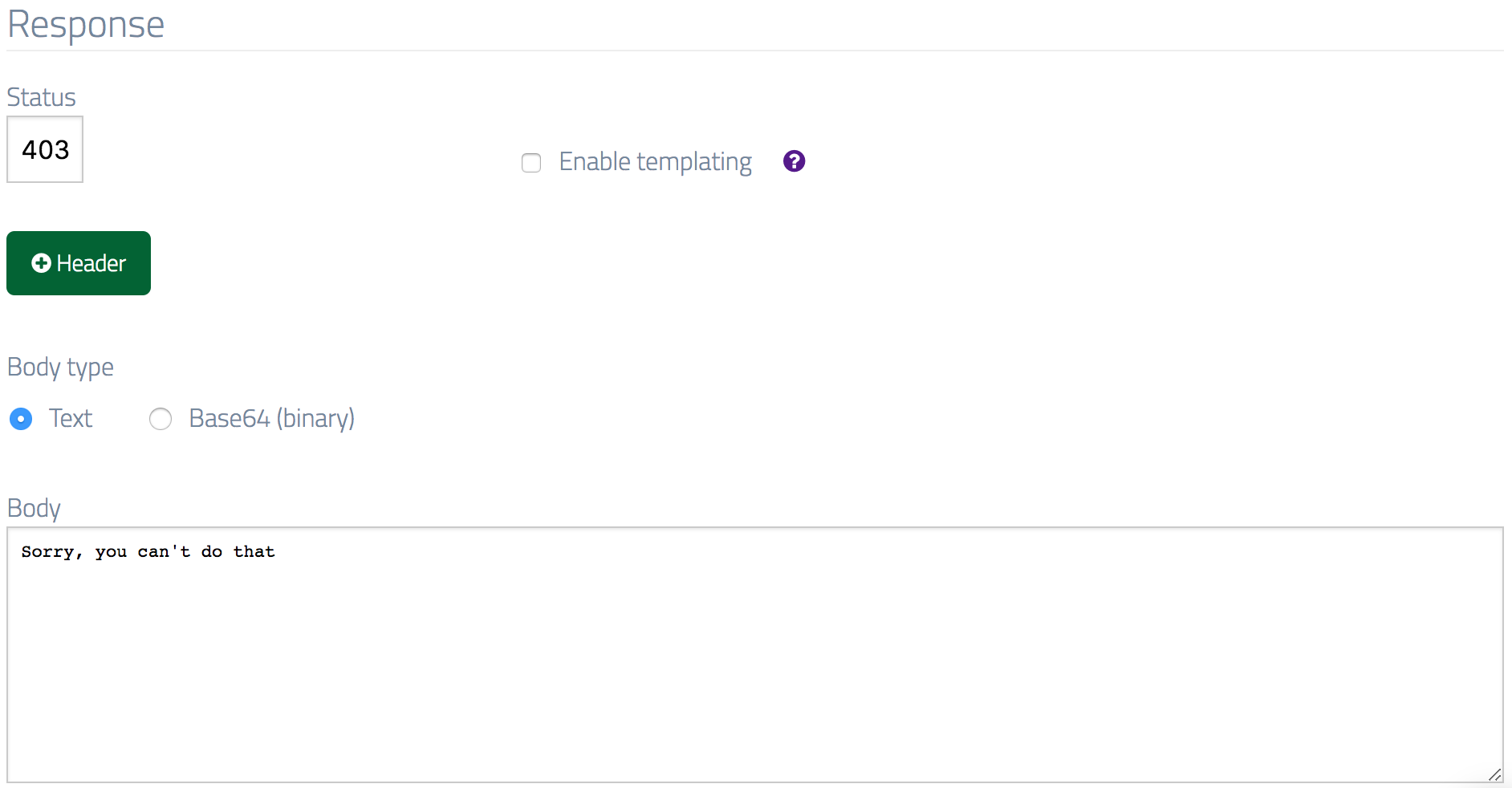
 In the Response section, set the Status to `403` and the body content to `"Sorry, you can't do that"`.
 Create a second stub with the method set to `GET`, the URL to `/examples/12` and the response body to `"Example 12 body"` (keeping the Status as `200`).
Now if you make a request that matches the specific stub you will see a response with a `200` status:
```bash theme={null}
$ curl -v http://example.wiremockapi.cloud/examples/12
> GET /examples/12 HTTP/1.1
> Host: example.wiremockapi.cloud
> User-Agent: curl/7.54.0
> Accept: */*
>
< HTTP/1.1 200 OK
< Transfer-Encoding: chunked
<
```
```java theme={null}
HttpResponse response =
Unirest.get("http://example.wiremockapi.cloud/examples/12").asString();
```
```javascript theme={null}
fetch('http://example.wiremockapi.cloud/examples/12').then(res => ...);
```
```python theme={null}
import requests
response = requests.get('http://example.wiremockapi.cloud/examples/12')
```
```ruby theme={null}
require 'uri'
require 'net/http'
uri = URI('http://example.wiremockapi.cloud/examples/12')
response = Net::HTTP.get_response(uri)
```
```php theme={null}
true,
]);
$response = curl_exec($curl);
```
```go theme={null}
import "net/http"
resp, _ := http.Get("http://example.wiremockapi.cloud/examples/12")
defer resp.Body.Close()
```
and the success message:
```
Example 12 body
```
Whereas if you make a request to a URL with no stub to match you will see the default `403` response
```bash theme={null}
$ curl -v http://example.wiremockapi.cloud/examples/12222222
> GET /examples/12222222 HTTP/1.1
> Host: example.wiremockapi.cloud
> User-Agent: curl/7.54.0
> Accept: */*
>
< HTTP/1.1 403 Forbidden
< Transfer-Encoding: chunked
<
```
```java theme={null}
HttpResponse response =
Unirest.get("http://example.wiremockapi.cloud/examples/12222222").asString();
```
```javascript theme={null}
fetch('http://example.wiremockapi.cloud/examples/12222222').then(res => ...);
```
```python theme={null}
import requests
response = requests.get('http://example.wiremockapi.cloud/examples/12222222')
```
```ruby theme={null}
require 'uri'
require 'net/http'
uri = URI('http://example.wiremockapi.cloud/examples/12222222')
response = Net::HTTP.get_response(uri)
```
```php theme={null}
true,
]);
$response = curl_exec($curl);
```
```go theme={null}
import "net/http"
resp, _ := http.Get("http://example.wiremockapi.cloud/examples/12222222")
defer resp.Body.Close()
```
with the following message:
```
Sorry, you can't do that
```
Create a second stub with the method set to `GET`, the URL to `/examples/12` and the response body to `"Example 12 body"` (keeping the Status as `200`).
Now if you make a request that matches the specific stub you will see a response with a `200` status:
```bash theme={null}
$ curl -v http://example.wiremockapi.cloud/examples/12
> GET /examples/12 HTTP/1.1
> Host: example.wiremockapi.cloud
> User-Agent: curl/7.54.0
> Accept: */*
>
< HTTP/1.1 200 OK
< Transfer-Encoding: chunked
<
```
```java theme={null}
HttpResponse response =
Unirest.get("http://example.wiremockapi.cloud/examples/12").asString();
```
```javascript theme={null}
fetch('http://example.wiremockapi.cloud/examples/12').then(res => ...);
```
```python theme={null}
import requests
response = requests.get('http://example.wiremockapi.cloud/examples/12')
```
```ruby theme={null}
require 'uri'
require 'net/http'
uri = URI('http://example.wiremockapi.cloud/examples/12')
response = Net::HTTP.get_response(uri)
```
```php theme={null}
true,
]);
$response = curl_exec($curl);
```
```go theme={null}
import "net/http"
resp, _ := http.Get("http://example.wiremockapi.cloud/examples/12")
defer resp.Body.Close()
```
and the success message:
```
Example 12 body
```
Whereas if you make a request to a URL with no stub to match you will see the default `403` response
```bash theme={null}
$ curl -v http://example.wiremockapi.cloud/examples/12222222
> GET /examples/12222222 HTTP/1.1
> Host: example.wiremockapi.cloud
> User-Agent: curl/7.54.0
> Accept: */*
>
< HTTP/1.1 403 Forbidden
< Transfer-Encoding: chunked
<
```
```java theme={null}
HttpResponse response =
Unirest.get("http://example.wiremockapi.cloud/examples/12222222").asString();
```
```javascript theme={null}
fetch('http://example.wiremockapi.cloud/examples/12222222').then(res => ...);
```
```python theme={null}
import requests
response = requests.get('http://example.wiremockapi.cloud/examples/12222222')
```
```ruby theme={null}
require 'uri'
require 'net/http'
uri = URI('http://example.wiremockapi.cloud/examples/12222222')
response = Net::HTTP.get_response(uri)
```
```php theme={null}
true,
]);
$response = curl_exec($curl);
```
```go theme={null}
import "net/http"
resp, _ := http.Get("http://example.wiremockapi.cloud/examples/12222222")
defer resp.Body.Close()
```
with the following message:
```
Sorry, you can't do that
```