> ## Documentation Index
> Fetch the complete documentation index at: https://docs.wiremock.io/llms.txt
> Use this file to discover all available pages before exploring further.
# Audit Events Overview
> Send WireMock Cloud audit events to an AWS S3 bucket you own
WireMock Cloud generates audit events when you perform various actions within your account. For example, creating or
deleting Mock APIs, changing settings or logging in and many more. For our enterprise customers we provide the ability
to push these audit events to an AWS S3 bucket stored within your AWS account.
## Usage
The audit event feature is only available to users on our Enterprise or Enterprise Trial plans and you will need to be
an organisation administrator to create and manage audit event destinations.
To create and manage your S3 bucket destination, navigate to the [Organisation Page](https://app.wiremock.cloud/account/organisation)
on your account. On this page you will see the `Audit Events` section.
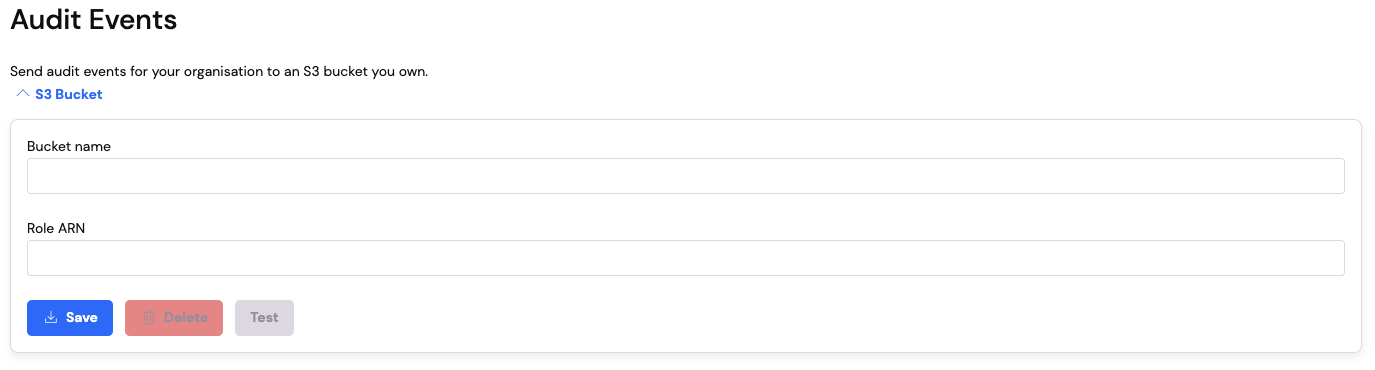 This is where you will create and manage your S3 audit event destination. To set up an S3 audit event destination you
will need to configure your AWS account with an S3 bucket and a role to allow WireMock Cloud to push audit events to that
bucket.
## Configure Your AWS Account
The first step in setting up your S3 audit event destination is to configure your AWS account to allow WireMock Cloud
to save audit events to your bucket. You can do this in the following way:
* Create the S3 bucket `-wiremock-cloud-audit-events` (you can use any bucket name if you have your own naming
convention but be sure to update the bucket name in the examples below)
* Create a policy called `wiremock-cloud-put-audit-events` with `s3:PutObject` on `arn:aws:s3:::-wiremock-cloud-audit-events/*`
```json theme={null}
{
"Version": "2012-10-17",
"Statement": [
{
"Effect": "Allow",
"Action": [
"s3:PutObject"
],
"Resource": "arn:aws:s3:::-wiremock-cloud-audit-events/*"
}
]
}
```
* Create an AWS account role for another AWS account
* Specify account id `499333472133`.
* Do **NOT** require external ID or MFA.
* Choose `wiremock-cloud-put-audit-events` as the policy (the one you created above)
* Name it `wiremock-cloud-put-audit-events`
* Set the trust policy as so:
```json theme={null}
{
"Version": "2012-10-17",
"Statement": [
{
"Effect": "Allow",
"Principal": {
"AWS": "arn:aws:iam::499333472133:root"
},
"Action": "sts:AssumeRole"
}
]
}
```
Once you have completed the steps above, you can navigate to the [Organisation Page](https://app.wiremock.cloud/account/organisation)
and continue the configuration there.
## Configure Your WireMock Cloud Account
Now you have configured your AWS account with the new bucket and role, you can add those details to the `Audit Events`
section on the Organisations page:
* Enter the bucket name into the `Bucket name` field
* Enter the full role arn into the `Role ARN` field
This is where you will create and manage your S3 audit event destination. To set up an S3 audit event destination you
will need to configure your AWS account with an S3 bucket and a role to allow WireMock Cloud to push audit events to that
bucket.
## Configure Your AWS Account
The first step in setting up your S3 audit event destination is to configure your AWS account to allow WireMock Cloud
to save audit events to your bucket. You can do this in the following way:
* Create the S3 bucket `-wiremock-cloud-audit-events` (you can use any bucket name if you have your own naming
convention but be sure to update the bucket name in the examples below)
* Create a policy called `wiremock-cloud-put-audit-events` with `s3:PutObject` on `arn:aws:s3:::-wiremock-cloud-audit-events/*`
```json theme={null}
{
"Version": "2012-10-17",
"Statement": [
{
"Effect": "Allow",
"Action": [
"s3:PutObject"
],
"Resource": "arn:aws:s3:::-wiremock-cloud-audit-events/*"
}
]
}
```
* Create an AWS account role for another AWS account
* Specify account id `499333472133`.
* Do **NOT** require external ID or MFA.
* Choose `wiremock-cloud-put-audit-events` as the policy (the one you created above)
* Name it `wiremock-cloud-put-audit-events`
* Set the trust policy as so:
```json theme={null}
{
"Version": "2012-10-17",
"Statement": [
{
"Effect": "Allow",
"Principal": {
"AWS": "arn:aws:iam::499333472133:root"
},
"Action": "sts:AssumeRole"
}
]
}
```
Once you have completed the steps above, you can navigate to the [Organisation Page](https://app.wiremock.cloud/account/organisation)
and continue the configuration there.
## Configure Your WireMock Cloud Account
Now you have configured your AWS account with the new bucket and role, you can add those details to the `Audit Events`
section on the Organisations page:
* Enter the bucket name into the `Bucket name` field
* Enter the full role arn into the `Role ARN` field
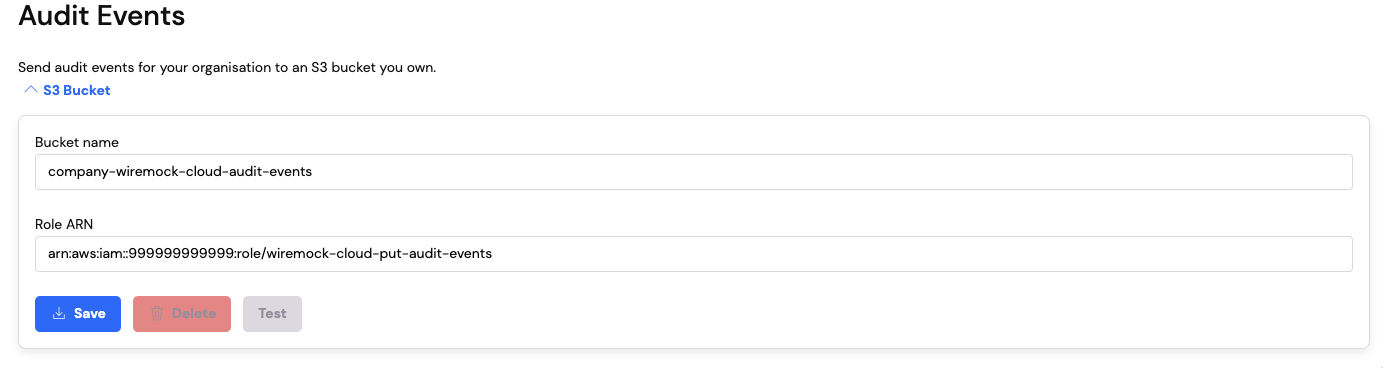 * Click on the `Save` button to add the S3 audit destination to your organisation
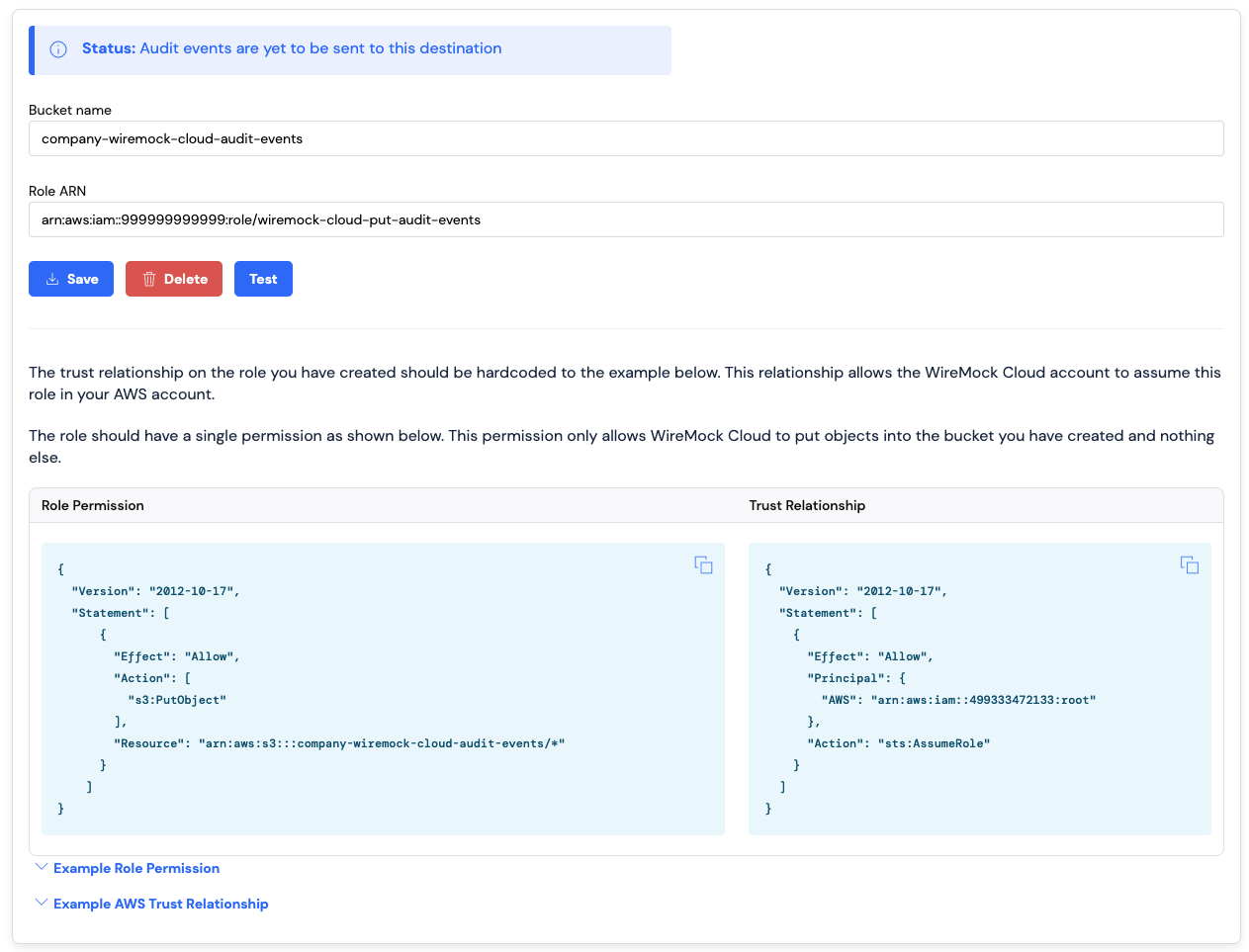
Once you have saved the audit destination, you will see some documentation you can copy to make sure the role permission
and trust relationship you created above is correct. For a newly created audit destination you should see the status
message - `Status: Audit events are yet to be sent to this destination`
* Click on the `Save` button to add the S3 audit destination to your organisation
Once you have saved the audit destination, you will see some documentation you can copy to make sure the role permission
and trust relationship you created above is correct. For a newly created audit destination you should see the status
message - `Status: Audit events are yet to be sent to this destination`
 ## Testing Your S3 Audit Event Destination
Now you saved the S3 audit event destination you can test it to make sure everything works end to end. Clicking on the
`Test` button will make WireMock Cloud attempt to post a test file to the bucket you created above. If all works
correctly the button will turn green and you should have a new file saved to your S3 bucket called `test-wiremock-cloud-integration.txt`.
This file will contain the date and time the test was performed.
## Testing Your S3 Audit Event Destination
Now you saved the S3 audit event destination you can test it to make sure everything works end to end. Clicking on the
`Test` button will make WireMock Cloud attempt to post a test file to the bucket you created above. If all works
correctly the button will turn green and you should have a new file saved to your S3 bucket called `test-wiremock-cloud-integration.txt`.
This file will contain the date and time the test was performed.
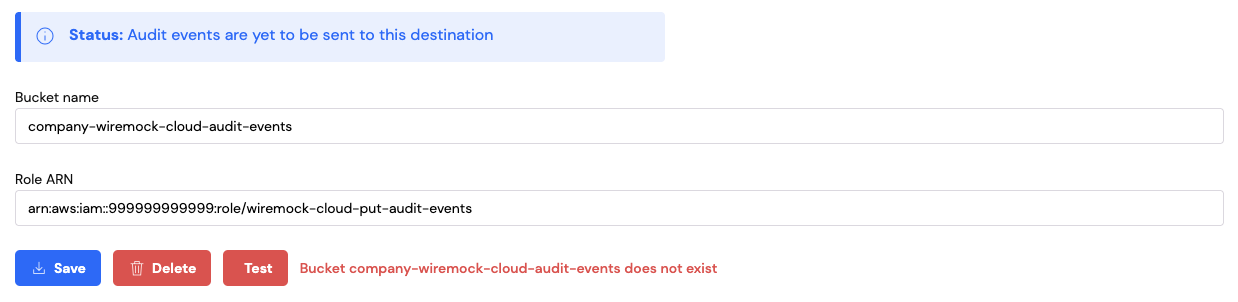
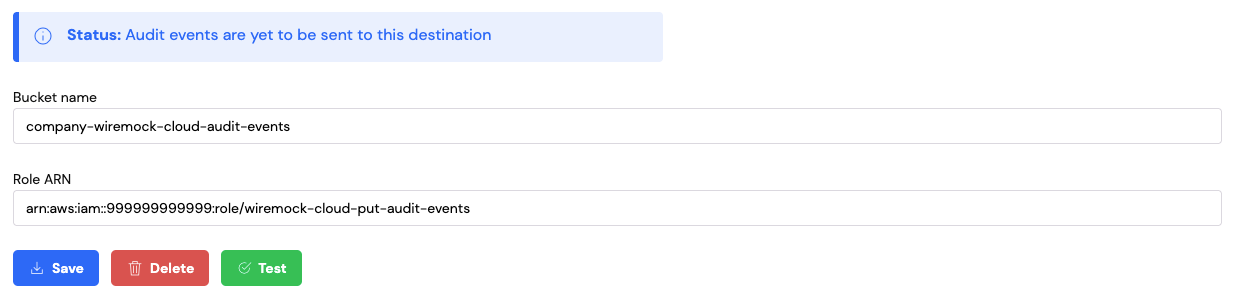 Should an error occur trying to post the file to your S3 bucket, an error will be displayed to help you diagnose the issue.
 ## Deleting Your S3 Audit Event Destination
If you no longer require audit events to be sent to your S3 bucket you can delete the audit event destination from your
organisation. This will stop audit events being set to your S3 bucket. To do this you can click on the `Delete`
button. This will display a confirmation dialog to allow you to confirm the deletion.
## Deleting Your S3 Audit Event Destination
If you no longer require audit events to be sent to your S3 bucket you can delete the audit event destination from your
organisation. This will stop audit events being set to your S3 bucket. To do this you can click on the `Delete`
button. This will display a confirmation dialog to allow you to confirm the deletion.
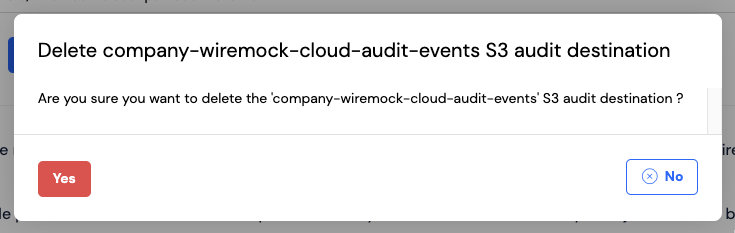 Clicking on `No` will close the dialog and no action will be taken, clicking on `Yes` will delete your S3 audit event
destination and no more audit events will be sent.
## Sending Audit Events To Your S3 Bucket
WireMock Cloud will send audit events to your S3 bucket in batches every 10 minutes. There is a lookback window of
7 days for audit events. This means if you are setting up an S3 audit event destination and have been a customer for
a while, the first batch of audit events sent to your bucket will span back 7 days prior to the date you setup the
destination.
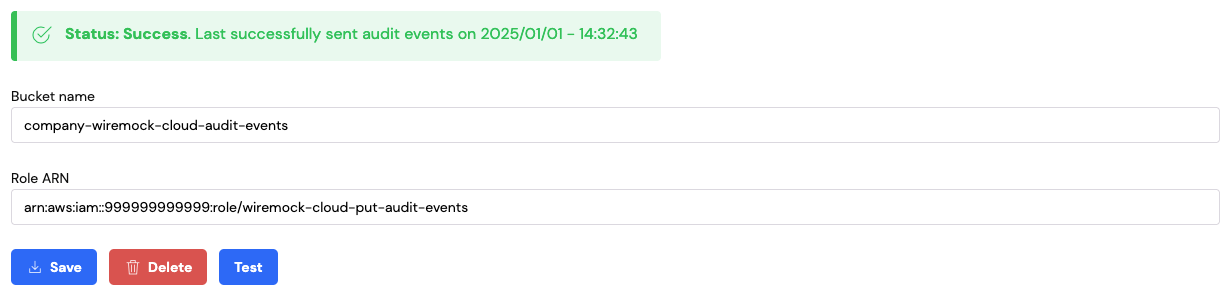
Once audit events are successfully being sent to your bucket you will see the status message update on the Organisation page:
Clicking on `No` will close the dialog and no action will be taken, clicking on `Yes` will delete your S3 audit event
destination and no more audit events will be sent.
## Sending Audit Events To Your S3 Bucket
WireMock Cloud will send audit events to your S3 bucket in batches every 10 minutes. There is a lookback window of
7 days for audit events. This means if you are setting up an S3 audit event destination and have been a customer for
a while, the first batch of audit events sent to your bucket will span back 7 days prior to the date you setup the
destination.
Once audit events are successfully being sent to your bucket you will see the status message update on the Organisation page:
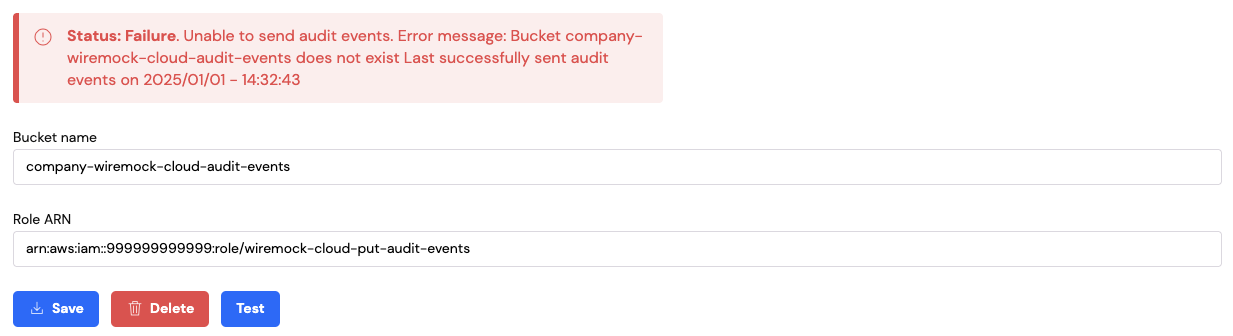
 If WireMock Cloud encounters an error while sending audit events to your S3 bucket, the status will be updated to
highlight the error. If audit events have been successfully sent in the past, the error will also contain the date the
last successful attempt was made:
If WireMock Cloud encounters an error while sending audit events to your S3 bucket, the status will be updated to
highlight the error. If audit events have been successfully sent in the past, the error will also contain the date the
last successful attempt was made:
 Audit events are saved in your S3 bucket using the following structure:
```
|── 2025-02
| |── 01
| | |── 2025-02-01T13-45-12-789Z-wjg0yr69.json
| |── 02
| |── 2025-02-02T13-32-12-789Z-16oe0mgo.json
| |── 2025-02-02T14-29-12-789Z-9lrrjdm6.json
|── 2025-03
|── 02
| |── 2025-03-02T13-23-12-789Z-kr731z1.json
|── 03
|── 2025-03-03T13-45-12-789Z-9odlj3w3.json
|── 2025-03-03T14-29-12-789Z-38o4klr7.json
```
Each file follows the [new line delimited JSON specification](https://github.com/ndjson/ndjson-spec).
Audit events for the following items in WireMock Cloud are sent to your S3 bucket:
* Mock APIs
* Users
* Teams
* Organisations
* API Templates
* API Template Catalogues
* Data Sources
* Database Connections
* Keys
* Stub Mappings
* Mock API Settings
* Subscriptions
* Open API Git Integrations
* API Keys
* S3 Audit Destinations
More information about working with the audit event json can be found [here](./working-with-audit-events).
## Limits
You can read more about [plan limits here](./plan-limits/).
Audit events are saved in your S3 bucket using the following structure:
```
|── 2025-02
| |── 01
| | |── 2025-02-01T13-45-12-789Z-wjg0yr69.json
| |── 02
| |── 2025-02-02T13-32-12-789Z-16oe0mgo.json
| |── 2025-02-02T14-29-12-789Z-9lrrjdm6.json
|── 2025-03
|── 02
| |── 2025-03-02T13-23-12-789Z-kr731z1.json
|── 03
|── 2025-03-03T13-45-12-789Z-9odlj3w3.json
|── 2025-03-03T14-29-12-789Z-38o4klr7.json
```
Each file follows the [new line delimited JSON specification](https://github.com/ndjson/ndjson-spec).
Audit events for the following items in WireMock Cloud are sent to your S3 bucket:
* Mock APIs
* Users
* Teams
* Organisations
* API Templates
* API Template Catalogues
* Data Sources
* Database Connections
* Keys
* Stub Mappings
* Mock API Settings
* Subscriptions
* Open API Git Integrations
* API Keys
* S3 Audit Destinations
More information about working with the audit event json can be found [here](./working-with-audit-events).
## Limits
You can read more about [plan limits here](./plan-limits/).