> ## Documentation Index
> Fetch the complete documentation index at: https://docs.wiremock.io/llms.txt
> Use this file to discover all available pages before exploring further.
# Advanced Stubbing
> Advanced request matching, using query, header and body matching with regexes, JSONPath, XPath and others.
In some cases matching on the URL alone is not specific enough. For instance you may want to simulate creation of a new
to-do item in a RESTful API by stubbing `POST` to `/api/to-do`. In order to test both success and failure cases it will be
necessary to return different responses depending on the post body (since the URL would always be the same).
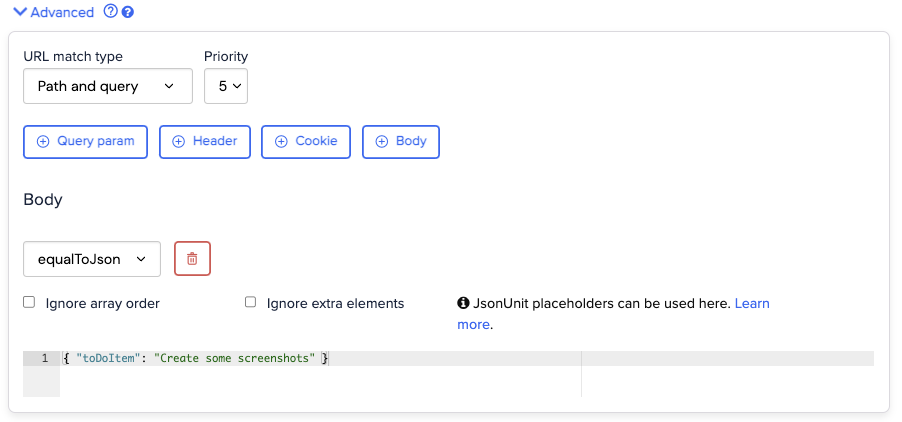
We can do this by adding a body matching clause in the Advanced portion of the Request section.
Click the button to add the clause, select the match type from the drop-down, then write (or paste) the expected value or expression into the text area.
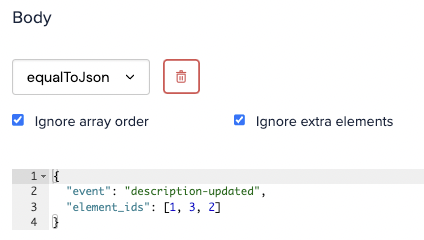
If your API uses JSON as its serialisation format you might want to match using `equalToJson`:
 For quick reference, here are the options available to you:
* ***Equals*** - matches if the request body is equal to the expected body
* ***Matches Regex*** - matches if the request body matches the specified regex
* ***Does Not Match Regex*** - matches if the request body does not match the specified regex
* ***Contains*** - matches if the request body contains the expected body
* ***Equals XML*** - matches if the request body is equal to the expected XML
* ***Matches XPath*** - matches if the request body matches the specified XPath
* ***Equals JSON*** - matches if the request body is equal to the expected JSON
* ***Matches JSONPath*** - matches if the request body matches the specified JSONPath
* ***Matches JSON Schema*** - matches if the request body matches the specified JSON schema
* ***Is Absent*** - matches if the request body is absent
**Note** that the `NOT` checkbox can be used to negate the selected matcher.
## Request method matching
The HTTP method that required for this stub to match. This defaults to `ANY`, meaning that a request with any method
will match.
## Request priority matching
Requests of a higher priority (i.e. lower number) will be matched first, in cases where more than one stub mapping in the
list would match a given request.
Normally it's fine to leave the priority at its default. However it can sometimes be useful to so create a low priority,
broadly matching stub defining some default behaviour e.g. a 404 page, and then create a set of higher priority, more specific
stubs for testing individual cases. See [Serving Default Responses](/default-responses/) for more details.
## URL matching
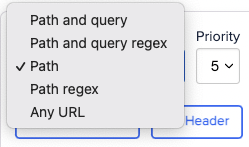
Determines how the URL will be matched. The options are:
* **Path and query** - exactly matches the path and query string parts of the URL
* **Path and query regex** - matches the path and query string parts of the URL against a regular expression
* **Path** - exactly matches the path part of the URL
* **Path regex** - matches the path part of the URL against a regular expression
* **Any URL** - matches any URL
For quick reference, here are the options available to you:
* ***Equals*** - matches if the request body is equal to the expected body
* ***Matches Regex*** - matches if the request body matches the specified regex
* ***Does Not Match Regex*** - matches if the request body does not match the specified regex
* ***Contains*** - matches if the request body contains the expected body
* ***Equals XML*** - matches if the request body is equal to the expected XML
* ***Matches XPath*** - matches if the request body matches the specified XPath
* ***Equals JSON*** - matches if the request body is equal to the expected JSON
* ***Matches JSONPath*** - matches if the request body matches the specified JSONPath
* ***Matches JSON Schema*** - matches if the request body matches the specified JSON schema
* ***Is Absent*** - matches if the request body is absent
**Note** that the `NOT` checkbox can be used to negate the selected matcher.
## Request method matching
The HTTP method that required for this stub to match. This defaults to `ANY`, meaning that a request with any method
will match.
## Request priority matching
Requests of a higher priority (i.e. lower number) will be matched first, in cases where more than one stub mapping in the
list would match a given request.
Normally it's fine to leave the priority at its default. However it can sometimes be useful to so create a low priority,
broadly matching stub defining some default behaviour e.g. a 404 page, and then create a set of higher priority, more specific
stubs for testing individual cases. See [Serving Default Responses](/default-responses/) for more details.
## URL matching
Determines how the URL will be matched. The options are:
* **Path and query** - exactly matches the path and query string parts of the URL
* **Path and query regex** - matches the path and query string parts of the URL against a regular expression
* **Path** - exactly matches the path part of the URL
* **Path regex** - matches the path part of the URL against a regular expression
* **Any URL** - matches any URL
 ## Advanced - Query parameters, headers and more
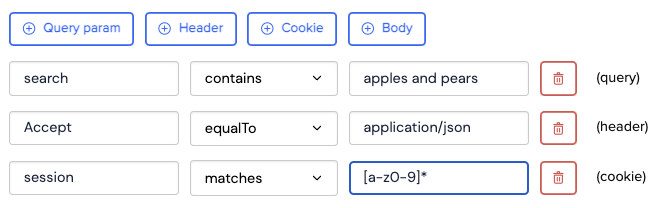
In addition to the URL and body, requests can be matched on:
* Headers
* Query parameters
* Cookies
Parameter match clauses can use the same set of match operations as body clauses:
## Advanced - Query parameters, headers and more
In addition to the URL and body, requests can be matched on:
* Headers
* Query parameters
* Cookies
Parameter match clauses can use the same set of match operations as body clauses:
 It's usually a good idea to use path only URL matching with query parameter matches.
When multiple match clauses are added a request must match all of them for the response to be served (they are combined
with logical AND).
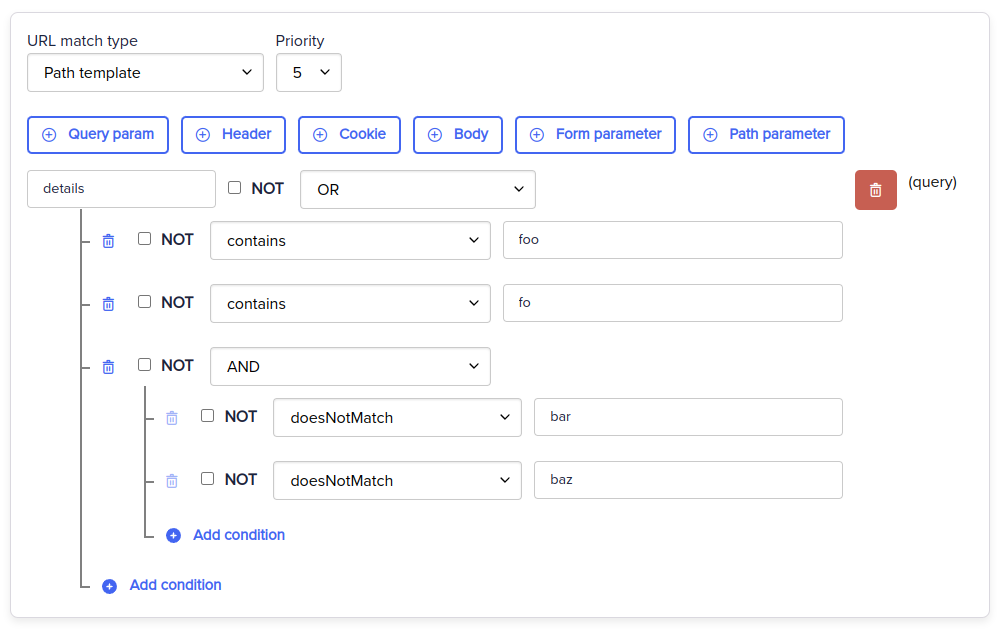
### Logical AND OR matchers
You can build complex logic using AND OR operators for Headers, Query parameters, Cookies, Form parameters and Path parameters.
These operators can be nested to help build realistic matching logic into your stubs.
It's usually a good idea to use path only URL matching with query parameter matches.
When multiple match clauses are added a request must match all of them for the response to be served (they are combined
with logical AND).
### Logical AND OR matchers
You can build complex logic using AND OR operators for Headers, Query parameters, Cookies, Form parameters and Path parameters.
These operators can be nested to help build realistic matching logic into your stubs.
 ## Matching JSON request bodies
Two specific match types exist for JSON formatted request bodies: equality (`equalToJson`) and JSONPath (`matchesJsonPath`).
### Equality
`equalToJson` performs a semantic comparison between the incoming JSON and the expected value, meaning that
it will return a match even when, for instance, the two documents have different amounts of whitespace.
You can also specify that array order an additional elements in the request JSON be ignored.
## Matching JSON request bodies
Two specific match types exist for JSON formatted request bodies: equality (`equalToJson`) and JSONPath (`matchesJsonPath`).
### Equality
`equalToJson` performs a semantic comparison between the incoming JSON and the expected value, meaning that
it will return a match even when, for instance, the two documents have different amounts of whitespace.
You can also specify that array order an additional elements in the request JSON be ignored.
 ### JSON Placeholders
JSON equality matching is implemented by [JsonUnit](https://github.com/lukas-krecan/JsonUnit), and
therefore supports placeholder syntax, allowing looser specification of fields within the document.
For instance, consider a request body like this, where `transaction_id` is unique to
each request:
```json theme={null}
{
"event": "details-updated",
"transaction_id": "abc-123-def"
}
```
Requiring an exact match on this document would ensure no match could ever be made, since
the same transaction ID would never be repeated.
This can be solved using a placeholder:
```json theme={null}
{
"event": "details-updated",
"transaction_id": "${json-unit.ignore}"
}
```
If you want to constrain the value to a specific type or pattern the following placeholders are also valid:
* `${json-unit.regex}[A-Z]+` (any Java-style regular expression can be used)
* `${json-unit.any-string}`
* `${json-unit.any-boolean}`
* `${json-unit.any-number}`
### JSONPath
`matchesJsonPath` allows request bodies to be matched according to a [JSONPath](https://github.com/json-path/JsonPath) expression. The
JSONPath expression is used to select one or more values from the request body, then the result is matched against sub-matcher (`equal to`, `contains` etc.).
It is also possible to simply assert that the expression returns something, by selecting `is present` from the list.
### JSON Placeholders
JSON equality matching is implemented by [JsonUnit](https://github.com/lukas-krecan/JsonUnit), and
therefore supports placeholder syntax, allowing looser specification of fields within the document.
For instance, consider a request body like this, where `transaction_id` is unique to
each request:
```json theme={null}
{
"event": "details-updated",
"transaction_id": "abc-123-def"
}
```
Requiring an exact match on this document would ensure no match could ever be made, since
the same transaction ID would never be repeated.
This can be solved using a placeholder:
```json theme={null}
{
"event": "details-updated",
"transaction_id": "${json-unit.ignore}"
}
```
If you want to constrain the value to a specific type or pattern the following placeholders are also valid:
* `${json-unit.regex}[A-Z]+` (any Java-style regular expression can be used)
* `${json-unit.any-string}`
* `${json-unit.any-boolean}`
* `${json-unit.any-number}`
### JSONPath
`matchesJsonPath` allows request bodies to be matched according to a [JSONPath](https://github.com/json-path/JsonPath) expression. The
JSONPath expression is used to select one or more values from the request body, then the result is matched against sub-matcher (`equal to`, `contains` etc.).
It is also possible to simply assert that the expression returns something, by selecting `is present` from the list.
 The expression in the above screenshot (`$.event` `equal to` `description-updated`) would match a request body of
```json theme={null}
{
"event": "description-updated"
}
```
but not
```json theme={null}
{
"event": "document-created"
}
```
## Matching XML request bodies
As with JSON matching, there are two match types available for working with XML: `equalToXml` and `matchesXPath`.
### Equality
`equalToXml` performs a semantic comparison between the incoming and expected XML documents, meaning that it will return a match regardless of whitespace, comments and node order.
### XML placeholders
When using `equalToXml` it is possible to ignore the value of specific elements using [XMLUnit](https://github.com/xmlunit/user-guide/wiki/Placeholders)'s placeholder syntax. For instance if you
expected to receive an XML request body containing a transaction ID that changed on every request you could ignore that value like this:
```xml theme={null}
${xmlunit.ignore}
1234
```
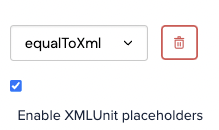
To use XML placeholders you must enable them by ticking the box:
The expression in the above screenshot (`$.event` `equal to` `description-updated`) would match a request body of
```json theme={null}
{
"event": "description-updated"
}
```
but not
```json theme={null}
{
"event": "document-created"
}
```
## Matching XML request bodies
As with JSON matching, there are two match types available for working with XML: `equalToXml` and `matchesXPath`.
### Equality
`equalToXml` performs a semantic comparison between the incoming and expected XML documents, meaning that it will return a match regardless of whitespace, comments and node order.
### XML placeholders
When using `equalToXml` it is possible to ignore the value of specific elements using [XMLUnit](https://github.com/xmlunit/user-guide/wiki/Placeholders)'s placeholder syntax. For instance if you
expected to receive an XML request body containing a transaction ID that changed on every request you could ignore that value like this:
```xml theme={null}
${xmlunit.ignore}
1234
```
To use XML placeholders you must enable them by ticking the box:
 ### XPath
`matchesXPath` allows XML request bodies to be matched according to an [XPath](https://www.w3schools.com/xml/xpath_syntax.asp) expression.
For instance, an XML request body like
```xml theme={null}
abc123
```
could be matched using the XPath expression
```
//stuff[id='abc123']
```
## Setting the response status
The HTTP status code to be sent with the response.
## Sending response headers
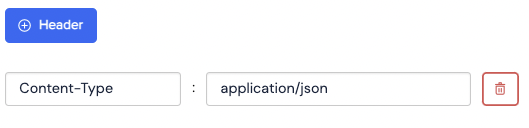
Headers can be set on the response:
### XPath
`matchesXPath` allows XML request bodies to be matched according to an [XPath](https://www.w3schools.com/xml/xpath_syntax.asp) expression.
For instance, an XML request body like
```xml theme={null}
abc123
```
could be matched using the XPath expression
```
//stuff[id='abc123']
```
## Setting the response status
The HTTP status code to be sent with the response.
## Sending response headers
Headers can be set on the response:
 ## Response body
A response body can optionally be specified. If [response templating](/response-templating/)
is enabled, certain parts can be dynamically generated using request attributes and random data.
## Response body
A response body can optionally be specified. If [response templating](/response-templating/)
is enabled, certain parts can be dynamically generated using request attributes and random data.